<!DOCTYPE html>
    <html lang="vi" xmlns="http://www.w3.org/1999/xhtml" prefix="og: http://ogp.me/ns#">
    <head>
<title>HƯỚNG DẪN SỬ DỤNG ONEDRIVE</title>
<meta name="description" content="HƯỚNG DẪN SỬ DỤNG ONEDRIVE - Savefile - Tin Tức - https&#x3A;&#x002F;&#x002F;hust.edu.vn&#x002F;vi&#x002F;news&#x002F;savefile&#x002F;tin-tuc-su-kien&#x002F;huong-dan-su-dung-onedrive-605526.html">
<meta name="author" content="Đại học Bách khoa Hà Nội">
<meta name="copyright" content="Đại học Bách khoa Hà Nội [ccpr@hust.edu.vn]">
<meta name="google-site-verification" content="lpSvS2om85_DqFe7xgBMV-TvBFbuNGWvXNWeLtncZjM">
<meta name="generator" content="NukeViet v4.5">
<meta name="viewport" content="width=device-width, initial-scale=1">
<meta http-equiv="Content-Type" content="text/html; charset=utf-8">
<meta property="og:title" content="HƯỚNG DẪN SỬ DỤNG ONEDRIVE">
<meta property="og:type" content="website">
<meta property="og:description" content="Savefile - Tin Tức - https&#x3A;&#x002F;&#x002F;hust.edu.vn&#x002F;vi&#x002F;news&#x002F;savefile&#x002F;tin-tuc-su-kien&#x002F;huong-dan-su-dung-onedrive-605526.html">
<meta property="og:site_name" content="Đại học Bách khoa Hà Nội">
<meta property="og:url" content="https://hust.edu.vn/vi/news/savefile/tin-tuc-su-kien/huong-dan-su-dung-onedrive-605526.html">
<link rel="shortcut icon" href="https://hust-dev.hust.edu.vn/uploads/sys/android-icon-36x36.png">
<link    rel="canonical"    href="https://hust.edu.vn/vi/news/savefile/tin-tuc-su-kien/huong-dan-su-dung-onedrive-605526.html">
<link    rel="alternate"    href="https://hust-dev.hust.edu.vn/vi/news/rss/" title="Tin Tức"    type="application/rss+xml">
<link    rel="alternate"    href="https://hust-dev.hust.edu.vn/vi/news/rss/hoat-dong-chung/" title="Tin Tức - Hoạt động chung"    type="application/rss+xml">
<link    rel="alternate"    href="https://hust-dev.hust.edu.vn/vi/news/rss/cong-tac-dang-va-doan-the/" title="Tin Tức - Công tác Đảng và Đoàn thể"    type="application/rss+xml">
<link    rel="alternate"    href="https://hust-dev.hust.edu.vn/vi/news/rss/tuyen-sinh-dao-tao-cong-tac-sinh-vien/" title="Tin Tức - Tuyển sinh - Đào tạo - Công tác sinh viên"    type="application/rss+xml">
<link    rel="alternate"    href="https://hust-dev.hust.edu.vn/vi/news/rss/khoa-hoc-cong-nghe-dmst/" title="Tin Tức - Khoa học - Công nghệ - ĐMST"    type="application/rss+xml">
<link    rel="alternate"    href="https://hust-dev.hust.edu.vn/vi/news/rss/hop-tac-doi-ngoai-truyen-thong/" title="Tin Tức - Hợp tác - Đối ngoại - Truyền thông"    type="application/rss+xml">
<link    rel="alternate"    href="https://hust-dev.hust.edu.vn/vi/news/rss/kiem-dinh-xep-hang/" title="Tin Tức - Kiểm định - Xếp hạng"    type="application/rss+xml">
<link    rel="alternate"    href="https://hust-dev.hust.edu.vn/vi/news/rss/to-chuc-nhan-su-tuyen-dung/" title="Tin Tức - Tổ chức - Nhân sự - Tuyển dụng"    type="application/rss+xml">
<link    rel="alternate"    href="https://hust-dev.hust.edu.vn/vi/news/rss/bach-khoa-tren-bao-chi/" title="Tin Tức - Bách khoa trên Báo chí"    type="application/rss+xml">
<link    rel="alternate"    href="https://hust-dev.hust.edu.vn/vi/news/rss/tin-tuc-su-kien/" title="Tin Tức - Tin tức - sự kiện"    type="application/rss+xml">
<link    rel="alternate"    href="https://hust-dev.hust.edu.vn/vi/news/rss/tro-giup-can-bo/" title="Tin Tức - Trợ giúp Cán bộ"    type="application/rss+xml">
<link    rel="alternate"    href="https://hust-dev.hust.edu.vn/vi/news/rss/tro-giup-sinh-vien/" title="Tin Tức - Trợ giúp Sinh viên"    type="application/rss+xml">
<link    rel="alternate"    href="https://hust-dev.hust.edu.vn/vi/news/rss/su-kien-sap-dien-ra/" title="Tin Tức - Sự kiện sắp diễn ra"    type="application/rss+xml">
<link    rel="alternate"    href="https://hust-dev.hust.edu.vn/vi/news/rss/cong-tac-sinh-vien/" title="Tin Tức - Công tác Sinh viên"    type="application/rss+xml">
<link    rel="alternate"    href="https://hust-dev.hust.edu.vn/vi/news/rss/thong-bao-chung/" title="Tin Tức - Thông báo chung"    type="application/rss+xml">
<link    rel="alternate"    href="https://hust-dev.hust.edu.vn/vi/news/rss/lich-cong-tac/" title="Tin Tức - Lịch công tác"    type="application/rss+xml">
<link    rel="alternate"    href="https://hust-dev.hust.edu.vn/vi/news/rss/he-thong-phong-thi-nghiem/" title="Tin Tức - Hệ thống Phòng thí nghiệm"    type="application/rss+xml">
<link    rel="alternate"    href="https://hust-dev.hust.edu.vn/vi/news/rss/hoi-dong-nganh-lien-nganh/" title="Tin Tức - Hội đồng Ngành - Liên ngành"    type="application/rss+xml">
<link    rel="alternate"    href="https://hust-dev.hust.edu.vn/vi/news/rss/cac-truong-thanh-vien/" title="Tin Tức - Các trường thành viên"    type="application/rss+xml">
<link    rel="alternate"    href="https://hust-dev.hust.edu.vn/vi/news/rss/so-huu-tri-tue/" title="Tin Tức - Sở hữu trí tuệ"    type="application/rss+xml">
<link    rel="alternate"    href="https://hust-dev.hust.edu.vn/vi/news/rss/van-ban-phap-quy/" title="Tin Tức - Văn bản pháp quy"    type="application/rss+xml">
<link    rel="alternate"    href="https://hust-dev.hust.edu.vn/vi/news/rss/thong-tin-huong-dan/" title="Tin Tức - Thông tin hướng dẫn"    type="application/rss+xml">
<link    rel="alternate"    href="https://hust-dev.hust.edu.vn/vi/news/rss/cac-bieu-mau/" title="Tin Tức - Các biểu mẫu"    type="application/rss+xml">
<link    rel="alternate"    href="https://hust-dev.hust.edu.vn/vi/news/rss/van-ban-quy-che/" title="Tin Tức - Văn bản quy chế"    type="application/rss+xml">
<link    rel="alternate"    href="https://hust-dev.hust.edu.vn/vi/news/rss/cap-nha-nuoc/" title="Tin Tức - Cấp Nhà nước"    type="application/rss+xml">
<link    rel="alternate"    href="https://hust-dev.hust.edu.vn/vi/news/rss/cap-bo/" title="Tin Tức - Cấp Bộ"    type="application/rss+xml">
<link    rel="alternate"    href="https://hust-dev.hust.edu.vn/vi/news/rss/cap-truong/" title="Tin Tức - Cấp Trường"    type="application/rss+xml">
<link    rel="alternate"    href="https://hust-dev.hust.edu.vn/vi/news/rss/ke-hoach-hoc-tap/" title="Tin Tức - Kế hoạch học tập"    type="application/rss+xml">
<link    rel="alternate"    href="https://hust-dev.hust.edu.vn/vi/news/rss/thong-tin-van-bang/" title="Tin Tức - Thông tin văn bằng"    type="application/rss+xml">
<link    rel="alternate"    href="https://hust-dev.hust.edu.vn/vi/news/rss/du-an-sahep/" title="Tin Tức - Dự án SAHEP"    type="application/rss+xml">
<link    rel="alternate"    href="https://hust-dev.hust.edu.vn/vi/news/rss/media/" title="Tin Tức - Media"    type="application/rss+xml">
<link rel="preload" as="style" href="https://hust-dev.hust.edu.vn/assets/css/font-awesome.min.css" type="text/css">
<link rel="preload" as="style" href="https://hust-dev.hust.edu.vn/themes/hust/css/animate.min.css" type="text/css">
<link rel="preload" as="style" href="https://hust-dev.hust.edu.vn/themes/hust/css/bootstrap.min.css" type="text/css">
<link rel="preload" as="style" href="https://hust-dev.hust.edu.vn/themes/hust/css/style.css" type="text/css">
<link rel="preload" as="style" href="https://hust-dev.hust.edu.vn/themes/hust/css/style.responsive.css" type="text/css">
<link rel="preload" as="style" href="https://hust-dev.hust.edu.vn/themes/default/css/news.css" type="text/css">
<link rel="preload" as="style" href="https://hust-dev.hust.edu.vn/themes/hust/css/custom.css" type="text/css">
<link rel="preload" as="style" href="https://hust-dev.hust.edu.vn/themes/hust/css/hust.css" type="text/css">
<link rel="preload" as="style" href="https://hust-dev.hust.edu.vn/themes/hust/css/custom70.css" type="text/css">
<link rel="preload" as="style" href="https://hust-dev.hust.edu.vn/themes/hust/css/custom_NCKH.css" type="text/css">
<link rel="preload" as="style" href="https://hust-dev.hust.edu.vn/assets/css/hust.vi.0.css" type="text/css">
<link rel="preload" as="style" href="https://hust-dev.hust.edu.vn/themes/hust/js/slick/slick.css" type="text/css">
<link rel="preload" as="style" href="https://hust-dev.hust.edu.vn/themes/hust/js/slick/slick-theme.css" type="text/css">
<link rel="preload" as="script" href="https://hust-dev.hust.edu.vn/assets/js/jquery/jquery.min.js" type="text/javascript">
<link rel="preload" as="script" href="https://hust-dev.hust.edu.vn/assets/js/language/vi.js" type="text/javascript">
<link rel="preload" as="script" href="https://hust-dev.hust.edu.vn/assets/js/DOMPurify/purify3.js" type="text/javascript">
<link rel="preload" as="script" href="https://hust-dev.hust.edu.vn/assets/js/global.js" type="text/javascript">
<link rel="preload" as="script" href="https://hust-dev.hust.edu.vn/assets/js/site.js" type="text/javascript">
<link rel="preload" as="script" href="https://hust-dev.hust.edu.vn/themes/default/js/news.js" type="text/javascript">
<link rel="preload" as="script" href="https://hust-dev.hust.edu.vn/themes/hust/js/main.js" type="text/javascript">
<link rel="preload" as="script" href="https://hust-dev.hust.edu.vn/themes/hust/js/custom.js" type="text/javascript">
<link rel="preload" as="script" href="https://hust-dev.hust.edu.vn/themes/hust/js/hust.js" type="text/javascript">
<link rel="preload" as="script" href="https://hust-dev.hust.edu.vn/themes/hust/js/slick/slick.js" type="text/javascript">
<link rel="preload" as="script" href="https://www.googletagmanager.com/gtag/js?id=G-TT1NML6EJM" type="text/javascript">
<link rel="preload" as="script" href="https://hust-dev.hust.edu.vn/themes/hust/js/bootstrap.min.js" type="text/javascript">
<link    rel="stylesheet"    href="https://hust-dev.hust.edu.vn/assets/css/font-awesome.min.css">
<link    rel="stylesheet"    href="https://hust-dev.hust.edu.vn/themes/hust/css/animate.min.css">
<link    rel="stylesheet"    href="https://hust-dev.hust.edu.vn/themes/hust/css/bootstrap.min.css">
<link    rel="stylesheet"    href="https://hust-dev.hust.edu.vn/themes/hust/css/style.css">
<link    rel="stylesheet"    href="https://hust-dev.hust.edu.vn/themes/hust/css/style.responsive.css">
<link    rel="StyleSheet"    href="https://hust-dev.hust.edu.vn/themes/default/css/news.css">
<link    rel="stylesheet"    href="https://hust-dev.hust.edu.vn/themes/hust/css/custom.css">
<link    rel="stylesheet"    href="https://hust-dev.hust.edu.vn/themes/hust/css/hust.css">
<link    rel="stylesheet"    href="https://hust-dev.hust.edu.vn/themes/hust/css/custom70.css">
<link    rel="stylesheet"    href="https://hust-dev.hust.edu.vn/themes/hust/css/custom_NCKH.css">
<link    rel="stylesheet"    href="https://hust-dev.hust.edu.vn/assets/css/hust.vi.0.css">
<link rel="stylesheet" href="https://hust-dev.hust.edu.vn/themes/hust/js/slick/slick.css" />
<link rel="stylesheet" href="https://hust-dev.hust.edu.vn/themes/hust/js/slick/slick-theme.css" />
<style type="text/css">
	body{background: #fff;}
</style>
</head>
    <body>
<div id="print">
	<div id="hd_print">
		<h2 class="pull-left">Đại học Bách khoa Hà Nội</h2>
		<p class="pull-right"><a title="Đại học Bách khoa Hà Nội" href="https://hust-dev.hust.edu.vn/">https://hust-dev.hust.edu.vn</a></p>
	</div>
	<div class="clear"></div>
	<hr />
	<div id="content">
		<h1>HƯỚNG DẪN SỬ DỤNG ONEDRIVE</h1>
		<ul class="list-inline">
			<li>Thứ hai - 15/11/2021 14:54</li>
			<li class="hidden-print txtrequired"><em class="fa fa-print">&nbsp;</em><a title="In ra" href="javascript:;" onclick="window.print()">In ra</a></li>
			<li class="hidden-print txtrequired"><em class="fa fa-power-off">&nbsp;</em><a title="Đóng cửa sổ này" href="javascript:;" onclick="window.close()">Đóng cửa sổ này</a></li>
		</ul>
		<div class="clear"></div>
		<div id="hometext">
		</div>
		<div id="bodytext" class="clearfix">
			OneDrive là dịch vụ lưu trữ đám mây có thể hoạt động trên nhiều HĐH. OneDrive for Business có khả năng lưu trữ dữ liệu lớn từ 1TB – 5TB. Nó được xem là nơi lưu trữ “khổng lồ” với toàn bộ hình ảnh, video và các tài liệu quan trọng tại một không gian. Đặc biệt, người dùng có thể truy cập dữ liệu từ OneDrive trên nhiều thiết bị khác nhau như: máy tính, tablet, điện thoại chạy trên các hệ điều hành như Windows, Mac, Windows Phone, iOS, Android và Xbox.. Với OneDrive, bạn hoàn toàn có thể làm việc ở bất cứ đâu.<br />
<br />
<strong>Các tính năng chính của Onedrive:</strong>

<ul>
	<li>Upload file và thư mục.</li>
	<li>Download file và thư mục.</li>
	<li>Chia sẻ file và thư mục.</li>
	<li>Cùng 1 thời điểm, nhiều người dùng có thể cùng tương tác trên 1 file.</li>
	<li>Đồng bộ dữ liệu với máy tính cá nhân.<br />
	&nbsp;</li>
</ul>

<p><strong style="text-align: justify;">1. Cách Upload tập tin, thư mục&nbsp;trên OneDrive</strong></p>

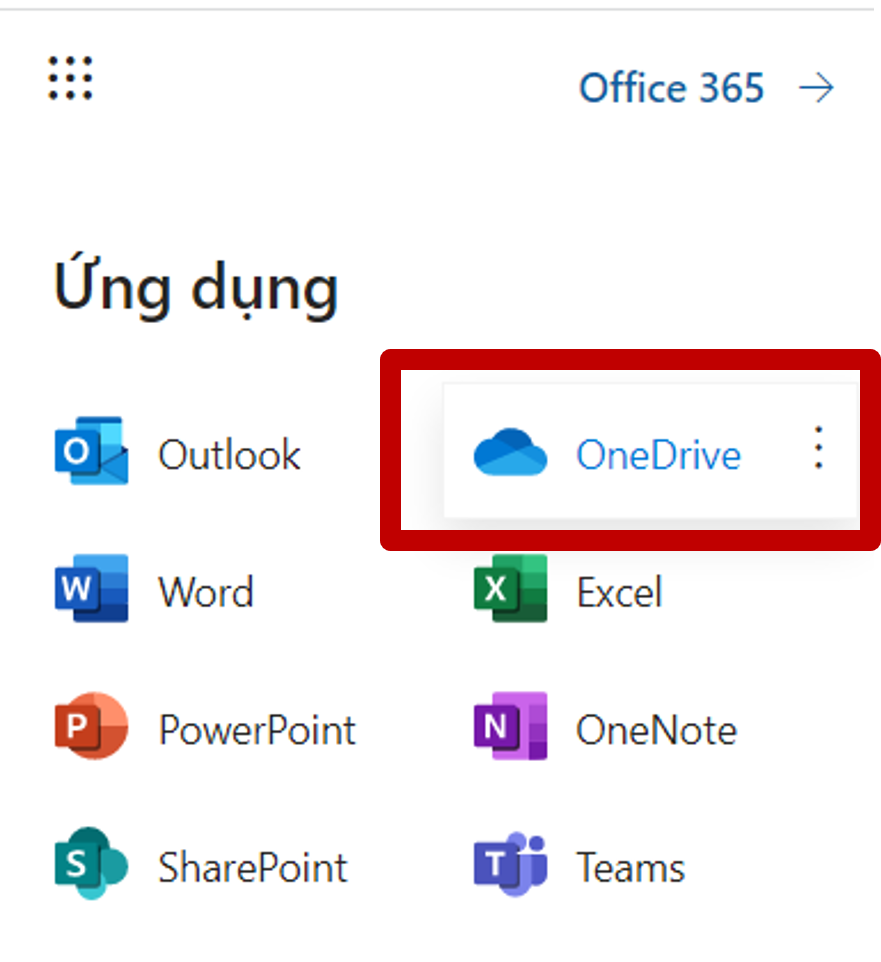
<p>Nếu sử dụng OneDrive trên nền web, bạn phải&nbsp;dăng nhập vào bằng tài khoản Office 365 sau đó chọn và làm việc với OneDrive trong bộ Office 365</p>

<p style="text-align: center;"><img alt="" src="https://hust-dev.hust.edu.vn/uploads/sys/news/2021/11/08.518511.27993.png" style="height: 350px; width: 350px;" /></p>

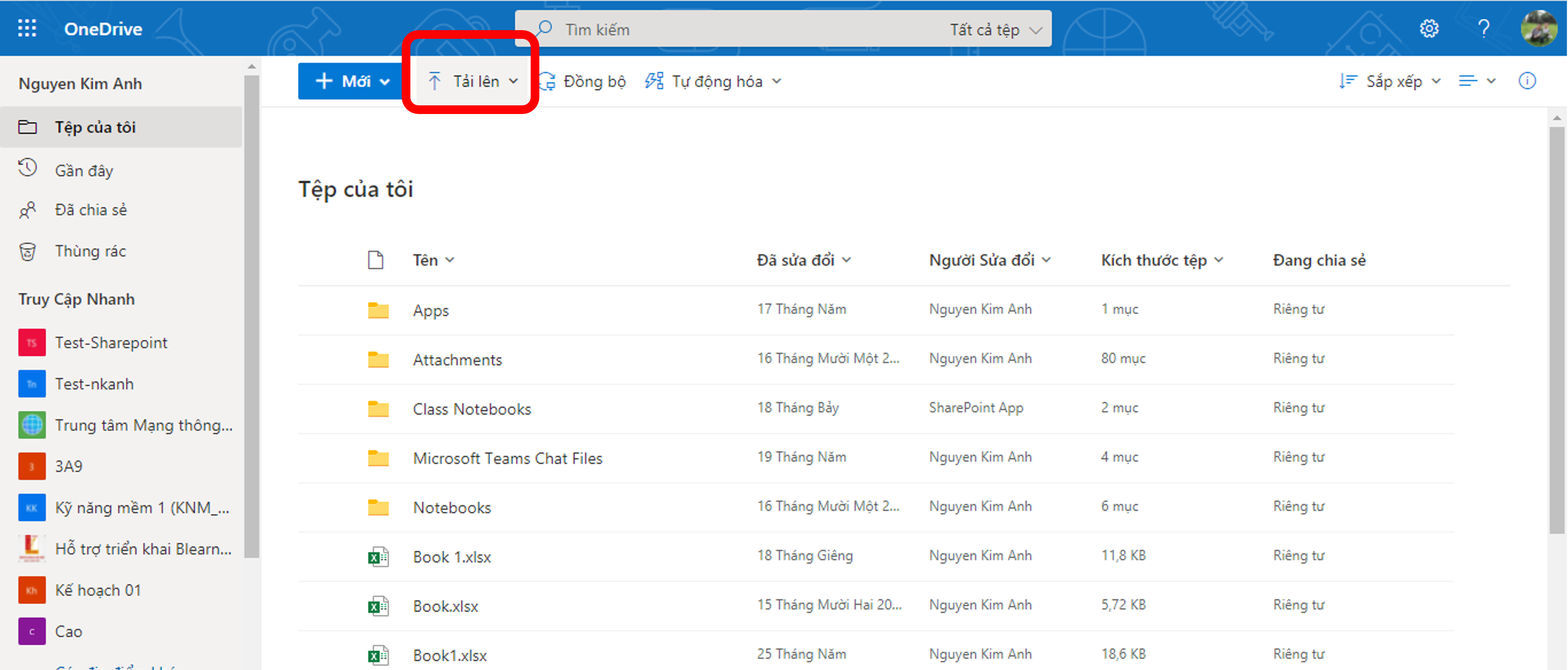
<p style="text-align: justify;">Tại không gian hiển thị, chọn&nbsp;Tải lên&nbsp;Tệp (File) hoặc Thư mục (Folder):</p>

<p style="text-align: center;"><img alt="" src="https://hust-dev.hust.edu.vn/uploads/sys/news/2021/11/09a.518511.27995.png" style="height: 257px; width: 600px;" /></p>

<p style="text-align: justify;">&nbsp;</p>

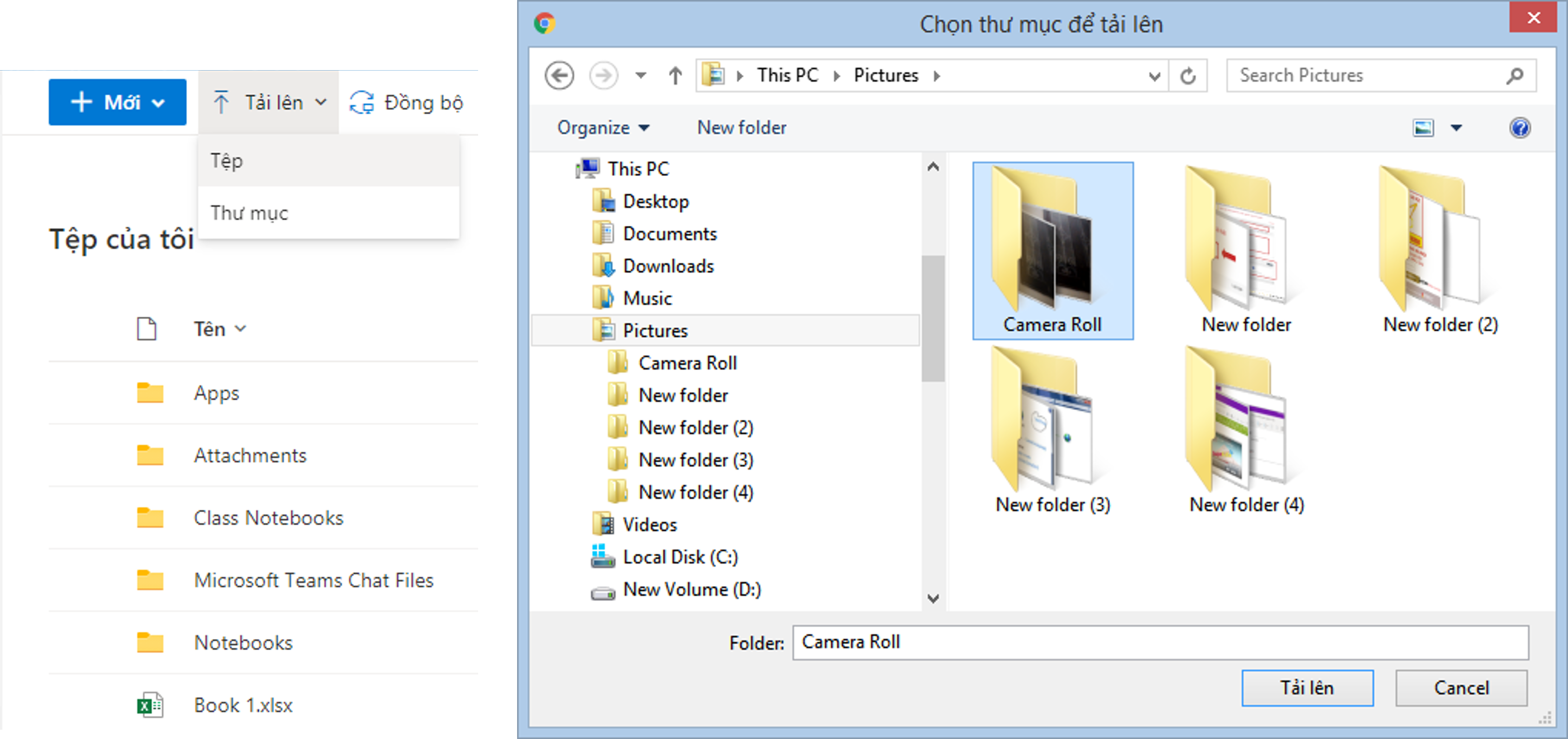
<p>Bạn chọn tập tin hoặc thư mục tương ứng mà bạn muốn upload lên =&gt; sau đó bấm&nbsp;Upload</p>

<p style="text-align: center;"><img alt="" src="https://hust-dev.hust.edu.vn/uploads/sys/news/2021/11/10.518511.27996.png" style="height: 283px; width: 600px;" /></p>

<p style="text-align: center;">&nbsp;</p>

<p style="text-align: justify;"><strong style="color: rgb(0, 0, 0); text-align: justify;">2. Cách Download tập tin, thư mục&nbsp;trên OneDrive</strong></p>

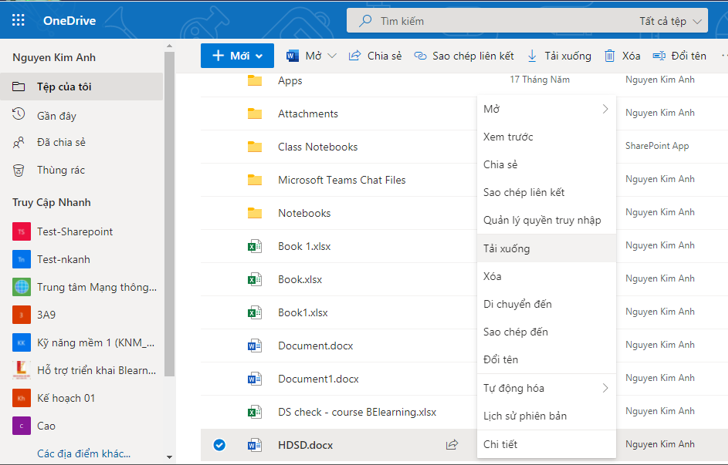
<p style="text-align: justify;">Click chuột phải vào tập tin hoặc thư mục mà bạn muốn tải =&gt; lúc này thanh công cụ sẽ hiển thị =&gt; bạn chọn&nbsp;Download</p>

<p style="text-align: center;"><img alt="" src="https://hust-dev.hust.edu.vn/uploads/sys/news/2021/11/o10.518511.27997.png" style="height: 383px; width: 600px;" /></p>

<p style="text-align: justify;">Có thể chọn các tính năng tương ứng khác có trong menu chuột phải như:</p>

<ul>
	<li style="text-align: justify;">Download&nbsp;(tải xuống dạng zip nếu là thư mục)</li>
	<li style="text-align: justify;">Delete&nbsp;(xóa),</li>
	<li style="text-align: justify;">Move to (di chuyển đến một vị trí khác)</li>
	<li style="text-align: justify;">Copy to&nbsp;(tạo một bản sao đến một vị trí khác)</li>
	<li style="text-align: justify;">Rename&nbsp;(đổi tên tập tin) Create album from folder&nbsp;(tạo 1 album từ folder)</li>
	<li style="text-align: justify;">Embed&nbsp;(tạo mã nhúng để bạn chèn vào website)</li>
	<li style="text-align: justify;">Details&nbsp;(thông tin chi tiết của tập tin, thư mục)</li>
</ul>

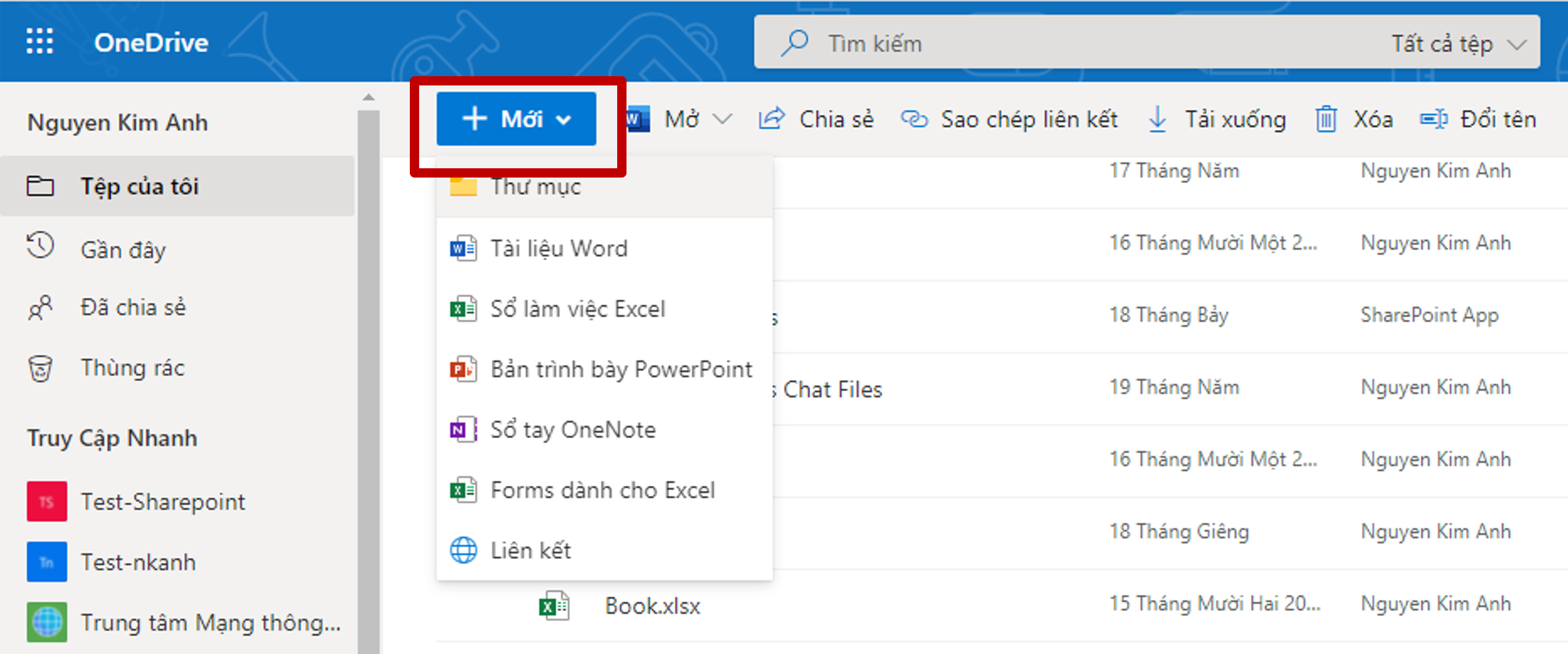
<p style="text-align: justify;"><strong>3. Tạo tập tin, thư mục trên OneDrive</strong><br />
Để tạo một tập tin trên OneDrive thì chúng ta sẽ có 2 cách:<br />
Cách 1: UPLOAD tập tin, thư muc có sẵn từ máy tính lên Onedrive<br />
Cách 2: tạo trực tiếp trên Onedrive. Bài sẽ&nbsp;hướng dẫn theo&nbsp;cách thứ 2 như sau: Tại giao diện chính, bạn chọn&nbsp;<strong>New (Mới)&nbsp;=&gt; chọn định dạng File/Thư mục</strong> mà bạn muốn tạo. Chúng ta sẽ có các lựa chọn như trong hình bên dưới.</p>

<p style="text-align: center;"><img alt="" src="https://hust-dev.hust.edu.vn/uploads/sys/news/2021/11/o11.518511.27998.png" style="height: 250px; width: 600px;" /></p>

<p style="text-align: justify;">&nbsp;</p>

<ul>
	<li style="text-align: justify;">Folder:&nbsp;Tạo thư mục chứa các tập tin.</li>
	<li style="text-align: justify;">Word document&nbsp;(tạo tập tin soạn thảo văn bản)</li>
	<li style="text-align: justify;">Excel workbook&nbsp;(tạo các bảng tính)</li>
	<li style="text-align: justify;">PowerPoint presentation&nbsp;(tạo trình chiếu)</li>
	<li style="text-align: justify;">OneNote notebook&nbsp;(tạo các ghi chú)</li>
	<li style="text-align: justify;">Forms survey&nbsp;(tạo các biểu mẫu)</li>
	<li style="text-align: justify;">Plain text document&nbsp;(tạo tập tin có định dạng .txt) =&gt; Nhấp chọn loại tập tin cần tạo, ví dụ mình chọn&nbsp;Excel, lúc này Onedrive sẽ mở ra ứng dụng Excel online&nbsp;</li>
</ul>

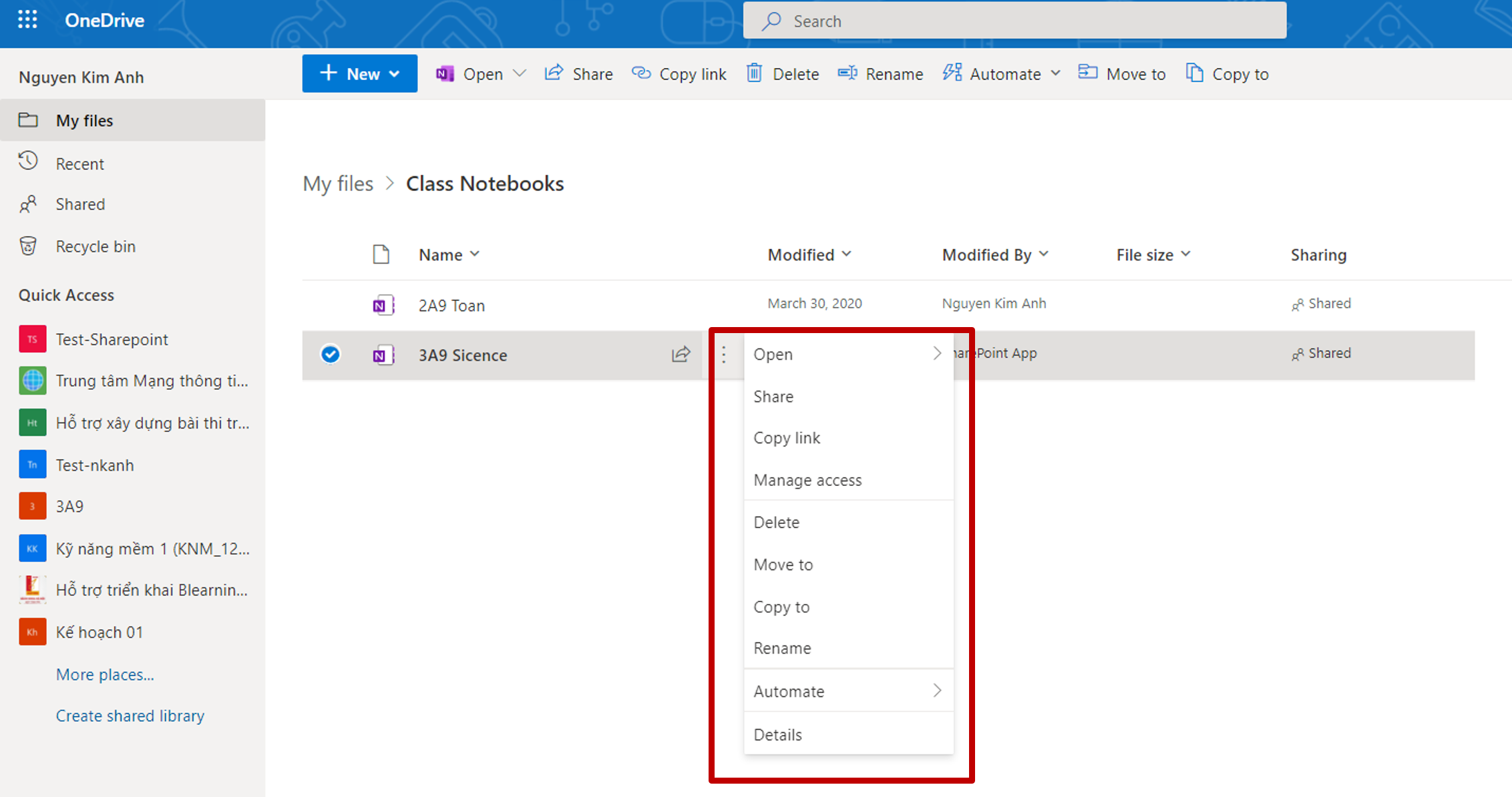
<p>Khi click chuột phải vào tập tin, thanh công cụ sẽ hiển thị như sau:</p>

<p style="text-align: center;"><img alt="" src="https://hust-dev.hust.edu.vn/uploads/sys/news/2021/11/o12.518511.27999.png" style="height: 316px; width: 600px;" /></p>

<p style="text-align: justify;">OneDrive hỗ trợ bạn mở tập tin bằng ứng dụng online hoặc offline, tải xuống hoặc xóa, copy, move tập tin đến 1 vị trí khác giống như phần thư mục.</p>

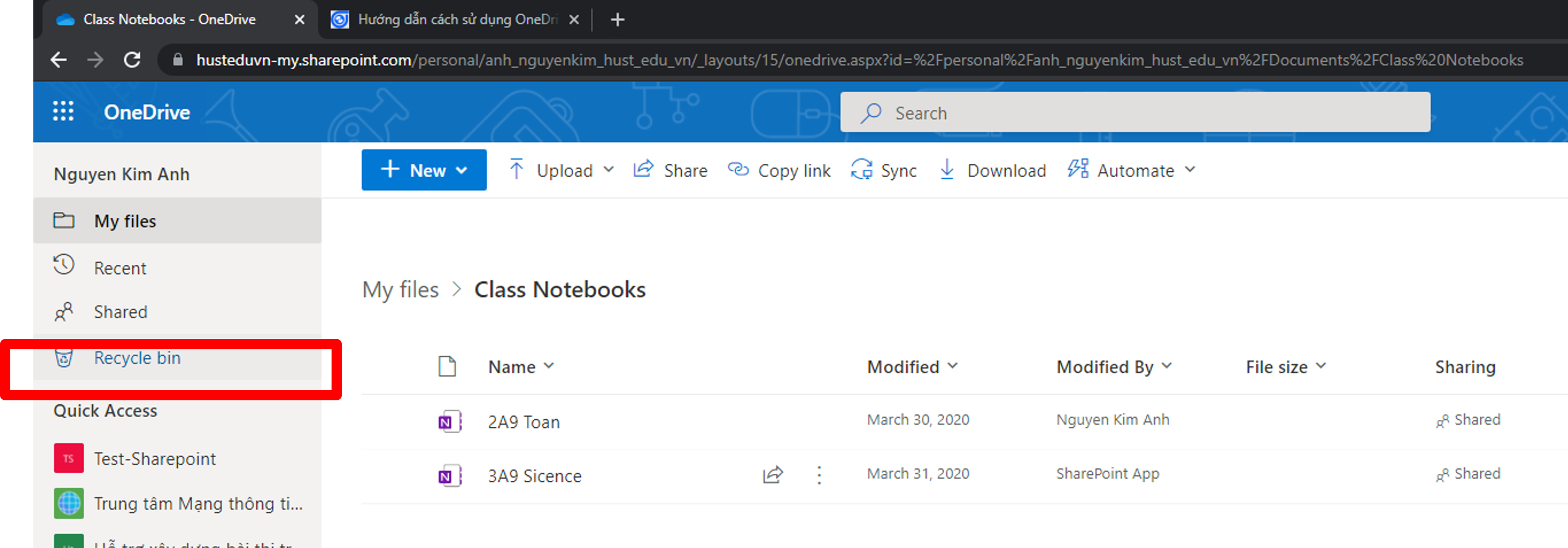
<p style="text-align: justify;"><strong>4. Cách xóa bỏ File / Folder trên Ondrive</strong></p>

<p style="text-align: center;"><strong><img alt="" src="https://hust-dev.hust.edu.vn/uploads/sys/news/2021/11/o13.518511.28001.png" style="height: 210px; width: 600px;" /></strong></p>

<p style="text-align: justify;">&nbsp;</p>

<ul>
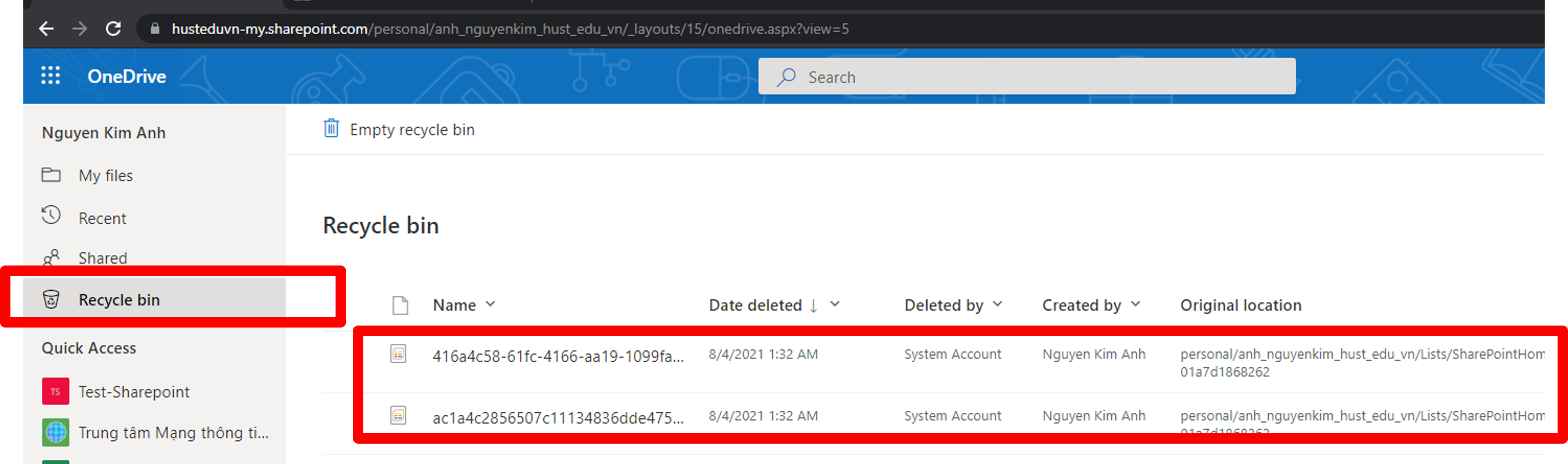
	<li>Recycle bin hiển thị tập tin / thư mục đã bị xóa</li>
</ul>

<p style="text-align: center;"><img alt="" src="https://hust-dev.hust.edu.vn/uploads/sys/news/2021/11/o14.518511.28002.png" style="height: 178px; width: 600px;" /></p>

<p style="text-align: justify;">&nbsp;</p>

<ul>
	<li>Để xóa vĩnh viễn tập tin hoặc thư mục nào đó, click chuột phải tại vị trí cần xóa, chọn Delêt hoặc nhấn Restore để phục hồi tập tin/thư mục đã xóa, vị trí phục hồi sẽ là vị trí tập tin hoặc thư mục trước khi bị xóa. Ngoài ra, có thể chon Empty recycle bin để làm rỗng thùng rác, hoặc nhấn Restore all items để phục hồi toàn bộ các dữ liệu. Quá thời hạn 30 ngày tập tin hoặc thư mục sẽ bị xóa và không phục hồi lại được.</li>
</ul>

<p><br />
<strong>5. Chia sẻ tập tin trên OneDrive</strong></p>

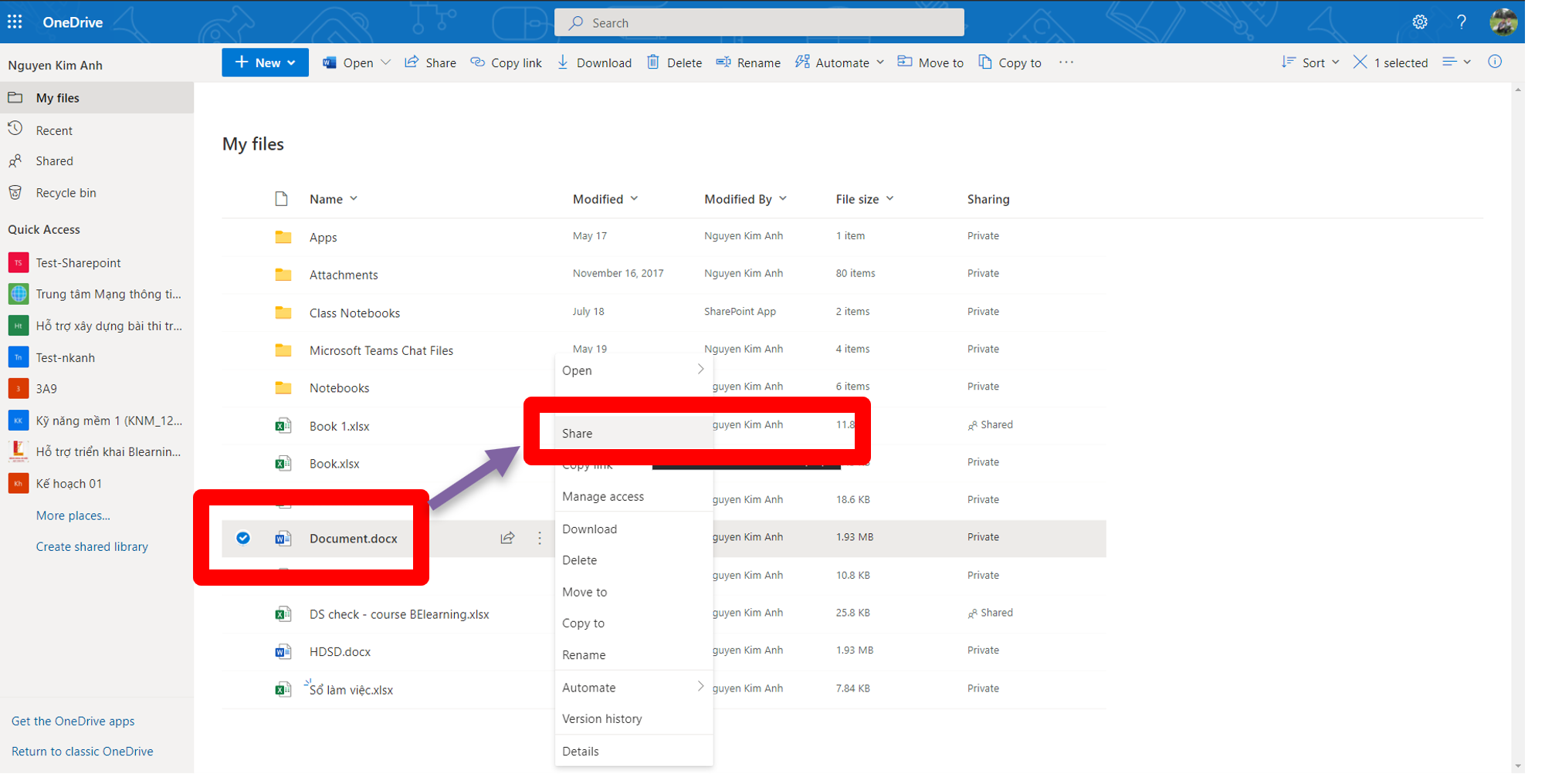
<p>OneDrive hỗ trợ bạn chia sẽ tập tin, thư mục đến những người khác để có thể sử dụng chung các dữ liệu đó. Để chia sẻ một file hoặc thư mục trên OneDrive, ta có thể làm như sau.&nbsp;<span style="text-align: center;">Click chuột phải vào tập tin hoặc thư mục cần chia sẻ , sau đó chọn Share</span></p>

<p style="text-align: center;"><br />
<img alt="" src="https://hust-dev.hust.edu.vn/uploads/sys/news/2021/11/o15.518511.28003.png" style="height: 305px; width: 600px;" /></p>

<ul>
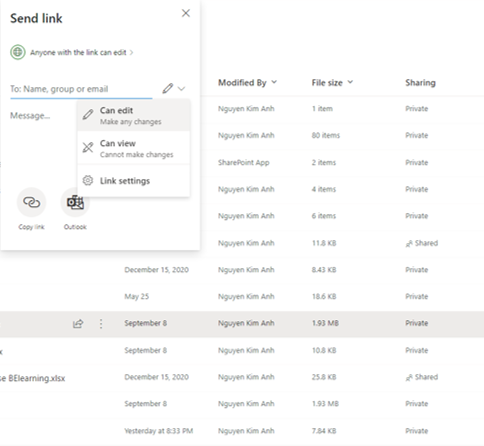
	<li>OneDrive hỗ trợ bạn phân quyền truy cập tập tin hoặc thư mục được chia sẻ. Có rất nhiều quyền cho bạn lựa chọn.<br />
	<br />
	<img alt="" src="https://hust-dev.hust.edu.vn/uploads/sys/news/2021/11/o16.518511.28004.png" style="height: 453px; width: 600px;" /><br />
	&nbsp;</li>
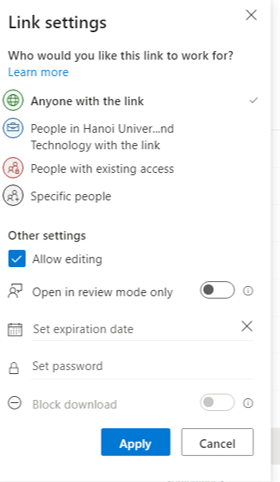
	<li>Tại phần Anyone with the link can edit, có thể nhấp chọn để tìm hiểu thêm các quyền khác
	<ul>
		<li>Anyone with the link:&nbsp;Cho phép bất kỳ ai có link đều có thể truy cập</li>
		<li>Specific people:&nbsp;Chỉ những người được chọn mới được phép truy cập</li>
		<li>Allow editing:&nbsp;Cho phép chỉnh sửa.</li>
		<li>Set expiration date:&nbsp;Chọn ngày hết hạn, nếu chọn tùy chọn này thì sau một khoảng thời gian,</li>
		<li>Onedrive sẽ tự động vô hiệu hóa đường dẫn.</li>
		<li>Set password:&nbsp;Đặt mật khẩu truy cập tập tin hoặc thư mục.</li>
	</ul>
	</li>
</ul>

<p style="text-align: center;">&nbsp;<img alt="" src="https://hust-dev.hust.edu.vn/uploads/sys/news/2021/11/017.518511.28005.png" style="height: 516px; width: 300px;" /></p>

<ul>
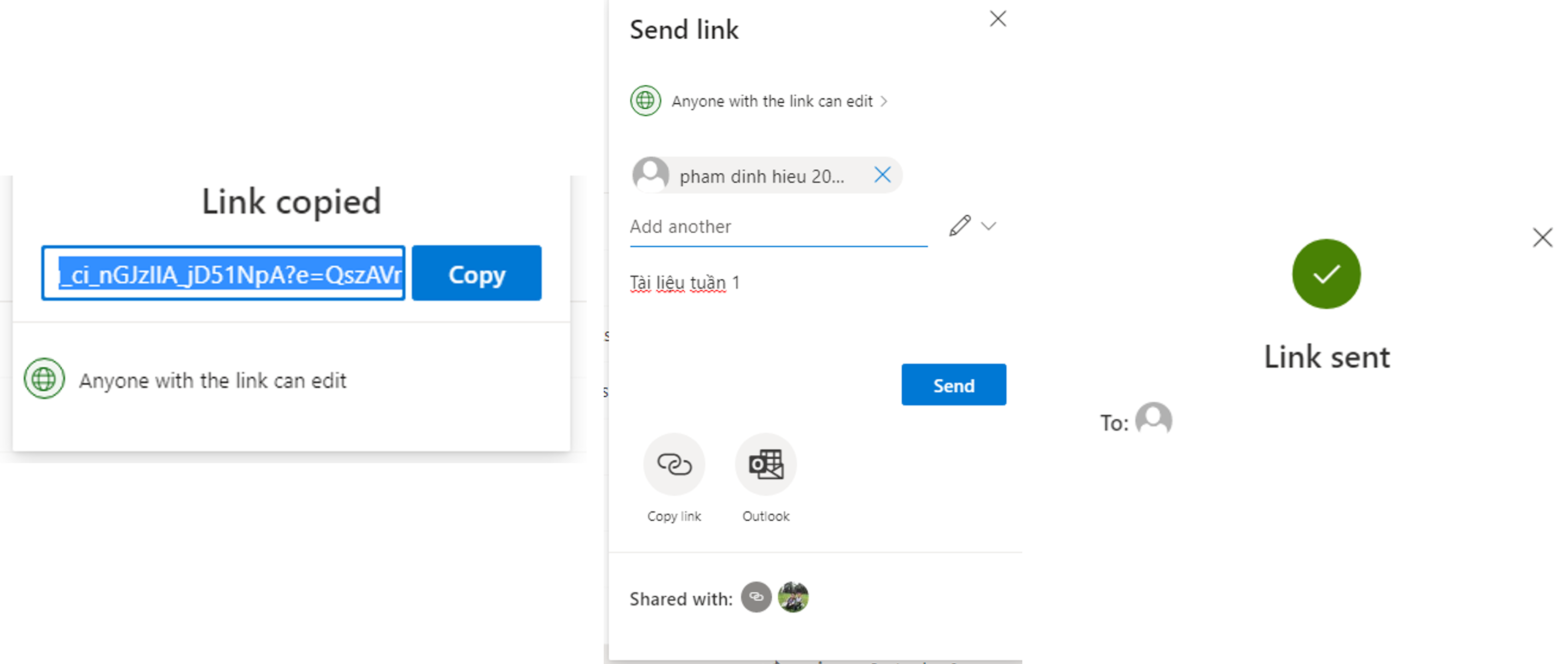
	<li style="text-align: justify;">Chọn copy link để hoàn thảnh việc chia sẻ. Có thể gửi link cho bạn bè sẽ có thông báo link đã đựcc gửi<br />
	<br />
	<img alt="" src="https://hust-dev.hust.edu.vn/uploads/sys/news/2021/11/018.518511.28006.png" style="height: 354px; width: 900px;" /></li>
</ul>
		</div>
				<div id="author">
						<p>
				<strong>Tác giả:</strong>
				<a href="https://hust-dev.hust.edu.vn/vi/news/author/anhnguyenkim/">Nguyễn Kim Anh</a>
			</p>
		</div>
	</div>
	<div id="footer" class="clearfix">
		<div id="url">
			<strong>URL của bản tin này: </strong><a href="https://hust.edu.vn/vi/news/savefile/tin-tuc-su-kien/huong-dan-su-dung-onedrive-605526.html" title="HƯỚNG DẪN SỬ DỤNG ONEDRIVE">https://hust.edu.vn/vi/news/savefile/tin-tuc-su-kien/huong-dan-su-dung-onedrive-605526.html</a>

		</div>
		<div class="clear"></div>
		<div class="copyright">
			&copy; Đại học Bách khoa Hà Nội
		</div>
		<div id="contact">
			<a href="mailto:ccpr@hust.edu.vn">ccpr@hust.edu.vn</a>
		</div>
	</div>
</div>
        <div id="timeoutsess" class="chromeframe">
            Bạn đã không sử dụng Site, <a onclick="timeoutsesscancel();" href="https://hust-dev.hust.edu.vn/#">Bấm vào đây để duy trì trạng thái đăng nhập</a>. Thời gian chờ: <span id="secField"> 60 </span> giây
        </div>
        <div id="openidResult" class="nv-alert" style="display:none"></div>
        <div id="openidBt" data-result="" data-redirect=""></div>
<script src="https://hust-dev.hust.edu.vn/assets/js/jquery/jquery.min.js"></script>
<script>var nv_base_siteurl="/",nv_lang_data="vi",nv_lang_interface="vi",nv_name_variable="nv",nv_fc_variable="op",nv_lang_variable="language",nv_module_name="news",nv_func_name="savefile",nv_is_user=0, nv_my_ofs=-4,nv_my_abbr="EDT",nv_cookie_prefix="nv4s_c523Wo",nv_check_pass_mstime=1738000,nv_area_admin=0,nv_safemode=0,theme_responsive=1,nv_recaptcha_ver=2,nv_recaptcha_sitekey="6Ld5WCEiAAAAAJr6hIEOr3bZf2m-LopszjRVYBWz",nv_recaptcha_type="image",XSSsanitize=1;</script>
<script src="https://hust-dev.hust.edu.vn/assets/js/language/vi.js"></script>
<script src="https://hust-dev.hust.edu.vn/assets/js/DOMPurify/purify3.js"></script>
<script src="https://hust-dev.hust.edu.vn/assets/js/global.js"></script>
<script src="https://hust-dev.hust.edu.vn/assets/js/site.js"></script>
<script src="https://hust-dev.hust.edu.vn/themes/default/js/news.js"></script>
<script src="https://hust-dev.hust.edu.vn/themes/hust/js/main.js"></script>
<script src="https://hust-dev.hust.edu.vn/themes/hust/js/custom.js"></script>
<script src="https://hust-dev.hust.edu.vn/themes/hust/js/hust.js"></script>
<script src="https://hust-dev.hust.edu.vn/themes/hust/js/slick/slick.js"></script>
<script type="application/ld+json">
        {
            "@context": "https://schema.org",
            "@type": "Organization",
            "url": "https://hust-dev.hust.edu.vn",
            "logo": "https://hust-dev.hust.edu.vn/uploads/sys/logo-dhbk-1-02.png"
        }
        </script>
<script async src="https://www.googletagmanager.com/gtag/js?id=G-TT1NML6EJM"></script>
<script>window.dataLayer=window.dataLayer||[];function gtag(){dataLayer.push(arguments)}gtag('js',new Date);gtag('config','G-TT1NML6EJM');</script>
<script src="https://hust-dev.hust.edu.vn/themes/hust/js/bootstrap.min.js"></script>
</body>
</html>