<!DOCTYPE html>
    <html lang="vi" xmlns="http://www.w3.org/1999/xhtml" prefix="og: http://ogp.me/ns#">
    <head>
<title>HƯỚNG DẪN SỬ DỤNG HƯỚNG DẪN SỬ DỤNG ONEDRIVE FOR BUSINESS</title>
<meta name="description" content="HƯỚNG DẪN SỬ DỤNG HƯỚNG DẪN SỬ DỤNG ONEDRIVE FOR BUSINESS - Savefile - Tin Tức -...">
<meta name="author" content="Đại học Bách khoa Hà Nội">
<meta name="copyright" content="Đại học Bách khoa Hà Nội [ccpr@hust.edu.vn]">
<meta name="google-site-verification" content="lpSvS2om85_DqFe7xgBMV-TvBFbuNGWvXNWeLtncZjM">
<meta name="generator" content="NukeViet v4.5">
<meta name="viewport" content="width=device-width, initial-scale=1">
<meta http-equiv="Content-Type" content="text/html; charset=utf-8">
<meta property="og:title" content="HƯỚNG DẪN SỬ DỤNG HƯỚNG DẪN SỬ DỤNG ONEDRIVE FOR BUSINESS">
<meta property="og:type" content="website">
<meta property="og:description" content="Savefile - Tin Tức - https&#x3A;&#x002F;&#x002F;hust.edu.vn&#x002F;vi&#x002F;news&#x002F;savefile&#x002F;tin-tuc-su-kien&#x002F;huong-dan-su-dung-huong-dan-su-dung-onedrive-for-business-253754.html">
<meta property="og:site_name" content="Đại học Bách khoa Hà Nội">
<meta property="og:url" content="https://hust.edu.vn/vi/news/savefile/tin-tuc-su-kien/huong-dan-su-dung-huong-dan-su-dung-onedrive-for-business-253754.html">
<link rel="shortcut icon" href="https://hust-dev.hust.edu.vn/uploads/sys/android-icon-36x36.png">
<link    rel="canonical"    href="https://hust.edu.vn/vi/news/savefile/tin-tuc-su-kien/huong-dan-su-dung-huong-dan-su-dung-onedrive-for-business-253754.html">
<link    rel="alternate"    href="https://hust-dev.hust.edu.vn/vi/news/rss/" title="Tin Tức"    type="application/rss+xml">
<link    rel="alternate"    href="https://hust-dev.hust.edu.vn/vi/news/rss/hoat-dong-chung/" title="Tin Tức - Hoạt động chung"    type="application/rss+xml">
<link    rel="alternate"    href="https://hust-dev.hust.edu.vn/vi/news/rss/cong-tac-dang-va-doan-the/" title="Tin Tức - Công tác Đảng và Đoàn thể"    type="application/rss+xml">
<link    rel="alternate"    href="https://hust-dev.hust.edu.vn/vi/news/rss/tuyen-sinh-dao-tao-cong-tac-sinh-vien/" title="Tin Tức - Tuyển sinh - Đào tạo - Công tác sinh viên"    type="application/rss+xml">
<link    rel="alternate"    href="https://hust-dev.hust.edu.vn/vi/news/rss/khoa-hoc-cong-nghe-dmst/" title="Tin Tức - Khoa học - Công nghệ - ĐMST"    type="application/rss+xml">
<link    rel="alternate"    href="https://hust-dev.hust.edu.vn/vi/news/rss/hop-tac-doi-ngoai-truyen-thong/" title="Tin Tức - Hợp tác - Đối ngoại - Truyền thông"    type="application/rss+xml">
<link    rel="alternate"    href="https://hust-dev.hust.edu.vn/vi/news/rss/kiem-dinh-xep-hang/" title="Tin Tức - Kiểm định - Xếp hạng"    type="application/rss+xml">
<link    rel="alternate"    href="https://hust-dev.hust.edu.vn/vi/news/rss/to-chuc-nhan-su-tuyen-dung/" title="Tin Tức - Tổ chức - Nhân sự - Tuyển dụng"    type="application/rss+xml">
<link    rel="alternate"    href="https://hust-dev.hust.edu.vn/vi/news/rss/bach-khoa-tren-bao-chi/" title="Tin Tức - Bách khoa trên Báo chí"    type="application/rss+xml">
<link    rel="alternate"    href="https://hust-dev.hust.edu.vn/vi/news/rss/tin-tuc-su-kien/" title="Tin Tức - Tin tức - sự kiện"    type="application/rss+xml">
<link    rel="alternate"    href="https://hust-dev.hust.edu.vn/vi/news/rss/tro-giup-can-bo/" title="Tin Tức - Trợ giúp Cán bộ"    type="application/rss+xml">
<link    rel="alternate"    href="https://hust-dev.hust.edu.vn/vi/news/rss/tro-giup-sinh-vien/" title="Tin Tức - Trợ giúp Sinh viên"    type="application/rss+xml">
<link    rel="alternate"    href="https://hust-dev.hust.edu.vn/vi/news/rss/su-kien-sap-dien-ra/" title="Tin Tức - Sự kiện sắp diễn ra"    type="application/rss+xml">
<link    rel="alternate"    href="https://hust-dev.hust.edu.vn/vi/news/rss/cong-tac-sinh-vien/" title="Tin Tức - Công tác Sinh viên"    type="application/rss+xml">
<link    rel="alternate"    href="https://hust-dev.hust.edu.vn/vi/news/rss/thong-bao-chung/" title="Tin Tức - Thông báo chung"    type="application/rss+xml">
<link    rel="alternate"    href="https://hust-dev.hust.edu.vn/vi/news/rss/lich-cong-tac/" title="Tin Tức - Lịch công tác"    type="application/rss+xml">
<link    rel="alternate"    href="https://hust-dev.hust.edu.vn/vi/news/rss/he-thong-phong-thi-nghiem/" title="Tin Tức - Hệ thống Phòng thí nghiệm"    type="application/rss+xml">
<link    rel="alternate"    href="https://hust-dev.hust.edu.vn/vi/news/rss/hoi-dong-nganh-lien-nganh/" title="Tin Tức - Hội đồng Ngành - Liên ngành"    type="application/rss+xml">
<link    rel="alternate"    href="https://hust-dev.hust.edu.vn/vi/news/rss/cac-truong-thanh-vien/" title="Tin Tức - Các trường thành viên"    type="application/rss+xml">
<link    rel="alternate"    href="https://hust-dev.hust.edu.vn/vi/news/rss/so-huu-tri-tue/" title="Tin Tức - Sở hữu trí tuệ"    type="application/rss+xml">
<link    rel="alternate"    href="https://hust-dev.hust.edu.vn/vi/news/rss/van-ban-phap-quy/" title="Tin Tức - Văn bản pháp quy"    type="application/rss+xml">
<link    rel="alternate"    href="https://hust-dev.hust.edu.vn/vi/news/rss/thong-tin-huong-dan/" title="Tin Tức - Thông tin hướng dẫn"    type="application/rss+xml">
<link    rel="alternate"    href="https://hust-dev.hust.edu.vn/vi/news/rss/cac-bieu-mau/" title="Tin Tức - Các biểu mẫu"    type="application/rss+xml">
<link    rel="alternate"    href="https://hust-dev.hust.edu.vn/vi/news/rss/van-ban-quy-che/" title="Tin Tức - Văn bản quy chế"    type="application/rss+xml">
<link    rel="alternate"    href="https://hust-dev.hust.edu.vn/vi/news/rss/cap-nha-nuoc/" title="Tin Tức - Cấp Nhà nước"    type="application/rss+xml">
<link    rel="alternate"    href="https://hust-dev.hust.edu.vn/vi/news/rss/cap-bo/" title="Tin Tức - Cấp Bộ"    type="application/rss+xml">
<link    rel="alternate"    href="https://hust-dev.hust.edu.vn/vi/news/rss/cap-truong/" title="Tin Tức - Cấp Trường"    type="application/rss+xml">
<link    rel="alternate"    href="https://hust-dev.hust.edu.vn/vi/news/rss/ke-hoach-hoc-tap/" title="Tin Tức - Kế hoạch học tập"    type="application/rss+xml">
<link    rel="alternate"    href="https://hust-dev.hust.edu.vn/vi/news/rss/thong-tin-van-bang/" title="Tin Tức - Thông tin văn bằng"    type="application/rss+xml">
<link    rel="alternate"    href="https://hust-dev.hust.edu.vn/vi/news/rss/du-an-sahep/" title="Tin Tức - Dự án SAHEP"    type="application/rss+xml">
<link    rel="alternate"    href="https://hust-dev.hust.edu.vn/vi/news/rss/media/" title="Tin Tức - Media"    type="application/rss+xml">
<link rel="preload" as="style" href="https://hust-dev.hust.edu.vn/assets/css/font-awesome.min.css" type="text/css">
<link rel="preload" as="style" href="https://hust-dev.hust.edu.vn/themes/hust/css/animate.min.css" type="text/css">
<link rel="preload" as="style" href="https://hust-dev.hust.edu.vn/themes/hust/css/bootstrap.min.css" type="text/css">
<link rel="preload" as="style" href="https://hust-dev.hust.edu.vn/themes/hust/css/style.css" type="text/css">
<link rel="preload" as="style" href="https://hust-dev.hust.edu.vn/themes/hust/css/style.responsive.css" type="text/css">
<link rel="preload" as="style" href="https://hust-dev.hust.edu.vn/themes/default/css/news.css" type="text/css">
<link rel="preload" as="style" href="https://hust-dev.hust.edu.vn/themes/hust/css/custom.css" type="text/css">
<link rel="preload" as="style" href="https://hust-dev.hust.edu.vn/themes/hust/css/hust.css" type="text/css">
<link rel="preload" as="style" href="https://hust-dev.hust.edu.vn/themes/hust/css/custom70.css" type="text/css">
<link rel="preload" as="style" href="https://hust-dev.hust.edu.vn/themes/hust/css/custom_NCKH.css" type="text/css">
<link rel="preload" as="style" href="https://hust-dev.hust.edu.vn/assets/css/hust.vi.0.css" type="text/css">
<link rel="preload" as="style" href="https://hust-dev.hust.edu.vn/themes/hust/js/slick/slick.css" type="text/css">
<link rel="preload" as="style" href="https://hust-dev.hust.edu.vn/themes/hust/js/slick/slick-theme.css" type="text/css">
<link rel="preload" as="script" href="https://hust-dev.hust.edu.vn/assets/js/jquery/jquery.min.js" type="text/javascript">
<link rel="preload" as="script" href="https://hust-dev.hust.edu.vn/assets/js/language/vi.js" type="text/javascript">
<link rel="preload" as="script" href="https://hust-dev.hust.edu.vn/assets/js/DOMPurify/purify3.js" type="text/javascript">
<link rel="preload" as="script" href="https://hust-dev.hust.edu.vn/assets/js/global.js" type="text/javascript">
<link rel="preload" as="script" href="https://hust-dev.hust.edu.vn/assets/js/site.js" type="text/javascript">
<link rel="preload" as="script" href="https://hust-dev.hust.edu.vn/themes/default/js/news.js" type="text/javascript">
<link rel="preload" as="script" href="https://hust-dev.hust.edu.vn/themes/hust/js/main.js" type="text/javascript">
<link rel="preload" as="script" href="https://hust-dev.hust.edu.vn/themes/hust/js/custom.js" type="text/javascript">
<link rel="preload" as="script" href="https://hust-dev.hust.edu.vn/themes/hust/js/hust.js" type="text/javascript">
<link rel="preload" as="script" href="https://hust-dev.hust.edu.vn/themes/hust/js/slick/slick.js" type="text/javascript">
<link rel="preload" as="script" href="https://www.googletagmanager.com/gtag/js?id=G-TT1NML6EJM" type="text/javascript">
<link rel="preload" as="script" href="https://hust-dev.hust.edu.vn/themes/hust/js/bootstrap.min.js" type="text/javascript">
<link    rel="stylesheet"    href="https://hust-dev.hust.edu.vn/assets/css/font-awesome.min.css">
<link    rel="stylesheet"    href="https://hust-dev.hust.edu.vn/themes/hust/css/animate.min.css">
<link    rel="stylesheet"    href="https://hust-dev.hust.edu.vn/themes/hust/css/bootstrap.min.css">
<link    rel="stylesheet"    href="https://hust-dev.hust.edu.vn/themes/hust/css/style.css">
<link    rel="stylesheet"    href="https://hust-dev.hust.edu.vn/themes/hust/css/style.responsive.css">
<link    rel="StyleSheet"    href="https://hust-dev.hust.edu.vn/themes/default/css/news.css">
<link    rel="stylesheet"    href="https://hust-dev.hust.edu.vn/themes/hust/css/custom.css">
<link    rel="stylesheet"    href="https://hust-dev.hust.edu.vn/themes/hust/css/hust.css">
<link    rel="stylesheet"    href="https://hust-dev.hust.edu.vn/themes/hust/css/custom70.css">
<link    rel="stylesheet"    href="https://hust-dev.hust.edu.vn/themes/hust/css/custom_NCKH.css">
<link    rel="stylesheet"    href="https://hust-dev.hust.edu.vn/assets/css/hust.vi.0.css">
<link rel="stylesheet" href="https://hust-dev.hust.edu.vn/themes/hust/js/slick/slick.css" />
<link rel="stylesheet" href="https://hust-dev.hust.edu.vn/themes/hust/js/slick/slick-theme.css" />
<style type="text/css">
	body{background: #fff;}
</style>
</head>
    <body>
<div id="print">
	<div id="hd_print">
		<h2 class="pull-left">Đại học Bách khoa Hà Nội</h2>
		<p class="pull-right"><a title="Đại học Bách khoa Hà Nội" href="https://hust-dev.hust.edu.vn/">https://hust-dev.hust.edu.vn</a></p>
	</div>
	<div class="clear"></div>
	<hr />
	<div id="content">
		<h1>HƯỚNG DẪN SỬ DỤNG HƯỚNG DẪN SỬ DỤNG ONEDRIVE FOR BUSINESS</h1>
		<ul class="list-inline">
			<li>Thứ hai - 11/09/2017 16:53</li>
			<li class="hidden-print txtrequired"><em class="fa fa-print">&nbsp;</em><a title="In ra" href="javascript:;" onclick="window.print()">In ra</a></li>
			<li class="hidden-print txtrequired"><em class="fa fa-power-off">&nbsp;</em><a title="Đóng cửa sổ này" href="javascript:;" onclick="window.close()">Đóng cửa sổ này</a></li>
		</ul>
		<div class="clear"></div>
		<div id="hometext">
		</div>
		<div id="bodytext" class="clearfix">
			<p style="margin:0px 0px 0px 38px;line-height:150%;text-indent:-28.35pt;"><strong><span style="font-size:large;"><span style="font-family:times new roman;">1.</span></span>&nbsp;&nbsp;&nbsp;&nbsp;&nbsp;&nbsp;&nbsp;&nbsp;&nbsp;&nbsp;&nbsp;&nbsp; </strong><strong><span style="font-size:large;"><span style="font-family:times new roman;">GIỚI THIỆU</span></span></strong></p>

<p style="margin:0px 0px 0px 38px;line-height:150%;text-indent:-28.35pt;">&nbsp;</p>

<p style="margin:0px 0px 0px 38px;line-height:150%;text-indent:-28.35pt;"><strong><em><span style="font-size:large;"><span style="font-family:times new roman;">1.1.</span></span>&nbsp;&nbsp;&nbsp;&nbsp;&nbsp; </em></strong><strong><em><span style="font-size:large;"><span style="font-family:times new roman;">Mục đích</span></span></em></strong></p>

<p style="margin:0px 0px 0px 38px;line-height:150%;text-indent:-28.35pt;"><strong><em><span style="font-size:large;"><span style="font-family:times new roman;">1.2.</span></span>&nbsp;&nbsp;&nbsp;&nbsp;&nbsp; </em></strong><strong><em><span style="font-size:large;"><span style="font-family:times new roman;">Phạm vi áp dụng</span></span></em></strong></p>

<p style="margin:0px 0px 0px 38px;line-height:150%;text-indent:-28.35pt;"><strong><em><span style="font-size:large;"><span style="font-family:times new roman;">1.3.</span></span>&nbsp;&nbsp;&nbsp;&nbsp;&nbsp; </em></strong><strong><em><span style="font-size:large;"><span style="font-family:times new roman;">Định nghĩa</span></span></em></strong></p>

<p style="margin:0px 0px 0px 38px;line-height:150%;text-indent:-28.35pt;">&nbsp;</p>

<p style="margin:0px 0px 0px 38px;line-height:150%;text-indent:-28.35pt;"><strong><span style="font-size:large;"><span style="font-family:times new roman;">2.</span></span>&nbsp;&nbsp;&nbsp;&nbsp;&nbsp;&nbsp;&nbsp;&nbsp;&nbsp;&nbsp;&nbsp;&nbsp; </strong><strong><span style="font-size:large;"><span style="font-family:times new roman;">HƯỚNG DẪN SỬ DỤNG</span></span></strong><strong><span style="font-size:large;"><span style="font-family:times new roman;"> ONEDRIVE FOR BUSINESS</span></span></strong></p>

<p style="margin:0px 0px 11px 38px;text-indent:-28.35pt;"><strong><em><span style="font-size:large;"><span style="font-family:times new roman;">2.1.</span></span>&nbsp;&nbsp;&nbsp;&nbsp;&nbsp; </em></strong><strong><em><span style="font-size:large;"><span style="font-family:times new roman;">Giới thiệu về OneDrive</span></span></em></strong></p>

<p style="margin:0px 0px 11px 38px;"><span style="font-size:large;"><span style="font-family:times new roman;">OneDrive là dịch vụ lưu trữ đám mây có thể hoạt động trên nhiều hệ điều hành. OneDrive for Business cung cấp cho người dùng 1 TB lưu trữ dữ liệu, hỗ trợ lưu toàn bộ hình ảnh, video và các tài liệu quan trọng tại một không gian, đồng thời có thể truy cập dữ liệu từ nhiều thiết bị như máy tính, tablet, điện thoại chạy hệ điều hành Windows, Mac, Windows Phone, iOS, Android và Xbox.</span></span></p>

<p style="margin:0px 0px 11px 38px;"><span style="font-size:large;"><span style="font-family:times new roman;">Người sử dụng OneDrive có thể cộng tác trực tuyến với nhiều người cùng lúc thông qua tính năng Office Online để dễ dàng chia sẻ và làm việc cùng nhau trên Word, Excel, PowerPoint và thậm chí là OneNote Online.</span></span></p>

<p style="margin:0px 0px 11px 38px;text-indent:-28.35pt;"><strong><em><span style="font-size:large;"><span style="font-family:times new roman;">2.2.</span></span>&nbsp;&nbsp;&nbsp;&nbsp;&nbsp; </em></strong><strong><em><span style="font-size:large;"><span style="font-family:times new roman;">Hướng dẫn Upload file lên OneDrive</span></span></em></strong></p>

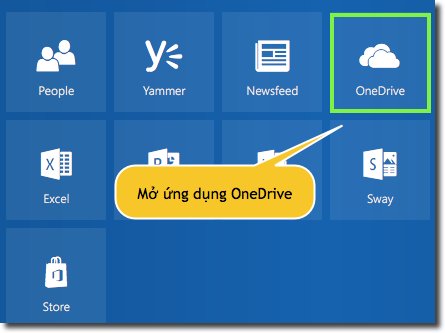
<p style="margin:0px 0px 11px;"><span style="font-size:large;"><span style="font-family:times new roman;">Tại màn hình Dashboard, tích chọn OneDrive.</span></span></p>

<p style="margin:0px 0px 11px;"><img alt="" src="https://hust-dev.hust.edu.vn/uploads/sys/news/2017/09/1.253684.10275.png" /></p>

<p style="margin:0px 0px 11px;">&nbsp;</p>

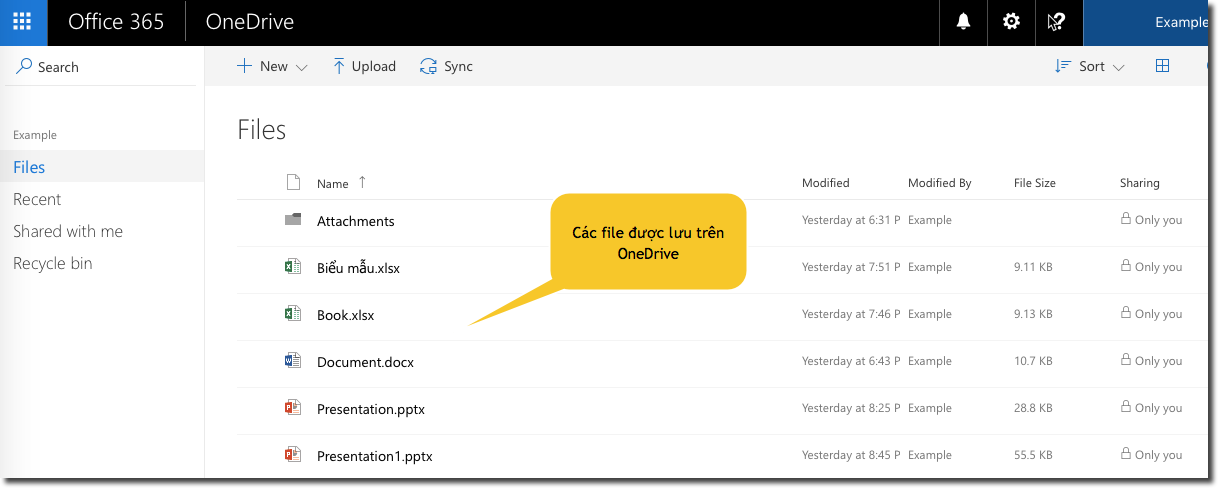
<p style="margin:0px 0px 11px;"><span style="font-size:large;"><span style="font-family:times new roman;">Đây là nơi chứa các file Word, Excel, PowerPoint khi lưu online và các file được người dùng upload lên cloud.</span></span></p>

<p style="margin:0px 0px 11px;"><img alt="" src="https://hust-dev.hust.edu.vn/uploads/sys/news/2017/09/2.253684.10276.png" /></p>

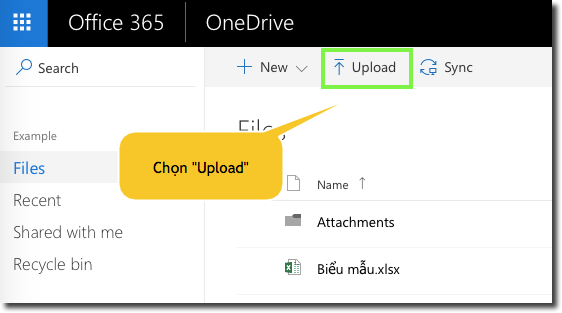
<p style="margin:0px 0px 11px;"><span style="font-size:large;"><span style="font-family:times new roman;">Để upload dữ liệu lên OneDrive, click Upload</span></span></p>

<p style="margin:0px 0px 11px;"><img alt="" src="https://hust-dev.hust.edu.vn/uploads/sys/news/2017/09/3.253684.10248.png" /></p>

<p style="margin:0px 0px 11px;">&nbsp;</p>

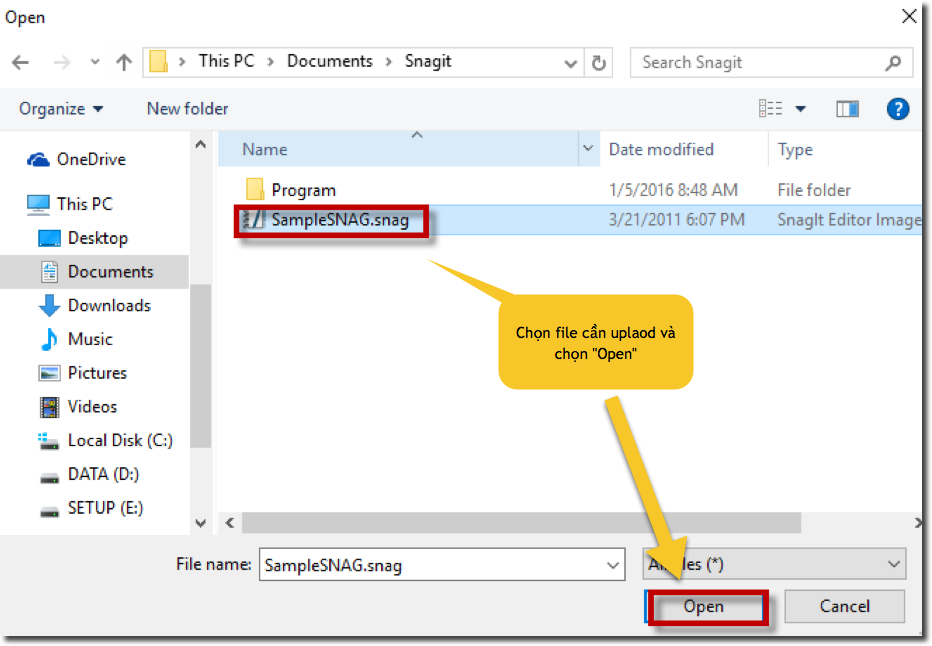
<p style="margin:0px 0px 11px;"><span style="font-size:large;"><span style="font-family:times new roman;">Chọn file cần upload, click Open</span></span></p>

<p style="margin:0px 0px 11px;"><img alt="" src="https://hust-dev.hust.edu.vn/uploads/sys/news/2017/09/4.253684.10249.png" /></p>

<p style="margin:0px 0px 11px;">&nbsp;</p>

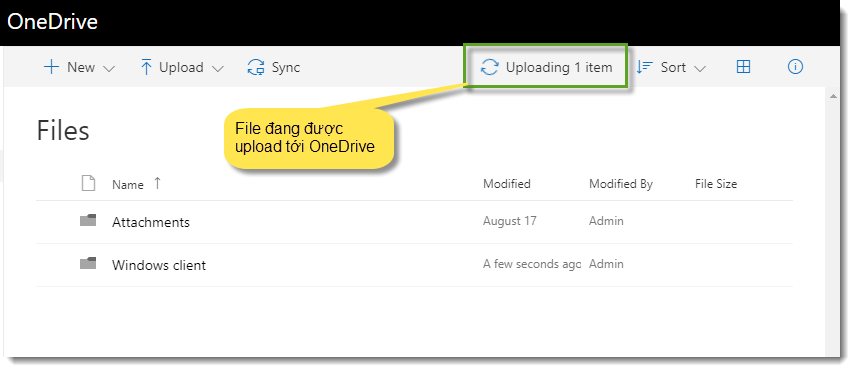
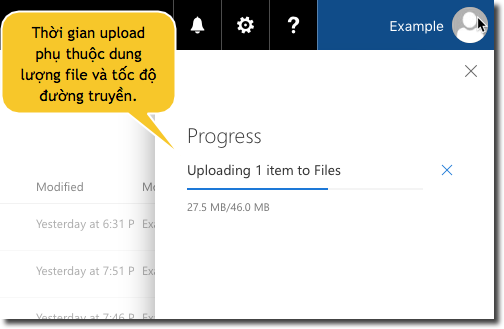
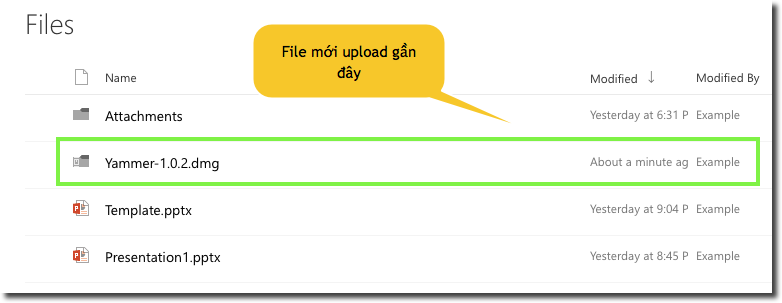
<p style="margin:0px 0px 11px;text-align:justify;"><span style="font-size:large;"><span style="font-family:times new roman;">Thời gian upload tùy thuộc vào dung lượng file và tốc độ đường truyền, sau khi upload xong, file mới sẽ được nhìn thấy trên Onedrive. Kích thước tối đa một file có thể upload lên OneDrive là 10GB.</span></span></p>

<p style="margin:0px 0px 11px;"><img alt="" src="https://hust-dev.hust.edu.vn/uploads/sys/news/2017/09/5.253684.10250.png" /></p>

<p style="margin:0px 0px 11px;"><img alt="" src="https://hust-dev.hust.edu.vn/uploads/sys/news/2017/09/6.253684.10251.png" /></p>

<p style="margin:0px 0px 11px;"><img alt="" src="https://hust-dev.hust.edu.vn/uploads/sys/news/2017/09/6.253684.10251.png" /></p>

<p style="margin:0px 0px 11px;"><img alt="" src="https://hust-dev.hust.edu.vn/uploads/sys/news/2017/09/7.253684.10252.png" /></p>

<p style="margin:0px 0px 11px;"><span style="font-size:large;"><span style="font-family:times new roman;">File đã được tải lên thành công, hiển thị chi tiết thời gian và ngày chỉnh sửa.</span></span></p>

<p style="margin:0px 0px 11px;"><img alt="" src="https://hust-dev.hust.edu.vn/uploads/sys/news/2017/09/8.253684.10253.png" /></p>

<p style="margin:0px 0px 11px 38px;text-indent:-28.35pt;"><strong><em><span style="font-size:large;"><span style="font-family:times new roman;">2.3.</span></span>&nbsp;&nbsp;&nbsp;&nbsp;&nbsp; </em></strong><strong><em><span style="font-size:large;"><span style="font-family:times new roman;">Download file từ OneDrive</span></span></em></strong></p>

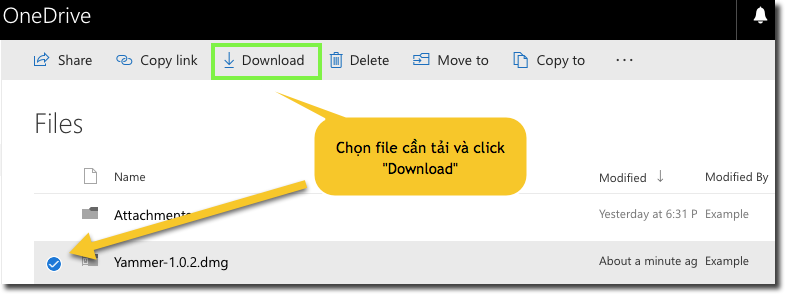
<p style="margin:0px 0px 11px;"><span style="font-size:large;"><span style="font-family:times new roman;">Để tải 1 file từ OneDrive về máy, tích chọn vào file cần tải, chọn Download</span></span></p>

<p style="margin:0px 0px 11px;"><img alt="" src="https://hust-dev.hust.edu.vn/uploads/sys/news/2017/09/9.253684.10254.png" /></p>

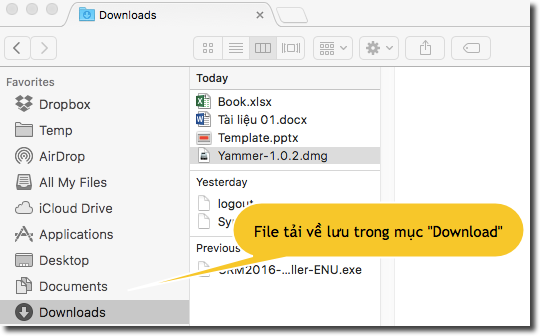
<p style="margin:0px 0px 11px;"><span style="font-size:large;"><span style="font-family:times new roman;">File tải về được lưu tại thư mục "Download" trong máy tính cá nhân của bạn</span></span></p>

<p style="margin:0px 0px 11px;"><img alt="" src="https://hust-dev.hust.edu.vn/uploads/sys/news/2017/09/10.253684.10255.png" /></p>

<p style="margin:0px 0px 11px 38px;line-height:150%;text-indent:-28.35pt;"><strong><em><span style="font-size:large;"><span style="font-family:times new roman;">2.4.</span></span>&nbsp;&nbsp;&nbsp;&nbsp;&nbsp; </em></strong><strong><em><span style="font-size:large;"><span style="font-family:times new roman;">Quản lý file/ thư mục trong OneDrive</span></span></em></strong></p>

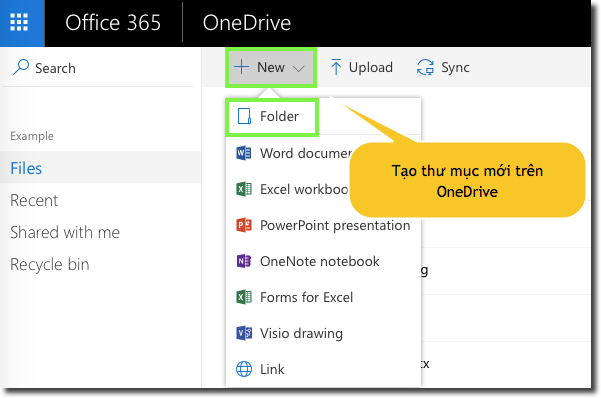
<p style="margin:0px 0px 11px;"><span style="font-size:large;"><span style="font-family:times new roman;">Để tạo một thư mục, chọn New | Folder.</span></span></p>

<p style="margin:0px 0px 11px;"><img alt="" src="https://hust-dev.hust.edu.vn/uploads/sys/news/2017/09/11.253684.10256.png" /></p>

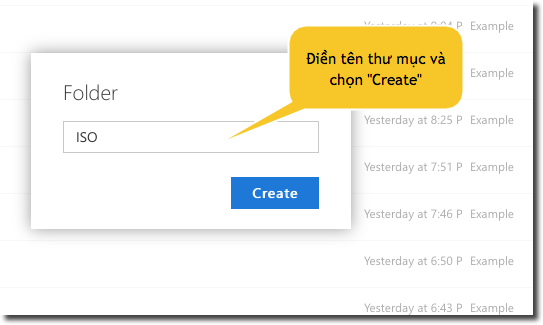
<p style="margin:0px 0px 11px;"><span style="font-size:large;"><span style="font-family:times new roman;">Điền tên Folder, chọn Create.</span></span></p>

<p style="margin:0px 0px 11px;"><img alt="" src="https://hust-dev.hust.edu.vn/uploads/sys/news/2017/09/12.253684.10257.png" /></p>

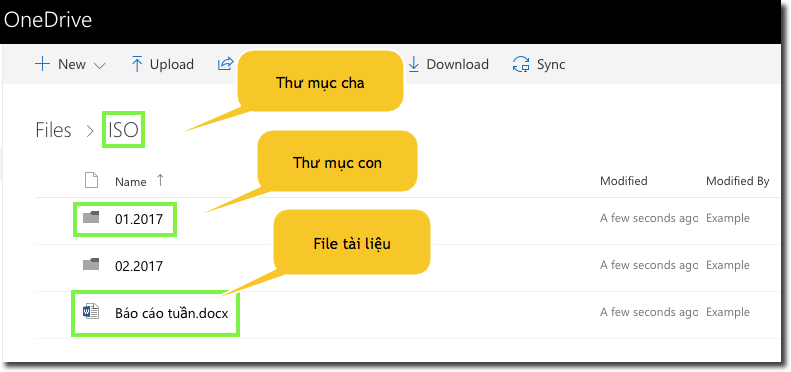
<p style="margin:0px 0px 11px;"><span style="font-size:large;"><span style="font-family:times new roman;">Sau khi tạo thư mục, ta có thể tạo,lưu các file vào thư mục đã tạo hoặc tạo các thư mục con.</span></span></p>

<p style="margin:0px 0px 11px;"><img alt="" src="https://hust-dev.hust.edu.vn/uploads/sys/news/2017/09/13.253684.10258.png" /></p>

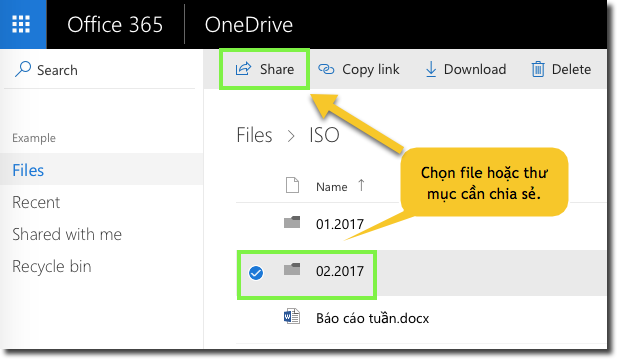
<p style="margin:0px 0px 11px;"><span style="font-size:large;"><span style="font-family:times new roman;">Muốn chia sẻ một file cho người khác, click chọn tài liệu muốn chia sẻ và chọn “<strong>Share</strong>” như hình dưới:</span></span></p>

<p style="margin:0px 0px 11px;"><img alt="" src="https://hust-dev.hust.edu.vn/uploads/sys/news/2017/09/14.253684.10259.png" /></p>

<p style="margin:0px 0px 11px;">&nbsp;</p>

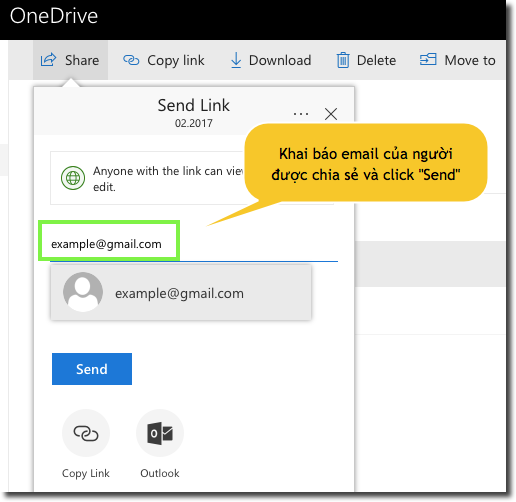
<p style="margin:0px 0px 11px;"><span style="font-size:large;"><span style="font-family:times new roman;">Khai báo email của người được chia sẻ tào liệu, chọn can view nếu muốn người được chia sẻ chỉ có quyền đọc file, chọn can edit nếu muốn người đó có thể sửa file. Click "Send".</span></span></p>

<p style="margin:0px 0px 11px;"><img alt="" src="https://hust-dev.hust.edu.vn/uploads/sys/news/2017/09/15.253684.10260.png" /></p>

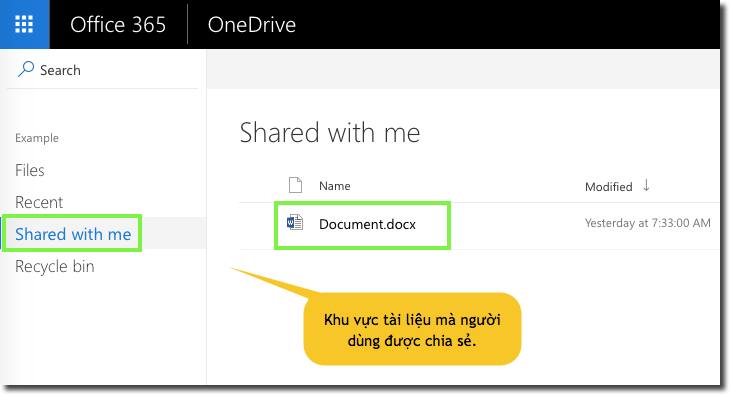
<p style="margin:0px 0px 11px;"><span style="font-size:large;"><span style="font-family:times new roman;">Để xem các file/thư mục đã được người khác Share cho mình, click Shared with me</span></span></p>

<p style="margin:0px 0px 11px;"><img alt="" src="https://hust-dev.hust.edu.vn/uploads/sys/news/2017/09/15.253684.10260.png" /></p>

<p style="margin:0px 0px 11px 38px;line-height:150%;text-indent:-28.35pt;"><strong><em><span style="font-size:large;"><span style="font-family:times new roman;">2.5.</span></span>&nbsp;&nbsp;&nbsp;&nbsp;&nbsp; </em></strong><strong><em><span style="font-size:large;"><span style="font-family:times new roman;">Cùng làm việc trên file chia sẻ</span></span></em></strong></p>

<p style="margin:0px 0px 11px;"><span style="font-size:large;"><span style="font-family:times new roman;">Tương tác là tính năng nổi bật của Office 365. Trên một file được chia sẻ, người dùng không cần phải gửi tài liệu qua lại bằng mail, với Office 365, người dùng có thể dễ dàng thêm, trả lời, theo dõi và cập nhật tài liệu trên một phiên bản. Các file luôn được cập nhật, vì vậy mọi người đều được tiếp cận với phiên bản có nội dung mới nhất.</span></span></p>

<p style="margin:0px 0px 11px;"><span style="font-size:large;"><span style="font-family:times new roman;">Office 365 hỗ trợ tối đa 10 người cùng làm việc trên 01 file cùng một thời điểm.</span></span></p>

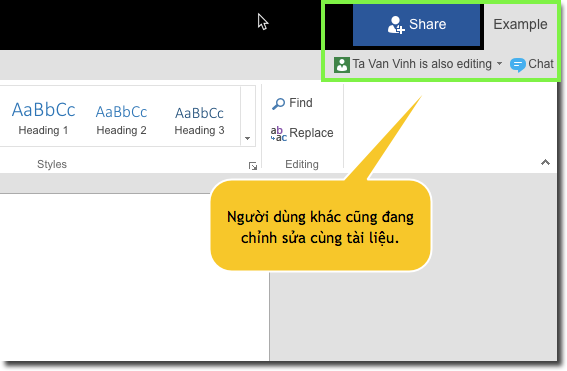
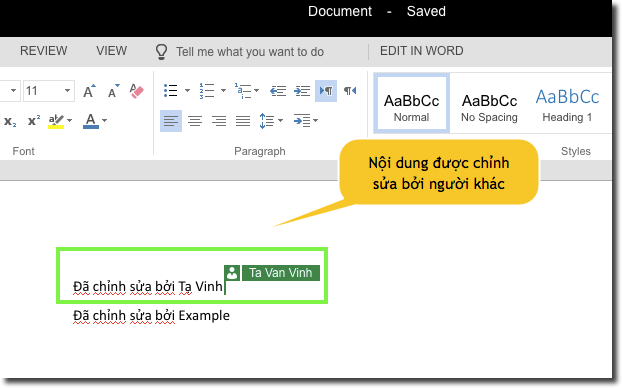
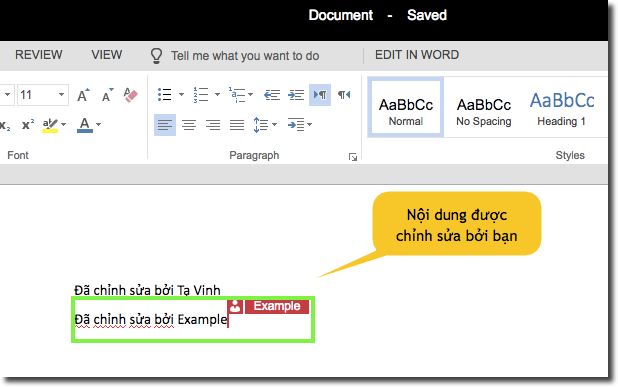
<p style="margin:0px 0px 11px;"><span style="font-size:large;"><span style="font-family:times new roman;">Để minh họa tính năng tương tác trên Office 365, các người dùng cùng mở một file và chỉnh sửa dữ liệu trên đó.</span></span></p>

<p style="margin:0px 0px 11px;"><img alt="" src="https://hust-dev.hust.edu.vn/uploads/sys/news/2017/09/16.253684.10261.png" /></p>

<p style="margin:0px 0px 11px;"><span style="font-size:large;"><span style="font-family:times new roman;">Các người dùng khác cùng làm việc trên cùng file có thể thấy nội dung được cập nhật và người đã sửa đổi nội dung.</span></span></p>

<p style="margin:0px 0px 11px;"><img alt="" src="https://hust-dev.hust.edu.vn/uploads/sys/news/2017/09/17.253684.10262.png" /></p>

<p style="margin:0px 0px 11px;"><img alt="" src="https://hust-dev.hust.edu.vn/uploads/sys/news/2017/09/18.253684.10263.png" /></p>

<p style="margin:0px 0px 11px 38px;text-indent:-28.35pt;"><strong><em><span style="font-size:large;"><span style="font-family:times new roman;">2.6.</span></span>&nbsp;&nbsp;&nbsp;&nbsp;&nbsp; </em></strong><strong><em><span style="font-size:large;"><span style="font-family:times new roman;">Đồng bộ OneDrive với máy tính cá nhân</span></span></em></strong></p>

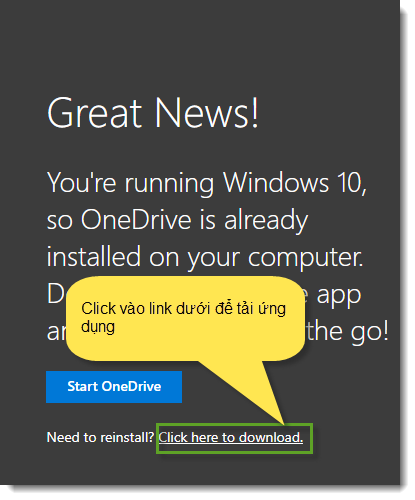
<p style="margin:0px 0px 11px;"><span style="font-size:large;"><span style="font-family:times new roman;">Để đồng bộ dữ liệu trên OneDrive với máy tính cá nhân, người dùng vào link <a href="https://onedrive.live.com/about/en-us/download/"><u><span style="color:#0563c1;">https://onedrive.live.com/about/en-us/download/</span></u></a>để tải ứng dụng về máy và tiến hành cài đặt.</span></span></p>

<p style="margin:0px 0px 11px;">&nbsp;<img alt="" src="https://hust-dev.hust.edu.vn/uploads/sys/news/2017/09/19.253684.10264.png" /> &nbsp; &nbsp; &nbsp; &nbsp;&nbsp;</p>

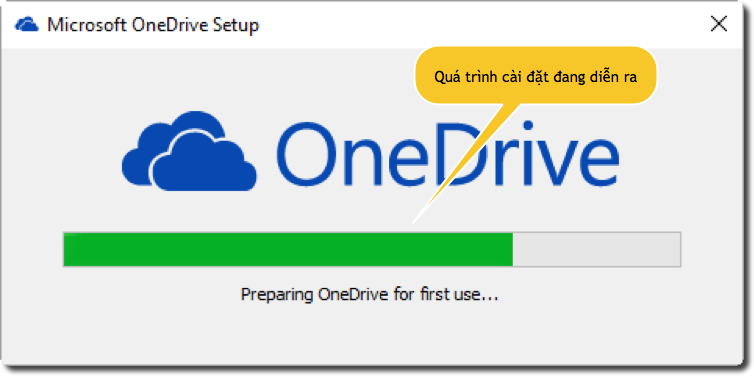
<p style="margin:0px 0px 11px;"><span style="font-size:large;"><span style="font-family:times new roman;">Mở file cài đặt đã tải về và tiến hành cài đặt ứng dụng, vui lòng chờ quá trình cài đặt hoàn tất trong vài giây.</span></span></p>

<p style="margin:0px 0px 11px;"><img alt="" src="https://hust-dev.hust.edu.vn/uploads/sys/news/2017/09/20.253684.10265.png" /></p>

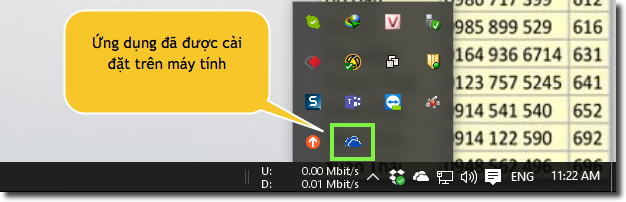
<p style="margin:0px 0px 11px;"><span style="font-size:large;"><span style="font-family:times new roman;">Sau khi cài đặt xong, sẽ thấy biểu tượng OneDrive ở góc phải phía dưới màn hình</span></span></p>

<p style="margin:0px 0px 11px;"><img alt="" src="https://hust-dev.hust.edu.vn/uploads/sys/news/2017/09/21.253684.10266.png" /></p>

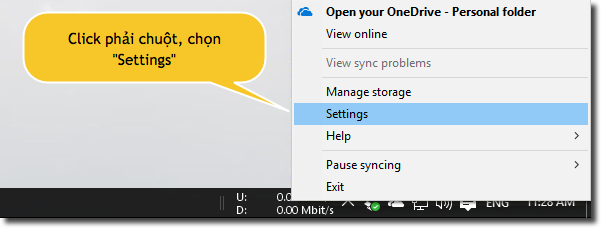
<p style="margin:0px 0px 11px;"><span style="font-size:large;"><span style="font-family:times new roman;">Click phải chuột vào biểu tượng OneDrive, chọn Settings.</span></span></p>

<p style="margin:0px 0px 11px;"><img alt="" src="https://hust-dev.hust.edu.vn/uploads/sys/news/2017/09/22.253684.10267.png" /></p>

<p style="margin:0px 0px 11px;">&nbsp;</p>

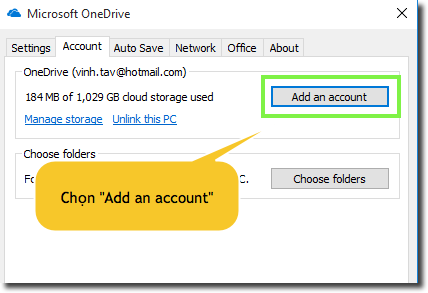
<p style="margin:0px 0px 11px;"><span style="font-size:large;"><span style="font-family:times new roman;">Tại thẻ "Account", chọn&nbsp; "Add an account".</span></span></p>

<p style="margin:0px 0px 11px 30px;"><img alt="" src="https://hust-dev.hust.edu.vn/uploads/sys/news/2017/09/23.253684.10268.png" /></p>

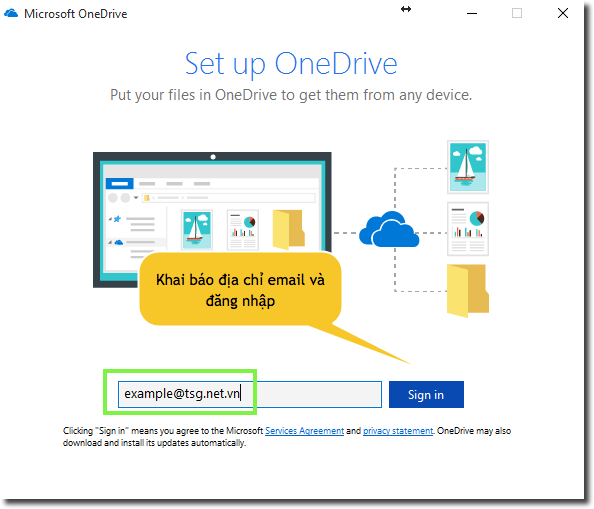
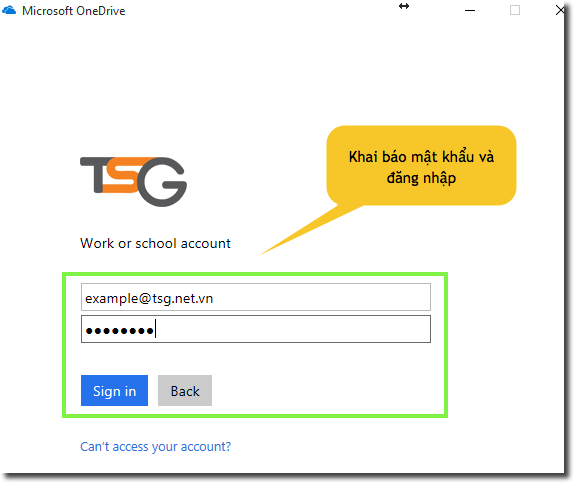
<p style="margin:0px 0px 11px 30px;"><span style="font-size:large;"><span style="font-family:times new roman;">Khai báo thông tin tài khoản và mật khẩu, sau đó tiến hành đăng nhập.</span></span></p>

<p style="margin:0px 0px 11px 30px;"><img alt="" src="https://hust-dev.hust.edu.vn/uploads/sys/news/2017/09/24.253684.10269.png" /></p>

<p style="margin:0px 0px 11px 30px;">&nbsp;</p>

<p style="margin:0px 0px 11px 30px;"><span style="font-size:large;"><span style="font-family:times new roman;">Nhập mật khẩu của tài khoản.</span></span></p>

<p style="margin:0px 0px 11px 30px;"><img alt="" src="https://hust-dev.hust.edu.vn/uploads/sys/news/2017/09/25.253684.10270.png" /></p>

<p style="margin:0px 0px 11px 30px;">&nbsp;</p>

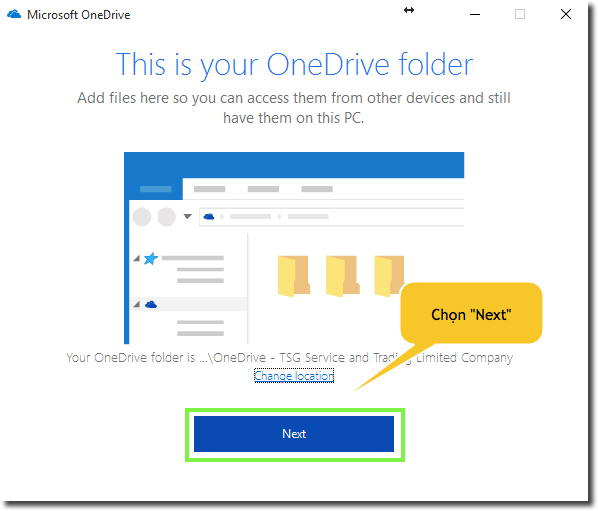
<p style="margin:0px 0px 11px 30px;"><span style="font-size:large;"><span style="font-family:times new roman;">Chọn "Next".</span></span></p>

<p style="margin:0px 0px 11px 30px;"><img alt="" src="https://hust-dev.hust.edu.vn/uploads/sys/news/2017/09/26.253684.10271.png" /></p>

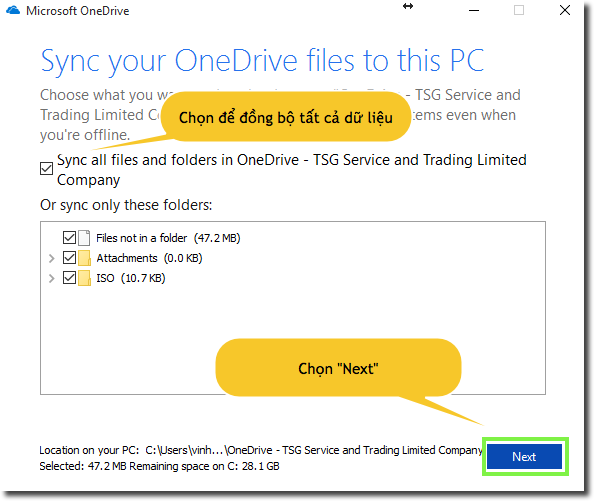
<p style="margin:0px 0px 11px 30px;"><span style="font-size:large;"><span style="font-family:times new roman;">Chọn các dữ liệu sẽ được đồng bộ về máy tính.</span></span></p>

<p style="margin:0px 0px 11px 30px;">&nbsp;</p>

<p style="margin:0px 0px 11px 30px;"><img alt="" src="https://hust-dev.hust.edu.vn/uploads/sys/news/2017/09/27.253684.10272.png" /></p>

<p style="margin:0px 0px 11px 30px;">&nbsp;</p>

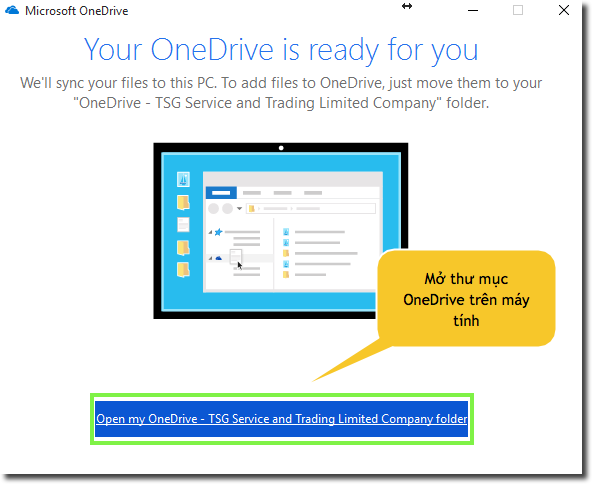
<p style="margin:0px 0px 11px 30px;"><span style="font-size:large;"><span style="font-family:times new roman;">Mở thư mục OneDrive trên máy tính.</span></span></p>

<p style="margin:0px 0px 11px 30px;"><img alt="" src="https://hust-dev.hust.edu.vn/uploads/sys/news/2017/09/28.253684.10273.png" /></p>

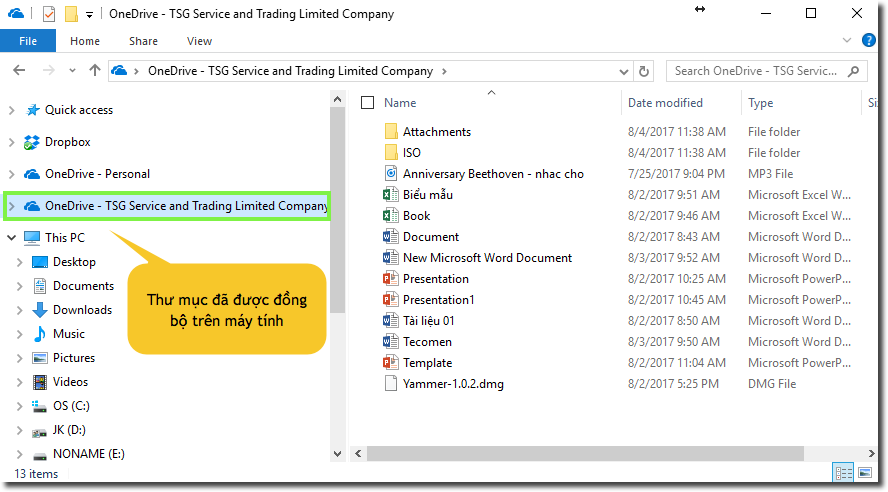
<p style="margin:0px 0px 11px 30px;"><span style="font-size:large;"><span style="font-family:times new roman;">Thư mục OneDrive đã được đồng bộ về máy tính.</span></span></p>

<p style="margin:0px 0px 11px 30px;"><img alt="" src="https://hust-dev.hust.edu.vn/uploads/sys/news/2017/09/29.253684.10274.png" /></p>

<p style="margin:0px 0px 11px 38px;line-height:150%;">&nbsp;</p>

<p style="margin:0px 0px 11px 38px;line-height:150%;"><span style="font-size:large;"><span style="font-family:times new roman;">Sau khi hoàn tất việc đồng bộ này, dữ liệu OneDrive trên Cloud đã được đồng bộ tự động với OneDrive trong máy tính cá nhân của bạn</span></span></p>
		</div>
				<div id="author">
						<p>
				<strong>Tác giả:</strong>
				<a href="https://hust-dev.hust.edu.vn/vi/news/author/admin/">admin</a>
			</p>
		</div>
	</div>
	<div id="footer" class="clearfix">
		<div id="url">
			<strong>URL của bản tin này: </strong><a href="https://hust.edu.vn/vi/news/savefile/tin-tuc-su-kien/huong-dan-su-dung-huong-dan-su-dung-onedrive-for-business-253754.html" title="HƯỚNG DẪN SỬ DỤNG HƯỚNG DẪN SỬ DỤNG ONEDRIVE FOR BUSINESS">https://hust.edu.vn/vi/news/savefile/tin-tuc-su-kien/huong-dan-su-dung-huong-dan-su-dung-onedrive-for-business-253754.html</a>

		</div>
		<div class="clear"></div>
		<div class="copyright">
			&copy; Đại học Bách khoa Hà Nội
		</div>
		<div id="contact">
			<a href="mailto:ccpr@hust.edu.vn">ccpr@hust.edu.vn</a>
		</div>
	</div>
</div>
        <div id="timeoutsess" class="chromeframe">
            Bạn đã không sử dụng Site, <a onclick="timeoutsesscancel();" href="https://hust-dev.hust.edu.vn/#">Bấm vào đây để duy trì trạng thái đăng nhập</a>. Thời gian chờ: <span id="secField"> 60 </span> giây
        </div>
        <div id="openidResult" class="nv-alert" style="display:none"></div>
        <div id="openidBt" data-result="" data-redirect=""></div>
<script src="https://hust-dev.hust.edu.vn/assets/js/jquery/jquery.min.js"></script>
<script>var nv_base_siteurl="/",nv_lang_data="vi",nv_lang_interface="vi",nv_name_variable="nv",nv_fc_variable="op",nv_lang_variable="language",nv_module_name="news",nv_func_name="savefile",nv_is_user=0, nv_my_ofs=-4,nv_my_abbr="EDT",nv_cookie_prefix="nv4s_c523Wo",nv_check_pass_mstime=1738000,nv_area_admin=0,nv_safemode=0,theme_responsive=1,nv_recaptcha_ver=2,nv_recaptcha_sitekey="6Ld5WCEiAAAAAJr6hIEOr3bZf2m-LopszjRVYBWz",nv_recaptcha_type="image",XSSsanitize=1;</script>
<script src="https://hust-dev.hust.edu.vn/assets/js/language/vi.js"></script>
<script src="https://hust-dev.hust.edu.vn/assets/js/DOMPurify/purify3.js"></script>
<script src="https://hust-dev.hust.edu.vn/assets/js/global.js"></script>
<script src="https://hust-dev.hust.edu.vn/assets/js/site.js"></script>
<script src="https://hust-dev.hust.edu.vn/themes/default/js/news.js"></script>
<script src="https://hust-dev.hust.edu.vn/themes/hust/js/main.js"></script>
<script src="https://hust-dev.hust.edu.vn/themes/hust/js/custom.js"></script>
<script src="https://hust-dev.hust.edu.vn/themes/hust/js/hust.js"></script>
<script src="https://hust-dev.hust.edu.vn/themes/hust/js/slick/slick.js"></script>
<script type="application/ld+json">
        {
            "@context": "https://schema.org",
            "@type": "Organization",
            "url": "https://hust-dev.hust.edu.vn",
            "logo": "https://hust-dev.hust.edu.vn/uploads/sys/logo-dhbk-1-02.png"
        }
        </script>
<script async src="https://www.googletagmanager.com/gtag/js?id=G-TT1NML6EJM"></script>
<script>window.dataLayer=window.dataLayer||[];function gtag(){dataLayer.push(arguments)}gtag('js',new Date);gtag('config','G-TT1NML6EJM');</script>
<script src="https://hust-dev.hust.edu.vn/themes/hust/js/bootstrap.min.js"></script>
</body>
</html>