<!DOCTYPE html>
    <html lang="vi" xmlns="http://www.w3.org/1999/xhtml" prefix="og: http://ogp.me/ns#">
    <head>
<title>HƯỚNG DẪN KHẮC PHỤC LỖI PROXY TRÊN MÁY TÍNH THÀNH CÔNG 100&#x25;</title>
<meta name="description" content="HƯỚNG DẪN KHẮC PHỤC LỖI PROXY TRÊN MÁY TÍNH THÀNH CÔNG 100&#x25; - Savefile - Tin Tức -...">
<meta name="author" content="Đại học Bách khoa Hà Nội">
<meta name="copyright" content="Đại học Bách khoa Hà Nội [ccpr@hust.edu.vn]">
<meta name="google-site-verification" content="lpSvS2om85_DqFe7xgBMV-TvBFbuNGWvXNWeLtncZjM">
<meta name="generator" content="NukeViet v4.5">
<meta name="viewport" content="width=device-width, initial-scale=1">
<meta http-equiv="Content-Type" content="text/html; charset=utf-8">
<meta property="og:title" content="HƯỚNG DẪN KHẮC PHỤC LỖI PROXY TRÊN MÁY TÍNH THÀNH CÔNG 100%">
<meta property="og:type" content="website">
<meta property="og:description" content="Savefile - Tin Tức - https&#x3A;&#x002F;&#x002F;hust.edu.vn&#x002F;vi&#x002F;news&#x002F;savefile&#x002F;tin-tuc-su-kien&#x002F;huong-dan-khac-phuc-loi-proxy-tren-may-tinh-thanh-cong-100-598771.html">
<meta property="og:site_name" content="Đại học Bách khoa Hà Nội">
<meta property="og:url" content="https://hust.edu.vn/vi/news/savefile/tin-tuc-su-kien/huong-dan-khac-phuc-loi-proxy-tren-may-tinh-thanh-cong-100-598771.html">
<link rel="shortcut icon" href="https://hust-dev.hust.edu.vn/uploads/sys/android-icon-36x36.png">
<link    rel="canonical"    href="https://hust.edu.vn/vi/news/savefile/tin-tuc-su-kien/huong-dan-khac-phuc-loi-proxy-tren-may-tinh-thanh-cong-100-598771.html">
<link    rel="alternate"    href="https://hust-dev.hust.edu.vn/vi/news/rss/" title="Tin Tức"    type="application/rss+xml">
<link    rel="alternate"    href="https://hust-dev.hust.edu.vn/vi/news/rss/hoat-dong-chung/" title="Tin Tức - Hoạt động chung"    type="application/rss+xml">
<link    rel="alternate"    href="https://hust-dev.hust.edu.vn/vi/news/rss/cong-tac-dang-va-doan-the/" title="Tin Tức - Công tác Đảng và Đoàn thể"    type="application/rss+xml">
<link    rel="alternate"    href="https://hust-dev.hust.edu.vn/vi/news/rss/tuyen-sinh-dao-tao-cong-tac-sinh-vien/" title="Tin Tức - Tuyển sinh - Đào tạo - Công tác sinh viên"    type="application/rss+xml">
<link    rel="alternate"    href="https://hust-dev.hust.edu.vn/vi/news/rss/khoa-hoc-cong-nghe-dmst/" title="Tin Tức - Khoa học - Công nghệ - ĐMST"    type="application/rss+xml">
<link    rel="alternate"    href="https://hust-dev.hust.edu.vn/vi/news/rss/hop-tac-doi-ngoai-truyen-thong/" title="Tin Tức - Hợp tác - Đối ngoại - Truyền thông"    type="application/rss+xml">
<link    rel="alternate"    href="https://hust-dev.hust.edu.vn/vi/news/rss/kiem-dinh-xep-hang/" title="Tin Tức - Kiểm định - Xếp hạng"    type="application/rss+xml">
<link    rel="alternate"    href="https://hust-dev.hust.edu.vn/vi/news/rss/to-chuc-nhan-su-tuyen-dung/" title="Tin Tức - Tổ chức - Nhân sự - Tuyển dụng"    type="application/rss+xml">
<link    rel="alternate"    href="https://hust-dev.hust.edu.vn/vi/news/rss/bach-khoa-tren-bao-chi/" title="Tin Tức - Bách khoa trên Báo chí"    type="application/rss+xml">
<link    rel="alternate"    href="https://hust-dev.hust.edu.vn/vi/news/rss/tin-tuc-su-kien/" title="Tin Tức - Tin tức - sự kiện"    type="application/rss+xml">
<link    rel="alternate"    href="https://hust-dev.hust.edu.vn/vi/news/rss/tro-giup-can-bo/" title="Tin Tức - Trợ giúp Cán bộ"    type="application/rss+xml">
<link    rel="alternate"    href="https://hust-dev.hust.edu.vn/vi/news/rss/tro-giup-sinh-vien/" title="Tin Tức - Trợ giúp Sinh viên"    type="application/rss+xml">
<link    rel="alternate"    href="https://hust-dev.hust.edu.vn/vi/news/rss/su-kien-sap-dien-ra/" title="Tin Tức - Sự kiện sắp diễn ra"    type="application/rss+xml">
<link    rel="alternate"    href="https://hust-dev.hust.edu.vn/vi/news/rss/cong-tac-sinh-vien/" title="Tin Tức - Công tác Sinh viên"    type="application/rss+xml">
<link    rel="alternate"    href="https://hust-dev.hust.edu.vn/vi/news/rss/thong-bao-chung/" title="Tin Tức - Thông báo chung"    type="application/rss+xml">
<link    rel="alternate"    href="https://hust-dev.hust.edu.vn/vi/news/rss/lich-cong-tac/" title="Tin Tức - Lịch công tác"    type="application/rss+xml">
<link    rel="alternate"    href="https://hust-dev.hust.edu.vn/vi/news/rss/he-thong-phong-thi-nghiem/" title="Tin Tức - Hệ thống Phòng thí nghiệm"    type="application/rss+xml">
<link    rel="alternate"    href="https://hust-dev.hust.edu.vn/vi/news/rss/hoi-dong-nganh-lien-nganh/" title="Tin Tức - Hội đồng Ngành - Liên ngành"    type="application/rss+xml">
<link    rel="alternate"    href="https://hust-dev.hust.edu.vn/vi/news/rss/cac-truong-thanh-vien/" title="Tin Tức - Các trường thành viên"    type="application/rss+xml">
<link    rel="alternate"    href="https://hust-dev.hust.edu.vn/vi/news/rss/so-huu-tri-tue/" title="Tin Tức - Sở hữu trí tuệ"    type="application/rss+xml">
<link    rel="alternate"    href="https://hust-dev.hust.edu.vn/vi/news/rss/van-ban-phap-quy/" title="Tin Tức - Văn bản pháp quy"    type="application/rss+xml">
<link    rel="alternate"    href="https://hust-dev.hust.edu.vn/vi/news/rss/thong-tin-huong-dan/" title="Tin Tức - Thông tin hướng dẫn"    type="application/rss+xml">
<link    rel="alternate"    href="https://hust-dev.hust.edu.vn/vi/news/rss/cac-bieu-mau/" title="Tin Tức - Các biểu mẫu"    type="application/rss+xml">
<link    rel="alternate"    href="https://hust-dev.hust.edu.vn/vi/news/rss/van-ban-quy-che/" title="Tin Tức - Văn bản quy chế"    type="application/rss+xml">
<link    rel="alternate"    href="https://hust-dev.hust.edu.vn/vi/news/rss/cap-nha-nuoc/" title="Tin Tức - Cấp Nhà nước"    type="application/rss+xml">
<link    rel="alternate"    href="https://hust-dev.hust.edu.vn/vi/news/rss/cap-bo/" title="Tin Tức - Cấp Bộ"    type="application/rss+xml">
<link    rel="alternate"    href="https://hust-dev.hust.edu.vn/vi/news/rss/cap-truong/" title="Tin Tức - Cấp Trường"    type="application/rss+xml">
<link    rel="alternate"    href="https://hust-dev.hust.edu.vn/vi/news/rss/ke-hoach-hoc-tap/" title="Tin Tức - Kế hoạch học tập"    type="application/rss+xml">
<link    rel="alternate"    href="https://hust-dev.hust.edu.vn/vi/news/rss/thong-tin-van-bang/" title="Tin Tức - Thông tin văn bằng"    type="application/rss+xml">
<link    rel="alternate"    href="https://hust-dev.hust.edu.vn/vi/news/rss/du-an-sahep/" title="Tin Tức - Dự án SAHEP"    type="application/rss+xml">
<link    rel="alternate"    href="https://hust-dev.hust.edu.vn/vi/news/rss/media/" title="Tin Tức - Media"    type="application/rss+xml">
<link rel="preload" as="style" href="https://hust-dev.hust.edu.vn/assets/css/font-awesome.min.css" type="text/css">
<link rel="preload" as="style" href="https://hust-dev.hust.edu.vn/themes/hust/css/animate.min.css" type="text/css">
<link rel="preload" as="style" href="https://hust-dev.hust.edu.vn/themes/hust/css/bootstrap.min.css" type="text/css">
<link rel="preload" as="style" href="https://hust-dev.hust.edu.vn/themes/hust/css/style.css" type="text/css">
<link rel="preload" as="style" href="https://hust-dev.hust.edu.vn/themes/hust/css/style.responsive.css" type="text/css">
<link rel="preload" as="style" href="https://hust-dev.hust.edu.vn/themes/default/css/news.css" type="text/css">
<link rel="preload" as="style" href="https://hust-dev.hust.edu.vn/themes/hust/css/custom.css" type="text/css">
<link rel="preload" as="style" href="https://hust-dev.hust.edu.vn/themes/hust/css/hust.css" type="text/css">
<link rel="preload" as="style" href="https://hust-dev.hust.edu.vn/themes/hust/css/custom70.css" type="text/css">
<link rel="preload" as="style" href="https://hust-dev.hust.edu.vn/themes/hust/css/custom_NCKH.css" type="text/css">
<link rel="preload" as="style" href="https://hust-dev.hust.edu.vn/assets/css/hust.vi.0.css" type="text/css">
<link rel="preload" as="style" href="https://hust-dev.hust.edu.vn/themes/hust/js/slick/slick.css" type="text/css">
<link rel="preload" as="style" href="https://hust-dev.hust.edu.vn/themes/hust/js/slick/slick-theme.css" type="text/css">
<link rel="preload" as="script" href="https://hust-dev.hust.edu.vn/assets/js/jquery/jquery.min.js" type="text/javascript">
<link rel="preload" as="script" href="https://hust-dev.hust.edu.vn/assets/js/language/vi.js" type="text/javascript">
<link rel="preload" as="script" href="https://hust-dev.hust.edu.vn/assets/js/DOMPurify/purify3.js" type="text/javascript">
<link rel="preload" as="script" href="https://hust-dev.hust.edu.vn/assets/js/global.js" type="text/javascript">
<link rel="preload" as="script" href="https://hust-dev.hust.edu.vn/assets/js/site.js" type="text/javascript">
<link rel="preload" as="script" href="https://hust-dev.hust.edu.vn/themes/default/js/news.js" type="text/javascript">
<link rel="preload" as="script" href="https://hust-dev.hust.edu.vn/themes/hust/js/main.js" type="text/javascript">
<link rel="preload" as="script" href="https://hust-dev.hust.edu.vn/themes/hust/js/custom.js" type="text/javascript">
<link rel="preload" as="script" href="https://hust-dev.hust.edu.vn/themes/hust/js/hust.js" type="text/javascript">
<link rel="preload" as="script" href="https://hust-dev.hust.edu.vn/themes/hust/js/slick/slick.js" type="text/javascript">
<link rel="preload" as="script" href="https://www.googletagmanager.com/gtag/js?id=G-TT1NML6EJM" type="text/javascript">
<link rel="preload" as="script" href="https://hust-dev.hust.edu.vn/themes/hust/js/bootstrap.min.js" type="text/javascript">
<link    rel="stylesheet"    href="https://hust-dev.hust.edu.vn/assets/css/font-awesome.min.css">
<link    rel="stylesheet"    href="https://hust-dev.hust.edu.vn/themes/hust/css/animate.min.css">
<link    rel="stylesheet"    href="https://hust-dev.hust.edu.vn/themes/hust/css/bootstrap.min.css">
<link    rel="stylesheet"    href="https://hust-dev.hust.edu.vn/themes/hust/css/style.css">
<link    rel="stylesheet"    href="https://hust-dev.hust.edu.vn/themes/hust/css/style.responsive.css">
<link    rel="StyleSheet"    href="https://hust-dev.hust.edu.vn/themes/default/css/news.css">
<link    rel="stylesheet"    href="https://hust-dev.hust.edu.vn/themes/hust/css/custom.css">
<link    rel="stylesheet"    href="https://hust-dev.hust.edu.vn/themes/hust/css/hust.css">
<link    rel="stylesheet"    href="https://hust-dev.hust.edu.vn/themes/hust/css/custom70.css">
<link    rel="stylesheet"    href="https://hust-dev.hust.edu.vn/themes/hust/css/custom_NCKH.css">
<link    rel="stylesheet"    href="https://hust-dev.hust.edu.vn/assets/css/hust.vi.0.css">
<link rel="stylesheet" href="https://hust-dev.hust.edu.vn/themes/hust/js/slick/slick.css" />
<link rel="stylesheet" href="https://hust-dev.hust.edu.vn/themes/hust/js/slick/slick-theme.css" />
<style type="text/css">
	body{background: #fff;}
</style>
</head>
    <body>
<div id="print">
	<div id="hd_print">
		<h2 class="pull-left">Đại học Bách khoa Hà Nội</h2>
		<p class="pull-right"><a title="Đại học Bách khoa Hà Nội" href="https://hust-dev.hust.edu.vn/">https://hust-dev.hust.edu.vn</a></p>
	</div>
	<div class="clear"></div>
	<hr />
	<div id="content">
		<h1>HƯỚNG DẪN KHẮC PHỤC LỖI PROXY TRÊN MÁY TÍNH THÀNH CÔNG 100%</h1>
		<ul class="list-inline">
			<li>Thứ hai - 18/10/2021 21:24</li>
			<li class="hidden-print txtrequired"><em class="fa fa-print">&nbsp;</em><a title="In ra" href="javascript:;" onclick="window.print()">In ra</a></li>
			<li class="hidden-print txtrequired"><em class="fa fa-power-off">&nbsp;</em><a title="Đóng cửa sổ này" href="javascript:;" onclick="window.close()">Đóng cửa sổ này</a></li>
		</ul>
		<div class="clear"></div>
		<div id="hometext">
		</div>
		<div id="bodytext" class="clearfix">
			<p><span style="color: rgb(0, 0, 0); font-family: Roboto, sans-serif; font-size: 16px; font-weight: bolder; text-align: justify;">Bạn vẫn truy cập internet hàng ngày một cách bình thường, thế nhưng đột nhiên nhiên một ngày nào đó thì trình duyệt của bạn hiện lên thông báo "không thể kết nối đến máy chủ proxy</span><span style="color: rgb(0, 0, 0); font-family: Roboto, sans-serif; font-size: 16px; font-weight: bolder; text-align: justify;">”. Nếu nhẹ thì cũng khoảng vài chục giây sau nó tự load vào được website đó, còn nặng thì không thể vào được mạng internet.</span></p>

<p style="box-sizing: border-box; margin-bottom: 1.3em; color: rgb(0, 0, 0); font-family: Roboto, sans-serif; font-size: 16px;"><span style="box-sizing: border-box;">nguyên nhân của tình trạng lỗi kết nối này? Và cách khắc phục lỗi này như thế nào cho triệt để. Bài viết dưới đây&nbsp;<a href="https://thanhbinhpc.com/" style="box-sizing: border-box; background-color: transparent; touch-action: manipulation; color: rgb(0, 0, 0);">thanhbinhpc.com</a>&nbsp;sẽ chia sẻ tới bạn các cách khắc phục máy tính&nbsp;lỗi proxy không vào được mạng</span></p>

<p style="box-sizing: border-box; margin-bottom: 1.3em; color: rgb(0, 0, 0); font-family: Roboto, sans-serif; font-size: 16px;"><span style="box-sizing: border-box;">Đầu tiên bạn cần phải biết Proxy là gì? Proxy chính là chia sẻ đường truyền giúp nhiều máy truy cập vào mạng thông thông qua 1 máy và máy này gọi là Proxy.&nbsp;</span><span style="box-sizing: border-box;">Theo đó, nguyên nhân gây nên lỗi&nbsp;không thể kết nối đến máy chủ Proxy&nbsp;trên các trình duyệt web là do Proxy của trình duyệt thiết lập chưa đúng hoặc do đường truyền mạng trên máy tính có trục trặc. Các máy tính sử dụng hệ điều hành windows 10 cũng rất hay gặp lỗi proxy dẫn đến không vào được mạng.&nbsp;</span></p>

<p style="box-sizing: border-box; margin-bottom: 1.3em; color: rgb(0, 0, 0); font-family: Roboto, sans-serif; font-size: 16px; text-align: justify;"><span style="box-sizing: border-box;">Nếu là lỗi do đường truyền mạng có trục trặc thì bạn hãy reset modem, đồng thời kiểm tra lại máy tính khác trong cùng mạng LAN của bạn có vào được internet hay không.&nbsp;</span><span style="box-sizing: border-box; font-size: 14.4px;">Nếu trên các máy khác vẫn vào được mạng bình thường thì máy tính của bạn&nbsp;đã xảy ra sự cố với máy chủ proxy hoặc địa chỉ không chính xác. Vì thế bạn phải thiết lập lại Proxy trong trình duyệt của bạn. Quy trình thiết lập Proxy cần làm từng bước theo hướng dẫn dưới đây:</span></p>

<h2 class="ftwp-heading" id="ftoc-heading-1" style="box-sizing: border-box; color: rgb(17, 17, 17); width: 944px; margin-top: 0px; margin-bottom: 0.5em; text-rendering: optimizespeed; font-size: 1.6em; line-height: 1.3; font-family: &quot;-apple-system, BlinkMacSystemFont, &amp;quot;Segoe UI&amp;quot;, Roboto, Oxygen-Sans, Ubuntu, Cantarell, &amp;quot;Helvetica Neue&amp;quot;, sans-serif&quot;, sans-serif; text-align: justify;"><span style="box-sizing: border-box; -webkit-box-decoration-break: clone; color: rgb(0, 0, 0);">1. Thiết lập proxy trên trình duyệt Google Chrome và Cốc Cốc:</span></h2>

<p style="box-sizing: border-box; margin-bottom: 1.3em; color: rgb(0, 0, 0); font-family: Roboto, sans-serif; font-size: 16px; text-align: justify;"><span style="box-sizing: border-box;">Dưới đây chúng tôi xin được hướng dẫn các thao tác khắc phục lỗi proxy win 10&nbsp; trên trình duyệt Cốc cốc, đối với trình duyệt Google Chrome thao tác đầu tiên chọn cài đặt có phần khác biệt còn các thao tác sau thực hiện tương tự như với trình duyệt cốc cốc.</span></p>

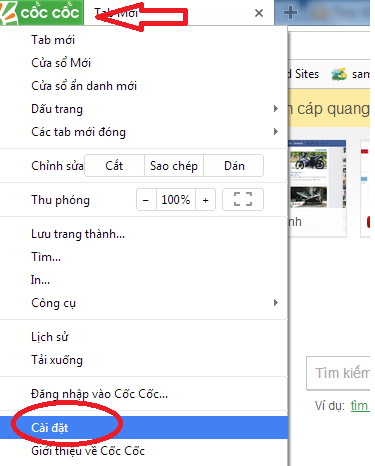
<p style="box-sizing: border-box; margin-bottom: 1.3em; color: rgb(0, 0, 0); font-family: Roboto, sans-serif; font-size: 16px; text-align: justify;"><span style="box-sizing: border-box;">–<span style="box-sizing: border-box; font-weight: bolder;">&nbsp;Bước 1</span>: Vào phần vài đặt của trình duyệt (phần settings)</span></p>

<p style="box-sizing: border-box; margin-bottom: 1.3em; color: rgb(0, 0, 0); font-family: Roboto, sans-serif; font-size: 16px; text-align: center;"><span style="box-sizing: border-box;"><img alt="" src="https://hust-dev.hust.edu.vn/uploads/sys/news/2021/10/may-tinh-bao-loi-proxy-1.518511.27728.png" style="width: 450px;" /></span></p>

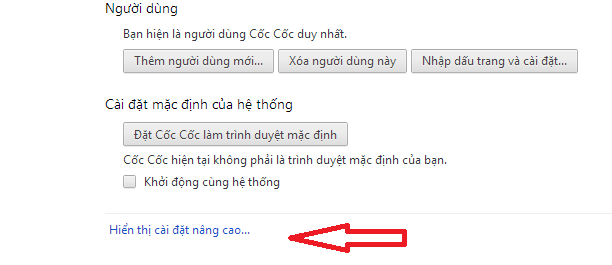
<p style="box-sizing: border-box; margin-bottom: 1.3em; color: rgb(0, 0, 0); font-family: Roboto, sans-serif; font-size: 16px; text-align: justify;"><span style="color: rgb(0, 0, 0); font-family: Roboto, sans-serif; font-size: 16px; text-align: justify;">–&nbsp;</span><span style="box-sizing: border-box; font-weight: bolder; color: rgb(0, 0, 0); font-family: Roboto, sans-serif; font-size: 16px; text-align: justify;">Bước 2</span><span style="color: rgb(0, 0, 0); font-family: Roboto, sans-serif; font-size: 16px; text-align: justify;">: Kéo thanh trượt xuống dưới cùng và chọn mục hiển thị nâng cao</span></p>

<p style="box-sizing: border-box; margin-bottom: 1.3em; color: rgb(0, 0, 0); font-family: Roboto, sans-serif; font-size: 16px; text-align: center;"><span style="color: rgb(0, 0, 0); font-family: Roboto, sans-serif; font-size: 16px; text-align: justify;"><img alt="" src="https://hust-dev.hust.edu.vn/uploads/sys/news/2021/10/may-tinh-bao-loi-proxy-2.518511.27729.png" style="height: 238px; width: 550px;" /></span></p>

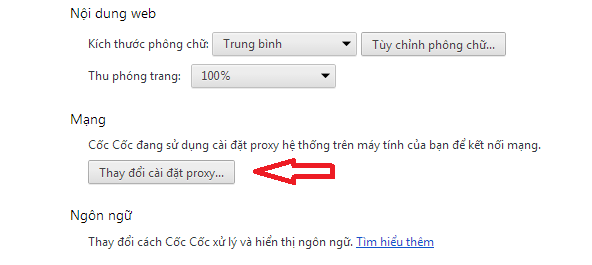
<p style="box-sizing: border-box; margin-bottom: 1.3em; color: rgb(0, 0, 0); font-family: Roboto, sans-serif; font-size: 16px; text-align: justify;"><span style="color: rgb(0, 0, 0); font-family: Roboto, sans-serif; font-size: 16px; text-align: justify;">–&nbsp;</span><span style="box-sizing: border-box; font-weight: bolder; color: rgb(0, 0, 0); font-family: Roboto, sans-serif; font-size: 16px; text-align: justify;">Bước 3</span><span style="color: rgb(0, 0, 0); font-family: Roboto, sans-serif; font-size: 16px; text-align: justify;">: Thay đổi thiết lập proxy</span></p>

<p style="box-sizing: border-box; margin-bottom: 1.3em; color: rgb(0, 0, 0); font-family: Roboto, sans-serif; font-size: 16px; text-align: center;"><span style="color: rgb(0, 0, 0); font-family: Roboto, sans-serif; font-size: 16px; text-align: justify;"><img alt="" src="https://hust-dev.hust.edu.vn/uploads/sys/news/2021/10/may-tinh-bao-loi-proxy-3.518511.27730.png" style="height: 269px; width: 600px;" /></span></p>

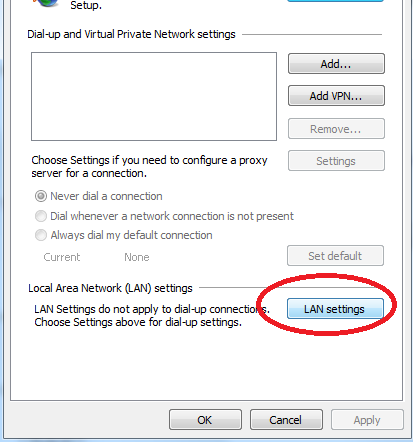
<p style="box-sizing: border-box; margin-bottom: 1.3em; color: rgb(0, 0, 0); font-family: Roboto, sans-serif; font-size: 16px; text-align: justify;"><span style="color: rgb(0, 0, 0); font-family: Roboto, sans-serif; font-size: 16px; text-align: justify;">+ Chọn thẻ&nbsp;</span><span style="box-sizing: border-box; font-family: Roboto, sans-serif; font-size: 16px; text-align: justify; color: rgb(0, 0, 255);">Connections</span><span style="color: rgb(0, 0, 0); font-family: Roboto, sans-serif; font-size: 16px; text-align: justify;">&nbsp;| Chọn&nbsp;</span><span style="box-sizing: border-box; font-family: Roboto, sans-serif; font-size: 16px; text-align: justify; color: rgb(0, 0, 255);">LAN Settings</span></p>

<p style="box-sizing: border-box; margin-bottom: 1.3em; color: rgb(0, 0, 0); font-family: Roboto, sans-serif; font-size: 16px; text-align: center;"><span style="box-sizing: border-box; font-family: Roboto, sans-serif; font-size: 16px; text-align: justify; color: rgb(0, 0, 255);"><img alt="" src="https://hust-dev.hust.edu.vn/uploads/sys/news/2021/10/may-tinh-bao-loi-proxy-4.518511.27731.png" style="height: 642px; width: 400px;" /></span></p>

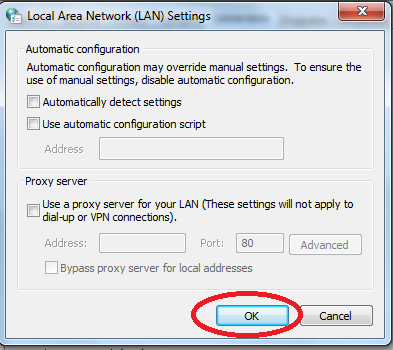
<p style="box-sizing: border-box; margin-bottom: 1.3em; color: rgb(0, 0, 0); font-family: Roboto, sans-serif; font-size: 16px; text-align: justify;"><span style="color: rgb(0, 0, 0); font-family: Roboto, sans-serif; font-size: 16px; text-align: justify;">+ Chọn Automatic detect settings, đồng thời bỏ chọn hết phần dưới | Nhấn OK</span></p>

<p style="box-sizing: border-box; margin-bottom: 1.3em; color: rgb(0, 0, 0); font-family: Roboto, sans-serif; font-size: 16px; text-align: center;"><span style="color: rgb(0, 0, 0); font-family: Roboto, sans-serif; font-size: 16px; text-align: justify;"><img alt="" src="https://hust-dev.hust.edu.vn/uploads/sys/news/2021/10/may-tinh-bao-loi-proxy-5.518511.27732.png" style="height: 534px; width: 400px;" /></span></p>

<p style="box-sizing: border-box; margin-bottom: 1.3em; color: rgb(0, 0, 0); font-family: Roboto, sans-serif; font-size: 16px; text-align: justify;"><span style="color: rgb(0, 0, 0); font-family: Roboto, sans-serif; font-size: 16px; text-align: justify;">Hoàn tất xong bước này thì máy tính của bạn đã được&nbsp;lỗi proxy không vào được mạng, khi đó bạn hãy khởi động lại trình duyệt và truy cập vào mạng bình thường.</span></p>

<h2 class="ftwp-heading" id="ftoc-heading-2" style="box-sizing: border-box; color: rgb(17, 17, 17); width: 944px; margin-top: 0px; margin-bottom: 0.5em; text-rendering: optimizespeed; font-size: 1.6em; line-height: 1.3; font-family: &quot;-apple-system, BlinkMacSystemFont, &amp;quot;Segoe UI&amp;quot;, Roboto, Oxygen-Sans, Ubuntu, Cantarell, &amp;quot;Helvetica Neue&amp;quot;, sans-serif&quot;, sans-serif; text-align: justify;"><span style="box-sizing: border-box; -webkit-box-decoration-break: clone; color: rgb(0, 0, 0);">2. Thiết lập proxy trên trình duyệt Firefox</span></h2>

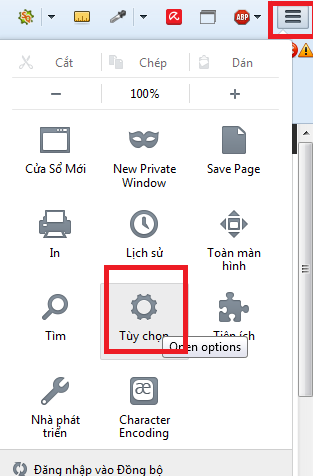
<p style="box-sizing: border-box; margin-bottom: 1.3em; color: rgb(0, 0, 0); font-family: Roboto, sans-serif; font-size: 16px; text-align: justify;"><span style="box-sizing: border-box;">–&nbsp;<span style="box-sizing: border-box; font-weight: bolder;">Bước 1</span>: Vào Cài đặt</span></p>

<p style="box-sizing: border-box; margin-bottom: 1.3em; color: rgb(0, 0, 0); font-family: Roboto, sans-serif; font-size: 16px; text-align: center;"><span style="box-sizing: border-box;"><img alt="" src="https://hust-dev.hust.edu.vn/uploads/sys/news/2021/10/may-tinh-bao-loi-proxy-6.518511.27733.png" style="height: 608px; width: 400px;" /></span></p>

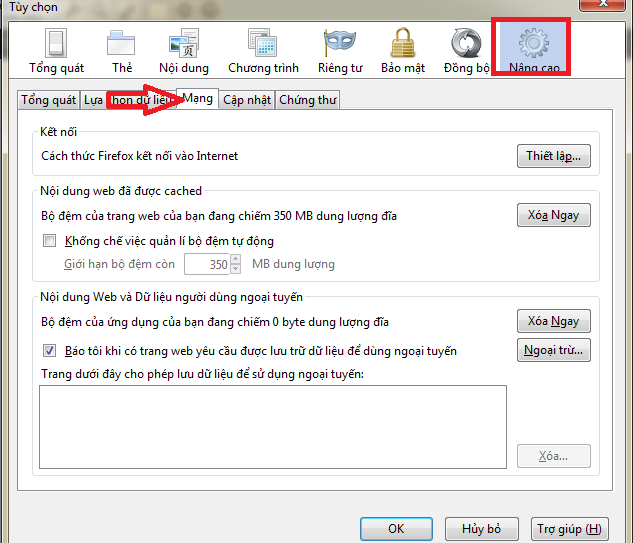
<p style="box-sizing: border-box; margin-bottom: 1.3em; color: rgb(0, 0, 0); font-family: Roboto, sans-serif; font-size: 16px; text-align: justify;"><span style="color: rgb(0, 0, 0); font-family: Roboto, sans-serif; font-size: 16px; text-align: justify;">–&nbsp;</span><span style="box-sizing: border-box; font-weight: bolder; color: rgb(0, 0, 0); font-family: Roboto, sans-serif; font-size: 16px; text-align: justify;">Bước 2</span><span style="color: rgb(0, 0, 0); font-family: Roboto, sans-serif; font-size: 16px; text-align: justify;">: Vào mục Nâng cao | Chọn Mạng | Chọn Thiết lập</span></p>

<p style="box-sizing: border-box; margin-bottom: 1.3em; color: rgb(0, 0, 0); font-family: Roboto, sans-serif; font-size: 16px; text-align: center;"><span style="color: rgb(0, 0, 0); font-family: Roboto, sans-serif; font-size: 16px; text-align: justify;"><img alt="" src="https://hust-dev.hust.edu.vn/uploads/sys/news/2021/10/may-tinh-bao-loi-proxy-7.518511.27734.png" style="height: 386px; width: 450px;" /></span></p>

<p style="box-sizing: border-box; margin-bottom: 1.3em; color: rgb(0, 0, 0); font-family: Roboto, sans-serif; font-size: 16px; text-align: justify;"><span style="box-sizing: border-box;">–&nbsp;<span style="box-sizing: border-box; font-weight: bolder;">Bước 3</span>: Chọn Sử dụng proxy có sẵn của hệ thống | Nhấn OK để xác nhận</span></p>

<p style="box-sizing: border-box; margin-bottom: 1.3em; color: rgb(0, 0, 0); font-family: Roboto, sans-serif; font-size: 16px; text-align: justify;"><span style="box-sizing: border-box;">Sau khi thực hiện các bước trên thì bạn hãy thoát khỏi tất cả các trình duyệt trên&nbsp;<a href="https://thanhbinhpc.com/6-luu-y-khi-chon-mua-man-hinh-may-tinh-cu-va-moi.html" style="box-sizing: border-box; background-color: transparent; touch-action: manipulation; color: rgb(5, 49, 223);"><span style="box-sizing: border-box; font-weight: bolder;">màn hình máy tính</span></a>&nbsp;và khởi động lại, sau đó kiểm tra kết nối trở lại bình thường.</span></p>

<p style="box-sizing: border-box; margin-bottom: 1.3em; color: rgb(0, 0, 0); font-family: Roboto, sans-serif; font-size: 16px; text-align: justify;"><span style="box-sizing: border-box;"><span style="box-sizing: border-box; font-weight: bolder;">Chú ý</span>: Sau khi bạn thiết lập lại proxy mà vẫn&nbsp; không vào được lan setting win 10&nbsp; thì bạn hãy hãy xóa lịch sử của trình duyệt bằng cách nhấn tổ hợp phím Ctrl + H&nbsp; chọn xóa dữ liệu trang web rồi kết nối lại, nếu bạn cẩn thận thì có thể reset lại máy tính.</span></p>

<p style="box-sizing: border-box; margin-bottom: 1.3em; color: rgb(0, 0, 0); font-family: Roboto, sans-serif; font-size: 16px; text-align: justify;"><span style="box-sizing: border-box;">Trên đây là tổng hợp các cách khắc phục lỗi&nbsp;proxy server không được sử dụng hay&nbsp;lan setting bị ẩn win 10&nbsp; mà&nbsp;<span style="box-sizing: border-box; font-weight: bolder;">thanhbinhpc.com</span>&nbsp;muốn chia sẻ với các bạn. Chỉ với những bước đơn giản và nhanh chóng bạn có thể lại truy cập vào được Internet của mình 1 cách bình thường rồi. Cách khắc phục&nbsp;lỗi proxy không vào được mạng win 10 rất đơn giản và hữu ích đúng không? Hãy chia sẻ cho bạn bè của mình để mọi người có thể biết cách xử lý khi&nbsp;không vào được lan setting win 10 nhé!</span></p>

<p style="box-sizing: border-box; margin-bottom: 1.3em; color: rgb(0, 0, 0); font-family: Roboto, sans-serif; font-size: 16px; text-align: right;"><span style="font-size:12px;">Nguồn: thanhbinhpc.com</span></p>
		</div>
				<div id="author">
						<p>
				<strong>Tác giả:</strong>
				<a href="https://hust-dev.hust.edu.vn/vi/news/author/anhnguyenkim/">Nguyễn Kim Anh</a>
			</p>
		</div>
	</div>
	<div id="footer" class="clearfix">
		<div id="url">
			<strong>URL của bản tin này: </strong><a href="https://hust.edu.vn/vi/news/savefile/tin-tuc-su-kien/huong-dan-khac-phuc-loi-proxy-tren-may-tinh-thanh-cong-100-598771.html" title="HƯỚNG DẪN KHẮC PHỤC LỖI PROXY TRÊN MÁY TÍNH THÀNH CÔNG 100%">https://hust.edu.vn/vi/news/savefile/tin-tuc-su-kien/huong-dan-khac-phuc-loi-proxy-tren-may-tinh-thanh-cong-100-598771.html</a>

		</div>
		<div class="clear"></div>
		<div class="copyright">
			&copy; Đại học Bách khoa Hà Nội
		</div>
		<div id="contact">
			<a href="mailto:ccpr@hust.edu.vn">ccpr@hust.edu.vn</a>
		</div>
	</div>
</div>
        <div id="timeoutsess" class="chromeframe">
            Bạn đã không sử dụng Site, <a onclick="timeoutsesscancel();" href="https://hust-dev.hust.edu.vn/#">Bấm vào đây để duy trì trạng thái đăng nhập</a>. Thời gian chờ: <span id="secField"> 60 </span> giây
        </div>
        <div id="openidResult" class="nv-alert" style="display:none"></div>
        <div id="openidBt" data-result="" data-redirect=""></div>
<div id="run_cronjobs" style="visibility:hidden;display:none;"><img alt="cron" src="/index.php?second=cronjobs&amp;p=c8Y6j8T2" width="1" height="1" /></div>
<script src="https://hust-dev.hust.edu.vn/assets/js/jquery/jquery.min.js"></script>
<script>var nv_base_siteurl="/",nv_lang_data="vi",nv_lang_interface="vi",nv_name_variable="nv",nv_fc_variable="op",nv_lang_variable="language",nv_module_name="news",nv_func_name="savefile",nv_is_user=0, nv_my_ofs=-4,nv_my_abbr="EDT",nv_cookie_prefix="nv4s_c523Wo",nv_check_pass_mstime=1738000,nv_area_admin=0,nv_safemode=0,theme_responsive=1,nv_recaptcha_ver=2,nv_recaptcha_sitekey="6Ld5WCEiAAAAAJr6hIEOr3bZf2m-LopszjRVYBWz",nv_recaptcha_type="image",XSSsanitize=1;</script>
<script src="https://hust-dev.hust.edu.vn/assets/js/language/vi.js"></script>
<script src="https://hust-dev.hust.edu.vn/assets/js/DOMPurify/purify3.js"></script>
<script src="https://hust-dev.hust.edu.vn/assets/js/global.js"></script>
<script src="https://hust-dev.hust.edu.vn/assets/js/site.js"></script>
<script src="https://hust-dev.hust.edu.vn/themes/default/js/news.js"></script>
<script src="https://hust-dev.hust.edu.vn/themes/hust/js/main.js"></script>
<script src="https://hust-dev.hust.edu.vn/themes/hust/js/custom.js"></script>
<script src="https://hust-dev.hust.edu.vn/themes/hust/js/hust.js"></script>
<script src="https://hust-dev.hust.edu.vn/themes/hust/js/slick/slick.js"></script>
<script type="application/ld+json">
        {
            "@context": "https://schema.org",
            "@type": "Organization",
            "url": "https://hust-dev.hust.edu.vn",
            "logo": "https://hust-dev.hust.edu.vn/uploads/sys/logo-dhbk-1-02.png"
        }
        </script>
<script async src="https://www.googletagmanager.com/gtag/js?id=G-TT1NML6EJM"></script>
<script>window.dataLayer=window.dataLayer||[];function gtag(){dataLayer.push(arguments)}gtag('js',new Date);gtag('config','G-TT1NML6EJM');</script>
<script src="https://hust-dev.hust.edu.vn/themes/hust/js/bootstrap.min.js"></script>
</body>
</html>