<!DOCTYPE html>
    <html lang="vi" xmlns="http://www.w3.org/1999/xhtml" prefix="og: http://ogp.me/ns#">
    <head>
<title>CÀI ĐẶT OneDrive TRÊN MÁY TÍNH WINDOWS 10</title>
<meta name="description" content="CÀI ĐẶT OneDrive TRÊN MÁY TÍNH WINDOWS 10 - Savefile - Tin Tức -...">
<meta name="author" content="Đại học Bách khoa Hà Nội">
<meta name="copyright" content="Đại học Bách khoa Hà Nội [ccpr@hust.edu.vn]">
<meta name="google-site-verification" content="lpSvS2om85_DqFe7xgBMV-TvBFbuNGWvXNWeLtncZjM">
<meta name="generator" content="NukeViet v4.5">
<meta name="viewport" content="width=device-width, initial-scale=1">
<meta http-equiv="Content-Type" content="text/html; charset=utf-8">
<meta property="og:title" content="CÀI ĐẶT OneDrive TRÊN MÁY TÍNH WINDOWS 10">
<meta property="og:type" content="website">
<meta property="og:description" content="Savefile - Tin Tức - https&#x3A;&#x002F;&#x002F;hust.edu.vn&#x002F;vi&#x002F;news&#x002F;savefile&#x002F;tin-tuc-su-kien&#x002F;cai-dat-onedrive-tren-may-tinh-windows-10-602044.html">
<meta property="og:site_name" content="Đại học Bách khoa Hà Nội">
<meta property="og:url" content="https://hust.edu.vn/vi/news/savefile/tin-tuc-su-kien/cai-dat-onedrive-tren-may-tinh-windows-10-602044.html">
<link rel="shortcut icon" href="https://hust-dev.hust.edu.vn/uploads/sys/android-icon-36x36.png">
<link    rel="canonical"    href="https://hust.edu.vn/vi/news/savefile/tin-tuc-su-kien/cai-dat-onedrive-tren-may-tinh-windows-10-602044.html">
<link    rel="alternate"    href="https://hust-dev.hust.edu.vn/vi/news/rss/" title="Tin Tức"    type="application/rss+xml">
<link    rel="alternate"    href="https://hust-dev.hust.edu.vn/vi/news/rss/hoat-dong-chung/" title="Tin Tức - Hoạt động chung"    type="application/rss+xml">
<link    rel="alternate"    href="https://hust-dev.hust.edu.vn/vi/news/rss/cong-tac-dang-va-doan-the/" title="Tin Tức - Công tác Đảng và Đoàn thể"    type="application/rss+xml">
<link    rel="alternate"    href="https://hust-dev.hust.edu.vn/vi/news/rss/tuyen-sinh-dao-tao-cong-tac-sinh-vien/" title="Tin Tức - Tuyển sinh - Đào tạo - Công tác sinh viên"    type="application/rss+xml">
<link    rel="alternate"    href="https://hust-dev.hust.edu.vn/vi/news/rss/khoa-hoc-cong-nghe-dmst/" title="Tin Tức - Khoa học - Công nghệ - ĐMST"    type="application/rss+xml">
<link    rel="alternate"    href="https://hust-dev.hust.edu.vn/vi/news/rss/hop-tac-doi-ngoai-truyen-thong/" title="Tin Tức - Hợp tác - Đối ngoại - Truyền thông"    type="application/rss+xml">
<link    rel="alternate"    href="https://hust-dev.hust.edu.vn/vi/news/rss/kiem-dinh-xep-hang/" title="Tin Tức - Kiểm định - Xếp hạng"    type="application/rss+xml">
<link    rel="alternate"    href="https://hust-dev.hust.edu.vn/vi/news/rss/to-chuc-nhan-su-tuyen-dung/" title="Tin Tức - Tổ chức - Nhân sự - Tuyển dụng"    type="application/rss+xml">
<link    rel="alternate"    href="https://hust-dev.hust.edu.vn/vi/news/rss/bach-khoa-tren-bao-chi/" title="Tin Tức - Bách khoa trên Báo chí"    type="application/rss+xml">
<link    rel="alternate"    href="https://hust-dev.hust.edu.vn/vi/news/rss/tin-tuc-su-kien/" title="Tin Tức - Tin tức - sự kiện"    type="application/rss+xml">
<link    rel="alternate"    href="https://hust-dev.hust.edu.vn/vi/news/rss/tro-giup-can-bo/" title="Tin Tức - Trợ giúp Cán bộ"    type="application/rss+xml">
<link    rel="alternate"    href="https://hust-dev.hust.edu.vn/vi/news/rss/tro-giup-sinh-vien/" title="Tin Tức - Trợ giúp Sinh viên"    type="application/rss+xml">
<link    rel="alternate"    href="https://hust-dev.hust.edu.vn/vi/news/rss/su-kien-sap-dien-ra/" title="Tin Tức - Sự kiện sắp diễn ra"    type="application/rss+xml">
<link    rel="alternate"    href="https://hust-dev.hust.edu.vn/vi/news/rss/cong-tac-sinh-vien/" title="Tin Tức - Công tác Sinh viên"    type="application/rss+xml">
<link    rel="alternate"    href="https://hust-dev.hust.edu.vn/vi/news/rss/thong-bao-chung/" title="Tin Tức - Thông báo chung"    type="application/rss+xml">
<link    rel="alternate"    href="https://hust-dev.hust.edu.vn/vi/news/rss/lich-cong-tac/" title="Tin Tức - Lịch công tác"    type="application/rss+xml">
<link    rel="alternate"    href="https://hust-dev.hust.edu.vn/vi/news/rss/he-thong-phong-thi-nghiem/" title="Tin Tức - Hệ thống Phòng thí nghiệm"    type="application/rss+xml">
<link    rel="alternate"    href="https://hust-dev.hust.edu.vn/vi/news/rss/hoi-dong-nganh-lien-nganh/" title="Tin Tức - Hội đồng Ngành - Liên ngành"    type="application/rss+xml">
<link    rel="alternate"    href="https://hust-dev.hust.edu.vn/vi/news/rss/cac-truong-thanh-vien/" title="Tin Tức - Các trường thành viên"    type="application/rss+xml">
<link    rel="alternate"    href="https://hust-dev.hust.edu.vn/vi/news/rss/so-huu-tri-tue/" title="Tin Tức - Sở hữu trí tuệ"    type="application/rss+xml">
<link    rel="alternate"    href="https://hust-dev.hust.edu.vn/vi/news/rss/van-ban-phap-quy/" title="Tin Tức - Văn bản pháp quy"    type="application/rss+xml">
<link    rel="alternate"    href="https://hust-dev.hust.edu.vn/vi/news/rss/thong-tin-huong-dan/" title="Tin Tức - Thông tin hướng dẫn"    type="application/rss+xml">
<link    rel="alternate"    href="https://hust-dev.hust.edu.vn/vi/news/rss/cac-bieu-mau/" title="Tin Tức - Các biểu mẫu"    type="application/rss+xml">
<link    rel="alternate"    href="https://hust-dev.hust.edu.vn/vi/news/rss/van-ban-quy-che/" title="Tin Tức - Văn bản quy chế"    type="application/rss+xml">
<link    rel="alternate"    href="https://hust-dev.hust.edu.vn/vi/news/rss/cap-nha-nuoc/" title="Tin Tức - Cấp Nhà nước"    type="application/rss+xml">
<link    rel="alternate"    href="https://hust-dev.hust.edu.vn/vi/news/rss/cap-bo/" title="Tin Tức - Cấp Bộ"    type="application/rss+xml">
<link    rel="alternate"    href="https://hust-dev.hust.edu.vn/vi/news/rss/cap-truong/" title="Tin Tức - Cấp Trường"    type="application/rss+xml">
<link    rel="alternate"    href="https://hust-dev.hust.edu.vn/vi/news/rss/ke-hoach-hoc-tap/" title="Tin Tức - Kế hoạch học tập"    type="application/rss+xml">
<link    rel="alternate"    href="https://hust-dev.hust.edu.vn/vi/news/rss/thong-tin-van-bang/" title="Tin Tức - Thông tin văn bằng"    type="application/rss+xml">
<link    rel="alternate"    href="https://hust-dev.hust.edu.vn/vi/news/rss/du-an-sahep/" title="Tin Tức - Dự án SAHEP"    type="application/rss+xml">
<link    rel="alternate"    href="https://hust-dev.hust.edu.vn/vi/news/rss/media/" title="Tin Tức - Media"    type="application/rss+xml">
<link rel="preload" as="style" href="https://hust-dev.hust.edu.vn/assets/css/font-awesome.min.css" type="text/css">
<link rel="preload" as="style" href="https://hust-dev.hust.edu.vn/themes/hust/css/animate.min.css" type="text/css">
<link rel="preload" as="style" href="https://hust-dev.hust.edu.vn/themes/hust/css/bootstrap.min.css" type="text/css">
<link rel="preload" as="style" href="https://hust-dev.hust.edu.vn/themes/hust/css/style.css" type="text/css">
<link rel="preload" as="style" href="https://hust-dev.hust.edu.vn/themes/hust/css/style.responsive.css" type="text/css">
<link rel="preload" as="style" href="https://hust-dev.hust.edu.vn/themes/default/css/news.css" type="text/css">
<link rel="preload" as="style" href="https://hust-dev.hust.edu.vn/themes/hust/css/custom.css" type="text/css">
<link rel="preload" as="style" href="https://hust-dev.hust.edu.vn/themes/hust/css/hust.css" type="text/css">
<link rel="preload" as="style" href="https://hust-dev.hust.edu.vn/themes/hust/css/custom70.css" type="text/css">
<link rel="preload" as="style" href="https://hust-dev.hust.edu.vn/themes/hust/css/custom_NCKH.css" type="text/css">
<link rel="preload" as="style" href="https://hust-dev.hust.edu.vn/assets/css/hust.vi.0.css" type="text/css">
<link rel="preload" as="style" href="https://hust-dev.hust.edu.vn/themes/hust/js/slick/slick.css" type="text/css">
<link rel="preload" as="style" href="https://hust-dev.hust.edu.vn/themes/hust/js/slick/slick-theme.css" type="text/css">
<link rel="preload" as="script" href="https://hust-dev.hust.edu.vn/assets/js/jquery/jquery.min.js" type="text/javascript">
<link rel="preload" as="script" href="https://hust-dev.hust.edu.vn/assets/js/language/vi.js" type="text/javascript">
<link rel="preload" as="script" href="https://hust-dev.hust.edu.vn/assets/js/DOMPurify/purify3.js" type="text/javascript">
<link rel="preload" as="script" href="https://hust-dev.hust.edu.vn/assets/js/global.js" type="text/javascript">
<link rel="preload" as="script" href="https://hust-dev.hust.edu.vn/assets/js/site.js" type="text/javascript">
<link rel="preload" as="script" href="https://hust-dev.hust.edu.vn/themes/default/js/news.js" type="text/javascript">
<link rel="preload" as="script" href="https://hust-dev.hust.edu.vn/themes/hust/js/main.js" type="text/javascript">
<link rel="preload" as="script" href="https://hust-dev.hust.edu.vn/themes/hust/js/custom.js" type="text/javascript">
<link rel="preload" as="script" href="https://hust-dev.hust.edu.vn/themes/hust/js/hust.js" type="text/javascript">
<link rel="preload" as="script" href="https://hust-dev.hust.edu.vn/themes/hust/js/slick/slick.js" type="text/javascript">
<link rel="preload" as="script" href="https://www.googletagmanager.com/gtag/js?id=G-TT1NML6EJM" type="text/javascript">
<link rel="preload" as="script" href="https://hust-dev.hust.edu.vn/themes/hust/js/bootstrap.min.js" type="text/javascript">
<link    rel="stylesheet"    href="https://hust-dev.hust.edu.vn/assets/css/font-awesome.min.css">
<link    rel="stylesheet"    href="https://hust-dev.hust.edu.vn/themes/hust/css/animate.min.css">
<link    rel="stylesheet"    href="https://hust-dev.hust.edu.vn/themes/hust/css/bootstrap.min.css">
<link    rel="stylesheet"    href="https://hust-dev.hust.edu.vn/themes/hust/css/style.css">
<link    rel="stylesheet"    href="https://hust-dev.hust.edu.vn/themes/hust/css/style.responsive.css">
<link    rel="StyleSheet"    href="https://hust-dev.hust.edu.vn/themes/default/css/news.css">
<link    rel="stylesheet"    href="https://hust-dev.hust.edu.vn/themes/hust/css/custom.css">
<link    rel="stylesheet"    href="https://hust-dev.hust.edu.vn/themes/hust/css/hust.css">
<link    rel="stylesheet"    href="https://hust-dev.hust.edu.vn/themes/hust/css/custom70.css">
<link    rel="stylesheet"    href="https://hust-dev.hust.edu.vn/themes/hust/css/custom_NCKH.css">
<link    rel="stylesheet"    href="https://hust-dev.hust.edu.vn/assets/css/hust.vi.0.css">
<link rel="stylesheet" href="https://hust-dev.hust.edu.vn/themes/hust/js/slick/slick.css" />
<link rel="stylesheet" href="https://hust-dev.hust.edu.vn/themes/hust/js/slick/slick-theme.css" />
<style type="text/css">
	body{background: #fff;}
</style>
</head>
    <body>
<div id="print">
	<div id="hd_print">
		<h2 class="pull-left">Đại học Bách khoa Hà Nội</h2>
		<p class="pull-right"><a title="Đại học Bách khoa Hà Nội" href="https://hust-dev.hust.edu.vn/">https://hust-dev.hust.edu.vn</a></p>
	</div>
	<div class="clear"></div>
	<hr />
	<div id="content">
		<h1>CÀI ĐẶT OneDrive TRÊN MÁY TÍNH WINDOWS 10</h1>
		<ul class="list-inline">
			<li>Chủ nhật - 31/10/2021 20:40</li>
			<li class="hidden-print txtrequired"><em class="fa fa-print">&nbsp;</em><a title="In ra" href="javascript:;" onclick="window.print()">In ra</a></li>
			<li class="hidden-print txtrequired"><em class="fa fa-power-off">&nbsp;</em><a title="Đóng cửa sổ này" href="javascript:;" onclick="window.close()">Đóng cửa sổ này</a></li>
		</ul>
		<div class="clear"></div>
		<div id="hometext">
		</div>
		<div id="bodytext" class="clearfix">
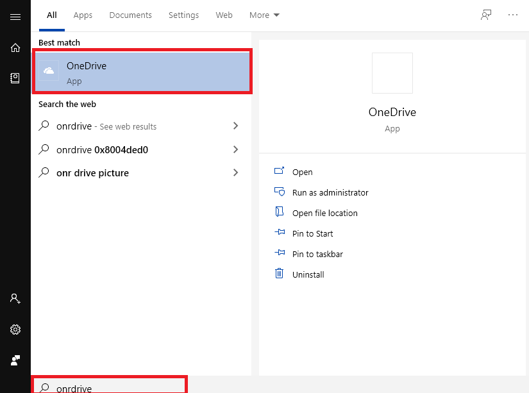
			<p><span style="font-size:16px;">Bước 1: Tại thanh tìm kiếm của Windows 10, gõ OneDrive và chọn kết quả hiển thị. Nếu không tìm thấy có thể tải App Onedrive&nbsp;tại đây. https://www.microsoft.com/vi-vn/microsoft-365/onedrive/download</span></p>

<p style="text-align: center;"><span style="font-size:16px;"><img alt="" src="https://hust-dev.hust.edu.vn/uploads/sys/news/2021/11/od1.518511.27901.png" /></span></p>

<p style="text-align: justify;">&nbsp;</p>

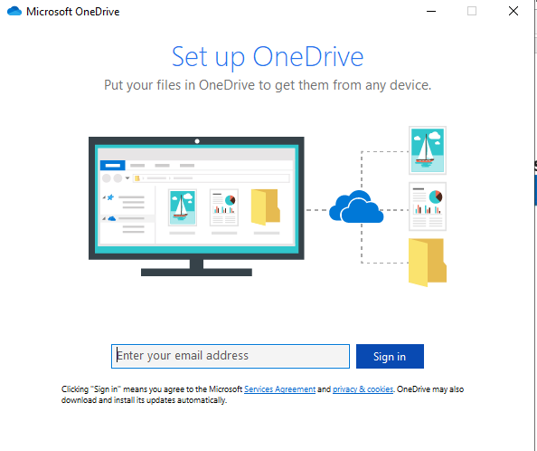
<p><span style="font-size:16px;">Bước 2:&nbsp;Nhập địa chỉ email rồi click chọn&nbsp;Sign in.&nbsp;</span></p>

<p style="text-align: center;"><span style="font-size:16px;"><img alt="" src="https://hust-dev.hust.edu.vn/uploads/sys/news/2021/11/od2.518511.27902.png" /></span></p>

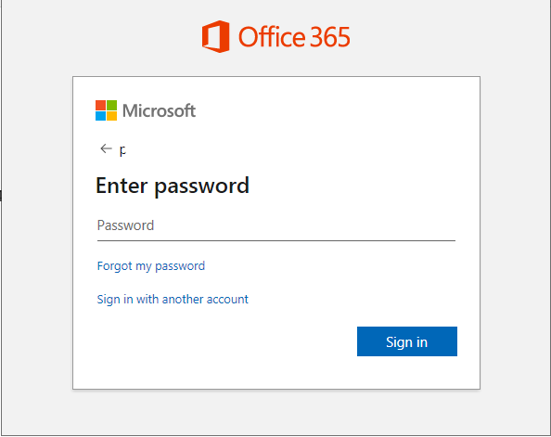
<p style="text-align: justify;"><span style="font-size:16px;">Bước 3:&nbsp;Nhập mật khẩu và&nbsp; tiếp tục chọn&nbsp;Sign in.</span></p>

<p style="text-align: center;"><span style="font-size:16px;"><img alt="" src="https://hust-dev.hust.edu.vn/uploads/sys/news/2021/11/od3.518511.27903.png" /></span></p>

<p style="text-align: justify;">&nbsp;</p>

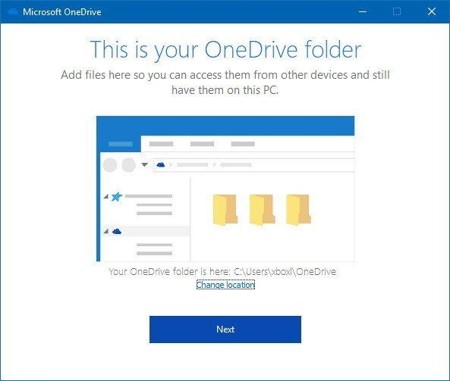
<p><span style="font-size:16px;">Bước 4:&nbsp;Màn hình gới thiệu về OneDrive sẽ xuất hiện. Tại đây sẽ có đường dẫn về thư mục OneDrive, nếu&nbsp;thư mục OneDrive đã tồn tại rồi bạn click vào&nbsp;Change location&nbsp;để thay đổi đường dẫn đến thư mục OneDrive nhằm tránh các đề rắc rối xảy ra khi đồng bộ hóa. Nếu không cần thay đổi bạn click&nbsp;Next&nbsp;để tiếp tục.</span></p>

<p style="text-align: center;"><span style="font-size:16px;"><img alt="" src="https://hust-dev.hust.edu.vn/uploads/sys/news/2021/11/od4.518511.27904.jpg" /></span></p>

<p style="text-align: justify;">&nbsp;</p>

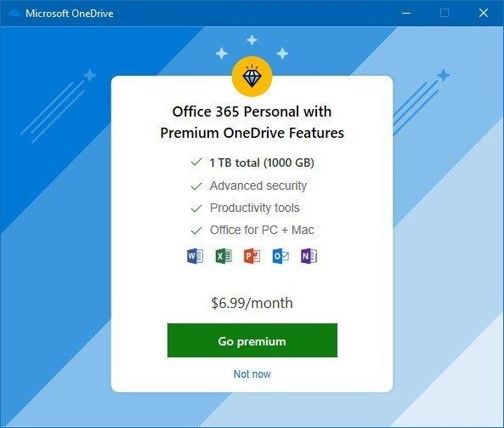
<p><span style="font-size:16px;">Bước 5:&nbsp;Chọn&nbsp;Not Now&nbsp;để được sử dụng phiên bản OneDrive miễn phí.</span></p>

<p style="text-align: center;"><span style="font-size:16px;"><img alt="" src="https://hust-dev.hust.edu.vn/uploads/sys/news/2021/11/od5.518511.27905.jpg" /></span></p>

<p style="text-align: center;">&nbsp;</p>

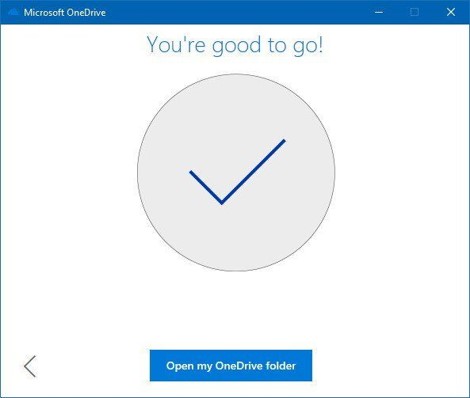
<p style="language:en-US;line-height:150%;margin-top:6.0pt;margin-bottom:0pt;margin-left:0in;text-indent:0in;text-align:justify;text-justify:inter-ideograph;direction:ltr;unicode-bidi:embed;word-break:normal;punctuation-wrap:hanging;"><span style="font-size:16px;">Bước 6: Các trang tiếp theo sẽ chỉ cho các bạn mẹo sử dụng OneDrive, bạn có thể đọc và nhấn nút Next để đến trang cuối cùng là Open my OneDrive folder. Sau khi hoàn tất các bước này, chúng ta&nbsp;đã có thể bắt đầu sử dụng download, tải ....làm việc được với&nbsp;Onedrive rồi</span></p>

<p style="language:en-US;line-height:150%;margin-top:6.0pt;margin-bottom:0pt;margin-left:0in;text-indent:0in;text-align:justify;text-justify:inter-ideograph;direction:ltr;unicode-bidi:embed;word-break:normal;punctuation-wrap:hanging;">&nbsp;</p>

<p style="text-align: center;"><span style="font-size:16px;"><img alt="" src="https://hust-dev.hust.edu.vn/uploads/sys/news/2021/11/od6.518511.27906.jpg" /></span></p>

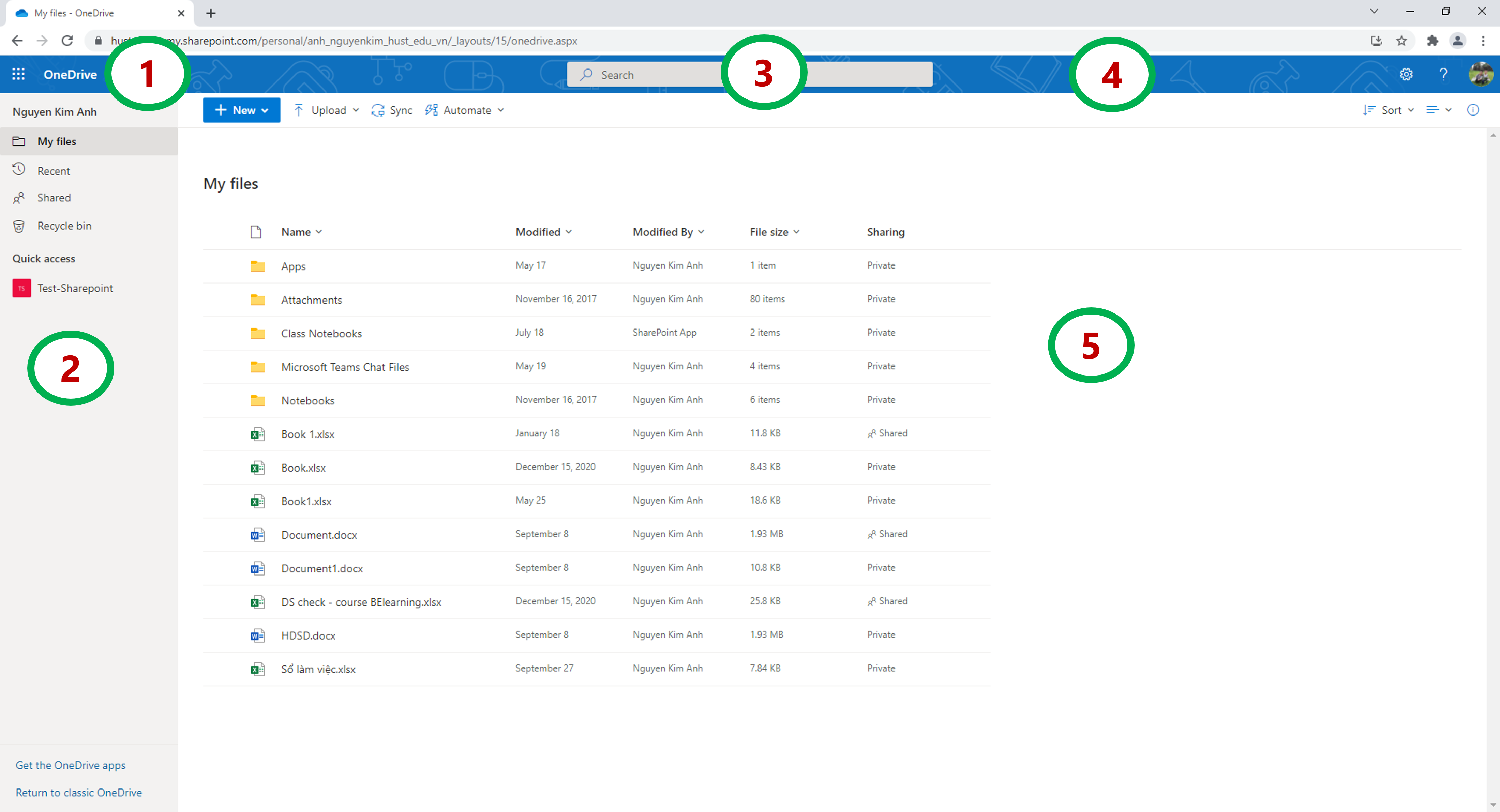
<p style="text-align: justify;"><span style="font-size:16px;">* Giao diện OneDrive&nbsp;</span></p>

<p style="text-align: center;"><span style="font-size:16px;"><img alt="" src="https://hust-dev.hust.edu.vn/uploads/sys/news/2021/11/od7.518511.27907.png" style="height: 325px; width: 600px;" /></span></p>

<p style="text-align: center;">&nbsp;</p>

<p><span style="font-size:16px;">&nbsp; &nbsp; &nbsp; Trong đó:</span></p>

<ul>
	<li style="margin-left: 40px;"><span style="font-size:16px;">1. Menu hiển thị các dịch vụ được cung cấp trong OneDrive, gồm có Word, Excel, Powerpoint,… và nhiều thứ khác.</span></li>
	<li style="margin-left: 40px;"><span style="font-size:16px;">2: Thanh điều hướng, gồm có: My files (tập tin của bạn), Recent (mở gần đây), Photos (thư mục hình ảnh), Shared (dữ liệu mà bạn đã chia sẽ), Recycle bin (thùng rác, nơi các tập tin, thư mục đã bị xóa).</span></li>
	<li style="margin-left: 40px;"><span style="font-size:16px;">3. Thanh tìm kiếm file.</span></li>
	<li style="margin-left: 40px;"><span style="font-size:16px;">4. .Thanh công cụ, bao gồm các cài đặt tài khoản, cài đặt onedirve.</span></li>
	<li style="margin-left: 40px;"><span style="font-size:16px;">5.&nbsp;Không gian hiển thị các tập tin, thư mục đã được lưu trữ</span></li>
</ul>

<p><span style="font-size:16px;">* Các tính năng chính của Onedrive</span></p>

<ul>
	<li><span style="font-size:16px;">Upload file và thư mục.</span></li>
	<li><span style="font-size:16px;">Download file và thư mục.</span></li>
	<li><span style="font-size:16px;">Chia sẻ file và thư mục.</span></li>
	<li><span style="font-size:16px;">Cùng 1 thời điểm, nhiều người dùng có thể cùng tương tác trên 1 file.</span></li>
	<li><span style="font-size:16px;">Đồng bộ dữ liệu với máy tính cá nhân.</span></li>
</ul>
		</div>
				<div id="author">
						<p>
				<strong>Tác giả:</strong>
				<a href="https://hust-dev.hust.edu.vn/vi/news/author/anhnguyenkim/">Nguyễn Kim Anh</a>
			</p>
		</div>
	</div>
	<div id="footer" class="clearfix">
		<div id="url">
			<strong>URL của bản tin này: </strong><a href="https://hust.edu.vn/vi/news/savefile/tin-tuc-su-kien/cai-dat-onedrive-tren-may-tinh-windows-10-602044.html" title="CÀI ĐẶT OneDrive TRÊN MÁY TÍNH WINDOWS 10">https://hust.edu.vn/vi/news/savefile/tin-tuc-su-kien/cai-dat-onedrive-tren-may-tinh-windows-10-602044.html</a>

		</div>
		<div class="clear"></div>
		<div class="copyright">
			&copy; Đại học Bách khoa Hà Nội
		</div>
		<div id="contact">
			<a href="mailto:ccpr@hust.edu.vn">ccpr@hust.edu.vn</a>
		</div>
	</div>
</div>
        <div id="timeoutsess" class="chromeframe">
            Bạn đã không sử dụng Site, <a onclick="timeoutsesscancel();" href="https://hust-dev.hust.edu.vn/#">Bấm vào đây để duy trì trạng thái đăng nhập</a>. Thời gian chờ: <span id="secField"> 60 </span> giây
        </div>
        <div id="openidResult" class="nv-alert" style="display:none"></div>
        <div id="openidBt" data-result="" data-redirect=""></div>
<script src="https://hust-dev.hust.edu.vn/assets/js/jquery/jquery.min.js"></script>
<script>var nv_base_siteurl="/",nv_lang_data="vi",nv_lang_interface="vi",nv_name_variable="nv",nv_fc_variable="op",nv_lang_variable="language",nv_module_name="news",nv_func_name="savefile",nv_is_user=0, nv_my_ofs=-4,nv_my_abbr="EDT",nv_cookie_prefix="nv4s_c523Wo",nv_check_pass_mstime=1738000,nv_area_admin=0,nv_safemode=0,theme_responsive=1,nv_recaptcha_ver=2,nv_recaptcha_sitekey="6Ld5WCEiAAAAAJr6hIEOr3bZf2m-LopszjRVYBWz",nv_recaptcha_type="image",XSSsanitize=1;</script>
<script src="https://hust-dev.hust.edu.vn/assets/js/language/vi.js"></script>
<script src="https://hust-dev.hust.edu.vn/assets/js/DOMPurify/purify3.js"></script>
<script src="https://hust-dev.hust.edu.vn/assets/js/global.js"></script>
<script src="https://hust-dev.hust.edu.vn/assets/js/site.js"></script>
<script src="https://hust-dev.hust.edu.vn/themes/default/js/news.js"></script>
<script src="https://hust-dev.hust.edu.vn/themes/hust/js/main.js"></script>
<script src="https://hust-dev.hust.edu.vn/themes/hust/js/custom.js"></script>
<script src="https://hust-dev.hust.edu.vn/themes/hust/js/hust.js"></script>
<script src="https://hust-dev.hust.edu.vn/themes/hust/js/slick/slick.js"></script>
<script type="application/ld+json">
        {
            "@context": "https://schema.org",
            "@type": "Organization",
            "url": "https://hust-dev.hust.edu.vn",
            "logo": "https://hust-dev.hust.edu.vn/uploads/sys/logo-dhbk-1-02.png"
        }
        </script>
<script async src="https://www.googletagmanager.com/gtag/js?id=G-TT1NML6EJM"></script>
<script>window.dataLayer=window.dataLayer||[];function gtag(){dataLayer.push(arguments)}gtag('js',new Date);gtag('config','G-TT1NML6EJM');</script>
<script src="https://hust-dev.hust.edu.vn/themes/hust/js/bootstrap.min.js"></script>
</body>
</html>