<!DOCTYPE html>
    <html lang="vi" xmlns="http://www.w3.org/1999/xhtml" prefix="og: http://ogp.me/ns#">
    <head>
<title>Cài đặt để nhận SMS khi có thư mới từ Gmail</title>
<meta name="description" content="Cài đặt để nhận SMS khi có thư mới từ Gmail - Savefile - Tin Tức -...">
<meta name="author" content="Đại học Bách khoa Hà Nội">
<meta name="copyright" content="Đại học Bách khoa Hà Nội [ccpr@hust.edu.vn]">
<meta name="google-site-verification" content="lpSvS2om85_DqFe7xgBMV-TvBFbuNGWvXNWeLtncZjM">
<meta name="generator" content="NukeViet v4.5">
<meta name="viewport" content="width=device-width, initial-scale=1">
<meta http-equiv="Content-Type" content="text/html; charset=utf-8">
<meta property="og:title" content="Cài đặt để nhận SMS khi có thư mới từ Gmail">
<meta property="og:type" content="website">
<meta property="og:description" content="Savefile - Tin Tức - https&#x3A;&#x002F;&#x002F;hust.edu.vn&#x002F;vi&#x002F;news&#x002F;savefile&#x002F;tin-tuc-su-kien&#x002F;cai-dat-de-nhan-sms-khi-co-thu-moi-tu-gmail-22038.html">
<meta property="og:site_name" content="Đại học Bách khoa Hà Nội">
<meta property="og:url" content="https://hust.edu.vn/vi/news/savefile/tin-tuc-su-kien/cai-dat-de-nhan-sms-khi-co-thu-moi-tu-gmail-22038.html">
<link rel="shortcut icon" href="https://hust-dev.hust.edu.vn/uploads/sys/android-icon-36x36.png">
<link    rel="canonical"    href="https://hust.edu.vn/vi/news/savefile/tin-tuc-su-kien/cai-dat-de-nhan-sms-khi-co-thu-moi-tu-gmail-22038.html">
<link    rel="alternate"    href="https://hust-dev.hust.edu.vn/vi/news/rss/" title="Tin Tức"    type="application/rss+xml">
<link    rel="alternate"    href="https://hust-dev.hust.edu.vn/vi/news/rss/hoat-dong-chung/" title="Tin Tức - Hoạt động chung"    type="application/rss+xml">
<link    rel="alternate"    href="https://hust-dev.hust.edu.vn/vi/news/rss/cong-tac-dang-va-doan-the/" title="Tin Tức - Công tác Đảng và Đoàn thể"    type="application/rss+xml">
<link    rel="alternate"    href="https://hust-dev.hust.edu.vn/vi/news/rss/tuyen-sinh-dao-tao-cong-tac-sinh-vien/" title="Tin Tức - Tuyển sinh - Đào tạo - Công tác sinh viên"    type="application/rss+xml">
<link    rel="alternate"    href="https://hust-dev.hust.edu.vn/vi/news/rss/khoa-hoc-cong-nghe-dmst/" title="Tin Tức - Khoa học - Công nghệ - ĐMST"    type="application/rss+xml">
<link    rel="alternate"    href="https://hust-dev.hust.edu.vn/vi/news/rss/hop-tac-doi-ngoai-truyen-thong/" title="Tin Tức - Hợp tác - Đối ngoại - Truyền thông"    type="application/rss+xml">
<link    rel="alternate"    href="https://hust-dev.hust.edu.vn/vi/news/rss/kiem-dinh-xep-hang/" title="Tin Tức - Kiểm định - Xếp hạng"    type="application/rss+xml">
<link    rel="alternate"    href="https://hust-dev.hust.edu.vn/vi/news/rss/to-chuc-nhan-su-tuyen-dung/" title="Tin Tức - Tổ chức - Nhân sự - Tuyển dụng"    type="application/rss+xml">
<link    rel="alternate"    href="https://hust-dev.hust.edu.vn/vi/news/rss/bach-khoa-tren-bao-chi/" title="Tin Tức - Bách khoa trên Báo chí"    type="application/rss+xml">
<link    rel="alternate"    href="https://hust-dev.hust.edu.vn/vi/news/rss/tin-tuc-su-kien/" title="Tin Tức - Tin tức - sự kiện"    type="application/rss+xml">
<link    rel="alternate"    href="https://hust-dev.hust.edu.vn/vi/news/rss/tro-giup-can-bo/" title="Tin Tức - Trợ giúp Cán bộ"    type="application/rss+xml">
<link    rel="alternate"    href="https://hust-dev.hust.edu.vn/vi/news/rss/tro-giup-sinh-vien/" title="Tin Tức - Trợ giúp Sinh viên"    type="application/rss+xml">
<link    rel="alternate"    href="https://hust-dev.hust.edu.vn/vi/news/rss/su-kien-sap-dien-ra/" title="Tin Tức - Sự kiện sắp diễn ra"    type="application/rss+xml">
<link    rel="alternate"    href="https://hust-dev.hust.edu.vn/vi/news/rss/cong-tac-sinh-vien/" title="Tin Tức - Công tác Sinh viên"    type="application/rss+xml">
<link    rel="alternate"    href="https://hust-dev.hust.edu.vn/vi/news/rss/thong-bao-chung/" title="Tin Tức - Thông báo chung"    type="application/rss+xml">
<link    rel="alternate"    href="https://hust-dev.hust.edu.vn/vi/news/rss/lich-cong-tac/" title="Tin Tức - Lịch công tác"    type="application/rss+xml">
<link    rel="alternate"    href="https://hust-dev.hust.edu.vn/vi/news/rss/he-thong-phong-thi-nghiem/" title="Tin Tức - Hệ thống Phòng thí nghiệm"    type="application/rss+xml">
<link    rel="alternate"    href="https://hust-dev.hust.edu.vn/vi/news/rss/hoi-dong-nganh-lien-nganh/" title="Tin Tức - Hội đồng Ngành - Liên ngành"    type="application/rss+xml">
<link    rel="alternate"    href="https://hust-dev.hust.edu.vn/vi/news/rss/cac-truong-thanh-vien/" title="Tin Tức - Các trường thành viên"    type="application/rss+xml">
<link    rel="alternate"    href="https://hust-dev.hust.edu.vn/vi/news/rss/so-huu-tri-tue/" title="Tin Tức - Sở hữu trí tuệ"    type="application/rss+xml">
<link    rel="alternate"    href="https://hust-dev.hust.edu.vn/vi/news/rss/van-ban-phap-quy/" title="Tin Tức - Văn bản pháp quy"    type="application/rss+xml">
<link    rel="alternate"    href="https://hust-dev.hust.edu.vn/vi/news/rss/thong-tin-huong-dan/" title="Tin Tức - Thông tin hướng dẫn"    type="application/rss+xml">
<link    rel="alternate"    href="https://hust-dev.hust.edu.vn/vi/news/rss/cac-bieu-mau/" title="Tin Tức - Các biểu mẫu"    type="application/rss+xml">
<link    rel="alternate"    href="https://hust-dev.hust.edu.vn/vi/news/rss/van-ban-quy-che/" title="Tin Tức - Văn bản quy chế"    type="application/rss+xml">
<link    rel="alternate"    href="https://hust-dev.hust.edu.vn/vi/news/rss/cap-nha-nuoc/" title="Tin Tức - Cấp Nhà nước"    type="application/rss+xml">
<link    rel="alternate"    href="https://hust-dev.hust.edu.vn/vi/news/rss/cap-bo/" title="Tin Tức - Cấp Bộ"    type="application/rss+xml">
<link    rel="alternate"    href="https://hust-dev.hust.edu.vn/vi/news/rss/cap-truong/" title="Tin Tức - Cấp Trường"    type="application/rss+xml">
<link    rel="alternate"    href="https://hust-dev.hust.edu.vn/vi/news/rss/ke-hoach-hoc-tap/" title="Tin Tức - Kế hoạch học tập"    type="application/rss+xml">
<link    rel="alternate"    href="https://hust-dev.hust.edu.vn/vi/news/rss/thong-tin-van-bang/" title="Tin Tức - Thông tin văn bằng"    type="application/rss+xml">
<link    rel="alternate"    href="https://hust-dev.hust.edu.vn/vi/news/rss/du-an-sahep/" title="Tin Tức - Dự án SAHEP"    type="application/rss+xml">
<link    rel="alternate"    href="https://hust-dev.hust.edu.vn/vi/news/rss/media/" title="Tin Tức - Media"    type="application/rss+xml">
<link rel="preload" as="style" href="https://hust-dev.hust.edu.vn/assets/css/font-awesome.min.css" type="text/css">
<link rel="preload" as="style" href="https://hust-dev.hust.edu.vn/themes/hust/css/animate.min.css" type="text/css">
<link rel="preload" as="style" href="https://hust-dev.hust.edu.vn/themes/hust/css/bootstrap.min.css" type="text/css">
<link rel="preload" as="style" href="https://hust-dev.hust.edu.vn/themes/hust/css/style.css" type="text/css">
<link rel="preload" as="style" href="https://hust-dev.hust.edu.vn/themes/hust/css/style.responsive.css" type="text/css">
<link rel="preload" as="style" href="https://hust-dev.hust.edu.vn/themes/default/css/news.css" type="text/css">
<link rel="preload" as="style" href="https://hust-dev.hust.edu.vn/themes/hust/css/custom.css" type="text/css">
<link rel="preload" as="style" href="https://hust-dev.hust.edu.vn/themes/hust/css/hust.css" type="text/css">
<link rel="preload" as="style" href="https://hust-dev.hust.edu.vn/themes/hust/css/custom70.css" type="text/css">
<link rel="preload" as="style" href="https://hust-dev.hust.edu.vn/themes/hust/css/custom_NCKH.css" type="text/css">
<link rel="preload" as="style" href="https://hust-dev.hust.edu.vn/assets/css/hust.vi.0.css" type="text/css">
<link rel="preload" as="style" href="https://hust-dev.hust.edu.vn/themes/hust/js/slick/slick.css" type="text/css">
<link rel="preload" as="style" href="https://hust-dev.hust.edu.vn/themes/hust/js/slick/slick-theme.css" type="text/css">
<link rel="preload" as="script" href="https://hust-dev.hust.edu.vn/assets/js/jquery/jquery.min.js" type="text/javascript">
<link rel="preload" as="script" href="https://hust-dev.hust.edu.vn/assets/js/language/vi.js" type="text/javascript">
<link rel="preload" as="script" href="https://hust-dev.hust.edu.vn/assets/js/DOMPurify/purify3.js" type="text/javascript">
<link rel="preload" as="script" href="https://hust-dev.hust.edu.vn/assets/js/global.js" type="text/javascript">
<link rel="preload" as="script" href="https://hust-dev.hust.edu.vn/assets/js/site.js" type="text/javascript">
<link rel="preload" as="script" href="https://hust-dev.hust.edu.vn/themes/default/js/news.js" type="text/javascript">
<link rel="preload" as="script" href="https://hust-dev.hust.edu.vn/themes/hust/js/main.js" type="text/javascript">
<link rel="preload" as="script" href="https://hust-dev.hust.edu.vn/themes/hust/js/custom.js" type="text/javascript">
<link rel="preload" as="script" href="https://hust-dev.hust.edu.vn/themes/hust/js/hust.js" type="text/javascript">
<link rel="preload" as="script" href="https://hust-dev.hust.edu.vn/themes/hust/js/slick/slick.js" type="text/javascript">
<link rel="preload" as="script" href="https://www.googletagmanager.com/gtag/js?id=G-TT1NML6EJM" type="text/javascript">
<link rel="preload" as="script" href="https://hust-dev.hust.edu.vn/themes/hust/js/bootstrap.min.js" type="text/javascript">
<link    rel="stylesheet"    href="https://hust-dev.hust.edu.vn/assets/css/font-awesome.min.css">
<link    rel="stylesheet"    href="https://hust-dev.hust.edu.vn/themes/hust/css/animate.min.css">
<link    rel="stylesheet"    href="https://hust-dev.hust.edu.vn/themes/hust/css/bootstrap.min.css">
<link    rel="stylesheet"    href="https://hust-dev.hust.edu.vn/themes/hust/css/style.css">
<link    rel="stylesheet"    href="https://hust-dev.hust.edu.vn/themes/hust/css/style.responsive.css">
<link    rel="StyleSheet"    href="https://hust-dev.hust.edu.vn/themes/default/css/news.css">
<link    rel="stylesheet"    href="https://hust-dev.hust.edu.vn/themes/hust/css/custom.css">
<link    rel="stylesheet"    href="https://hust-dev.hust.edu.vn/themes/hust/css/hust.css">
<link    rel="stylesheet"    href="https://hust-dev.hust.edu.vn/themes/hust/css/custom70.css">
<link    rel="stylesheet"    href="https://hust-dev.hust.edu.vn/themes/hust/css/custom_NCKH.css">
<link    rel="stylesheet"    href="https://hust-dev.hust.edu.vn/assets/css/hust.vi.0.css">
<link rel="stylesheet" href="https://hust-dev.hust.edu.vn/themes/hust/js/slick/slick.css" />
<link rel="stylesheet" href="https://hust-dev.hust.edu.vn/themes/hust/js/slick/slick-theme.css" />
<style type="text/css">
	body{background: #fff;}
</style>
</head>
    <body>
<div id="print">
	<div id="hd_print">
		<h2 class="pull-left">Đại học Bách khoa Hà Nội</h2>
		<p class="pull-right"><a title="Đại học Bách khoa Hà Nội" href="https://hust-dev.hust.edu.vn/">https://hust-dev.hust.edu.vn</a></p>
	</div>
	<div class="clear"></div>
	<hr />
	<div id="content">
		<h1>Cài đặt để nhận SMS khi có thư mới từ Gmail</h1>
		<ul class="list-inline">
			<li>Thứ sáu - 08/04/2016 20:16</li>
			<li class="hidden-print txtrequired"><em class="fa fa-print">&nbsp;</em><a title="In ra" href="javascript:;" onclick="window.print()">In ra</a></li>
			<li class="hidden-print txtrequired"><em class="fa fa-power-off">&nbsp;</em><a title="Đóng cửa sổ này" href="javascript:;" onclick="window.close()">Đóng cửa sổ này</a></li>
		</ul>
		<div class="clear"></div>
		<div id="hometext">
		</div>
		<div id="bodytext" class="clearfix">
			<p style="margin-top: 12px; margin-bottom: 0.0001pt; font-family: Tahoma, Arial, sans-serif; font-size: 13px; line-height: normal; text-align: justify;"><span style="font-size: 10pt; font-family: arial, helvetica, sans-serif;">Bài viết này hướng dẫn các bạn cách cấu hình sử dụng Google Doc gửi tin nhắn miễn phí khi có email mới trong Gmail.</span></p>

<p style="margin-top: 12px; margin-bottom: 0.0001pt; font-family: Tahoma, Arial, sans-serif; font-size: 13px; line-height: normal; text-align: justify;"><span style="font-size: 10pt; font-family: arial, helvetica, sans-serif;">Hình dưới đây cho thấy cơ chế làm việc của hệ thống sau khi cấu hình.</span></p>

<p style="margin-top: 12px; margin-bottom: 12px; font-family: Tahoma, Arial, sans-serif; font-size: 13px; line-height: 19.5px; text-align: justify;"><span style="font-size: 12pt; line-height: 17.12px; font-family: 'Times New Roman', serif;"><img alt="" src="https://hust-dev.hust.edu.vn/uploads/sys/news/2016/04/20160409-forwardsms.21267.15.jpg" /><br />
<span style="font-family: arial, helvetica, sans-serif; font-size: 10pt;">Để hệ thống có thể hoạt động được bạn cần thực hiện:</span></span></p>

<ol style="margin-top: 12px; margin-bottom: 12px; font-family: Tahoma, Arial, sans-serif; font-size: 13px; line-height: 19.5px; text-align: justify;">
	<li style="margin-left: 35px; line-height: 23.4px;"><span style="font-size: 10pt; line-height: 14.2667px; font-family: arial, helvetica, sans-serif;">Thiết lập lọc thư liên kết với một nhãn trong Gmail</span></li>
	<li style="margin-left: 35px; line-height: 23.4px;"><span style="font-size: 10pt; line-height: 14.2667px; font-family: arial, helvetica, sans-serif;">Google Docs sẽ theo dõi định kỳ luồng nhãn này để khi có một tư mới đến thì nó sẽ tạo một Google Calendar SMS</span></li>
	<li style="margin-left: 35px; line-height: 23.4px;"><span style="font-size: 10pt; line-height: 14.2667px; font-family: arial, helvetica, sans-serif;">Google Calendar sẽ gửi cho bạn một tin nhắn SMS có chứa chủ để của thư mới nhận.</span></li>
</ol>

<p style="margin-top: 12px; margin-bottom: 12px; font-family: Tahoma, Arial, sans-serif; font-size: 13px; line-height: 19.5px; text-align: justify;"><strong><span style="font-size: 10pt; line-height: 14.2667px; font-family: arial, helvetica, sans-serif;">Dưới đây là các bước cài đặt:</span></strong></p>

<p style="margin-top: 12px; margin-bottom: 12px; font-family: Tahoma, Arial, sans-serif; font-size: 13px; line-height: 19.5px; text-align: justify;"><span style="font-family: arial, helvetica, sans-serif; font-size: 10pt;"><strong><span style="line-height: 14.2667px;">Bước 1:</span></strong><span style="line-height: 14.2667px;">&nbsp;cài đặt google calendar để có thể gửi tin nhắn sms đến số điện thoại của bạn:<br />
đăng ký trên google calendar với số điện thoại cần nhận tin nhắn.<br />
<br />
<a href="https://www.google.com/calendar/render?pli=1" style="color: rgb(204, 0, 0); text-decoration: underline;">&nbsp;</a><a href="https://www.google.com/calendar/render?pli=1" style="color: rgb(204, 0, 0); text-decoration: underline;">https://www.google.com/calendar/render?pli=1</a></span></span><br />
<br />
<span style="font-family: arial, helvetica, sans-serif; font-size: 10pt;"><span style="line-height: 14.2667px;">Nhấp vào biểu tượng bánh răng ở đầu trang&nbsp;và chọn &nbsp;<strong>Settings&nbsp;</strong></span><br />
<br />
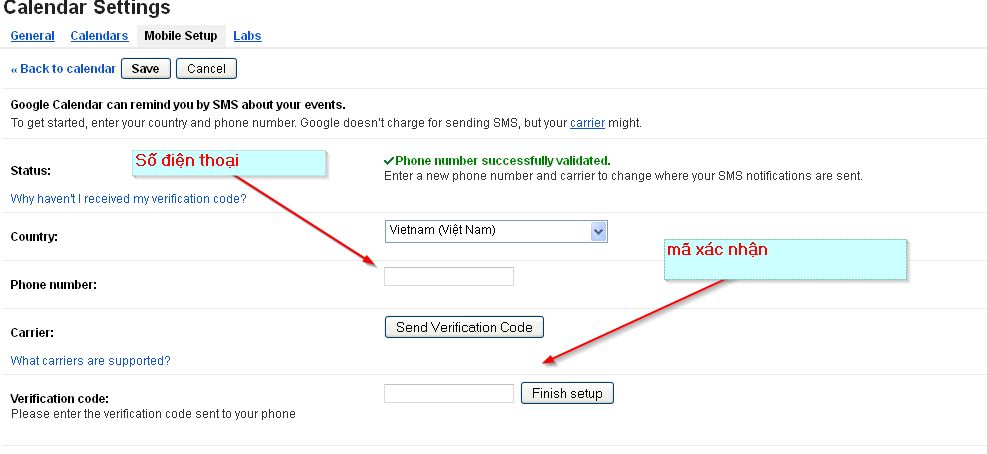
<span style="line-height: 14.2667px;">1.</span><span style="line-height: 14.2667px;">&nbsp;Nhấp vào tab&nbsp;<strong>Mobile Setup</strong></span></span></p>

<p style="margin-top: 12px; margin-bottom: 0.0001pt; font-family: Tahoma, Arial, sans-serif; font-size: 13px; line-height: normal; text-align: justify;"><span style="font-family: arial, helvetica, sans-serif; font-size: 10pt;">2. Chọn quốc gia của bạn từ trình đơn thả xuống &nbsp;<strong>Country</strong></span></p>

<p style="margin-top: 12px; margin-bottom: 0.0001pt; font-family: Tahoma, Arial, sans-serif; font-size: 13px; line-height: normal; text-align: justify;"><br />
<img alt="" src="https://hust-dev.hust.edu.vn/uploads/sys/news/2016/04/20160409-forwardsms1.21267.2.jpg" /><br />
<span style="font-family: arial, helvetica, sans-serif; font-size: 10pt;">3. Nhập số điện thoại của bạn trong&nbsp;&nbsp;<strong>Phone number</strong><br />
<br />
&nbsp;&nbsp;&nbsp;&nbsp;Chọn&nbsp;<a href="http://www.google.com/support/calendar/bin/answer.py?answer=37226" style="color: rgb(204, 0, 0); text-decoration: underline;" target="_blank"><span style="color: blue;">nhà cung cấp dịch vụ điện thoại</span></a>&nbsp;của bạn từ trình đơn thả xuống (nếu có). &nbsp;<br />
<br />
4. Chọn nhà cung cấp dịch vụ điện thoại ở Việt nam.<br />
Click vào<strong>&nbsp;Send Verification Code,</strong>&nbsp;và bạn sẽ nhận được một tin nhắn mã xác nhận trên điện thoại của bạn.</span></p>

<p style="margin-top: 12px; margin-bottom: 0.0001pt; font-family: Tahoma, Arial, sans-serif; font-size: 13px; line-height: normal; text-align: justify;"><span style="font-family: arial, helvetica, sans-serif; font-size: 10pt;">5. Nhập mã xãc nhận&nbsp;&nbsp;&nbsp;<strong>Verification code</strong>&nbsp; khi đã nhận được qua điện thoại.</span></p>

<p style="margin-top: 12px; margin-bottom: 0.0001pt; font-family: Tahoma, Arial, sans-serif; font-size: 13px; line-height: normal; text-align: justify;"><span style="font-family: arial, helvetica, sans-serif; font-size: 10pt;">6.Click vào&nbsp;<strong>F</strong><strong>inish setup.</strong></span></p>

<p style="margin-top: 12px; margin-bottom: 0.0001pt; font-family: Tahoma, Arial, sans-serif; font-size: 13px; line-height: normal; text-align: justify;"><span style="font-family: arial, helvetica, sans-serif; font-size: 10pt;">7.Click vào&nbsp;<strong>S</strong><strong>ave</strong>&nbsp;để lưu.</span><br />
<br />
<span style="font-size: 12pt; font-family: 'Times New Roman', serif;"><span style="font-family: arial, helvetica, sans-serif; font-size: 10pt;"><strong>Bước 2: Tạo Label cho thư khi được gửi đến</strong></span></span></p>

<p style="margin-top: 12px; margin-bottom: 0.0001pt; font-family: Tahoma, Arial, sans-serif; font-size: 13px; line-height: normal; text-align: justify;"><span style="font-size: 12pt; font-family: 'Times New Roman', serif;"><span style="font-family: arial, helvetica, sans-serif; font-size: 10pt;">1. Đăng nhập vào Gmail.</span></span></p>

<p align="center" style="margin-top: 12px; margin-bottom: 0.0001pt; font-family: Tahoma, Arial, sans-serif; font-size: 13px; text-align: justify; line-height: normal;"><img alt="" src="https://hust-dev.hust.edu.vn/uploads/sys/news/2016/04/20160409-forwardsms2.21267.3.jpg" /></p>

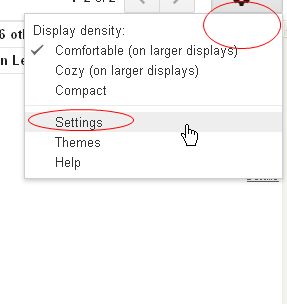
<p style="margin-top: 12px; margin-bottom: 0.0001pt; font-family: Tahoma, Arial, sans-serif; font-size: 13px; line-height: normal; text-align: justify;"><span style="font-size: 10pt; font-family: arial, helvetica, sans-serif;">2. Chọn Setting</span></p>

<p style="margin-top: 12px; margin-bottom: 12pt; font-family: Tahoma, Arial, sans-serif; font-size: 13px; line-height: normal; text-align: justify;"><span style="font-size: 12pt; font-family: 'Times New Roman', serif;"><img alt="" src="https://hust-dev.hust.edu.vn/uploads/sys/news/2016/04/20160409-forwardsms3.21267.4.jpg" /><br />
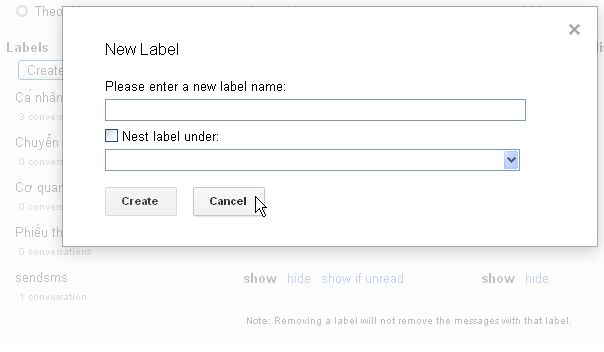
<span style="font-family: arial, helvetica, sans-serif; font-size: 10pt;">Vào&nbsp; Labels tab.</span><br />
<span style="font-family: arial, helvetica, sans-serif; font-size: 10pt;">tạo 1 label có tên&nbsp;&nbsp;<strong>sendsms</strong>&nbsp;&nbsp;sau đó click vào nút&nbsp;<strong>Create</strong>&nbsp;&nbsp;</span><br />
<br />
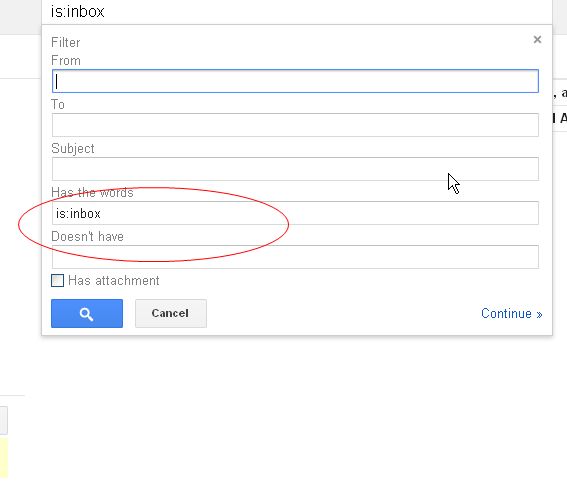
<span style="font-family: arial, helvetica, sans-serif; font-size: 10pt;">3. Vào Filter Tab</span><br />
<span style="font-family: arial, helvetica, sans-serif; font-size: 10pt;">Tạo 1 filter (có thể gán cho tất cả các mail mới hoặc chỉ những email được lọc theo tiêu chí nào đó mà bạn quan tâm). Ở đây nếu ta muốn gán cho tất cả các mail mới thì đặt trường&nbsp;‘<strong>Has the words’</strong>&nbsp;giá trị&nbsp;&nbsp;<strong>is:inbox&nbsp;</strong></span></span></p>

<p style="margin-top: 12px; margin-bottom: 12pt; font-family: Tahoma, Arial, sans-serif; font-size: 13px; line-height: normal;"><img alt="" src="https://hust-dev.hust.edu.vn/uploads/sys/news/2016/04/20160409-forwardsms4.21267.5.jpg" /></p>

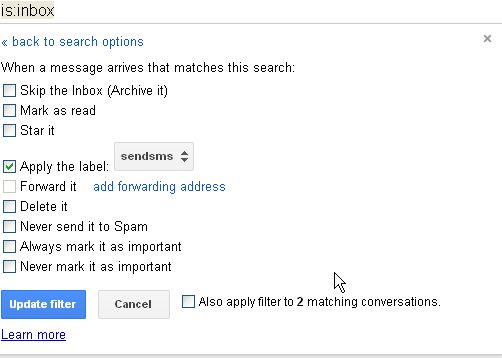
<p style="margin-top: 12px; margin-bottom: 12px; font-family: Tahoma, Arial, sans-serif; font-size: 13px; line-height: 19.5px; text-align: justify;"><span style="font-size: 12pt; line-height: 17.12px; font-family: 'Times New Roman', serif;"><span style="font-family: arial, helvetica, sans-serif; font-size: 10pt;">4. Click vào&nbsp;&nbsp;<strong>Create filter with this search</strong>&nbsp;để tạo liên kết giữa filter và label mà bạn vừa tạo.</span><br />
<span style="font-family: arial, helvetica, sans-serif; font-size: 10pt;">Chọn&nbsp;&nbsp;<strong>Apply the label</strong>&nbsp;và chọn &nbsp;<strong>sendsms&nbsp;</strong>từ hộp chọn, sau đó click vào&nbsp;<strong>Create filter</strong></span><br />
<img alt="" src="https://hust-dev.hust.edu.vn/uploads/sys/news/2016/04/20160409-forwardsms5.21267.6.jpg" /><br />
<span style="font-family: arial, helvetica, sans-serif; font-size: 10pt;"><strong>Bước 3: Nhập mã kích hoạt gửi SMS&nbsp;</strong></span><br />
<br />
<span style="font-family: arial, helvetica, sans-serif; font-size: 10pt;">1. Đăng nhập vào&nbsp;&nbsp;<a href="https://docs.google.com/" style="color: rgb(204, 0, 0); text-decoration: underline;" target="_blank">&nbsp;</a><a href="https://docs.google.com/" style="color: rgb(204, 0, 0); text-decoration: underline;">https://docs.google.com/</a></span></span><br />
<span style="font-family: arial, helvetica, sans-serif; font-size: 10pt;">2. Click&nbsp;<a href="https://docs.google.com/spreadsheet/ccc?key=0Aqy7rBwoHlSvdHo3QkNCem1YNHY1YmtfOGl0RzZaVEE&amp;newcopy=true" style="color: rgb(204, 0, 0); text-decoration: underline;" target="_blank"><span style="color: blue;">vào đây</span></a>&nbsp;để tạo một spreadsheet. Click&nbsp;<strong>Yes &nbsp;make a copy</strong>.</span></p>

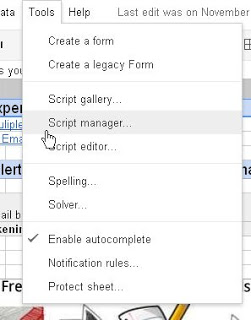
<p style="margin-top: 12px; margin-bottom: 0.0001pt; font-family: Tahoma, Arial, sans-serif; font-size: 13px; line-height: normal;"><span style="font-size: 10pt; font-family: arial, helvetica, sans-serif;">3. Kế tiếp chọn&nbsp;<strong>Tools</strong>-&gt;&nbsp;<strong>Script Editor</strong>. Sau đó chọn&nbsp;&nbsp;<strong>Resources</strong>-&gt;&nbsp;<strong>Current script’s triggers</strong>.</span></p>

<p style="margin-top: 12px; margin-bottom: 12px; font-family: Tahoma, Arial, sans-serif; font-size: 13px; line-height: 19.5px;">&nbsp;<img alt="" src="https://hust-dev.hust.edu.vn/uploads/sys/news/2016/04/20160409-forwardsms6.21267.7.jpg" /></p>

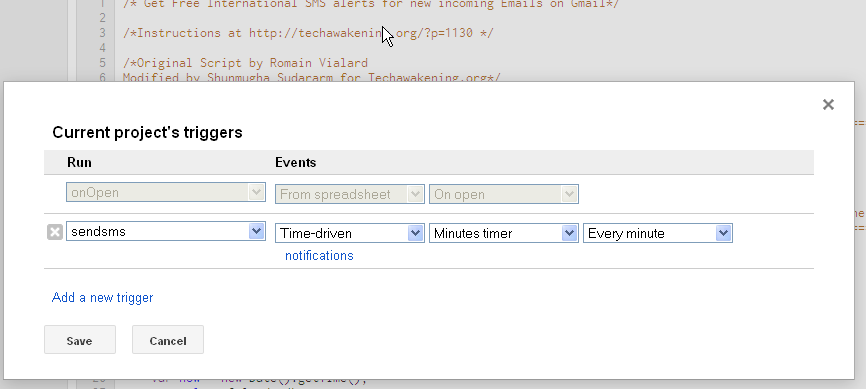
<p style="margin-top: 12px; margin-bottom: 0.0001pt; font-family: Tahoma, Arial, sans-serif; font-size: 13px; line-height: normal; text-align: justify;"><span style="font-size: 10pt; font-family: arial, helvetica, sans-serif;">&nbsp;4. Chọn&nbsp;<strong>Click here to add one</strong>. Bên dưới chọn&nbsp;<strong>Time-Driven - Minutes timer và Every minute</strong>&nbsp;và&nbsp;ghi nhận thay đổi.</span></p>

<p style="margin-top: 12px; margin-bottom: 12px; font-family: Tahoma, Arial, sans-serif; font-size: 13px; line-height: 19.5px;">&nbsp;<img alt="" src="https://hust-dev.hust.edu.vn/uploads/sys/news/2016/04/20160409-forwardsms7.21267.8.png" /></p>

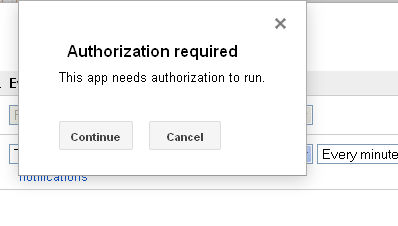
<p style="margin-top: 12px; margin-bottom: 0.0001pt; font-family: Tahoma, Arial, sans-serif; font-size: 13px; line-height: normal; text-align: justify;"><span style="font-size: 10pt; font-family: arial, helvetica, sans-serif;">5. Click vào&nbsp;<strong>Authorize</strong>&nbsp;để cấp quyền, sau đó ghi lại thay đổi của trigger.</span></p>

<p style="margin-top: 12px; margin-bottom: 12px; font-family: Tahoma, Arial, sans-serif; font-size: 13px; line-height: 19.5px; text-align: justify;"><span style="font-size: 12pt; line-height: 17.12px; font-family: 'Times New Roman', serif;"><img alt="" src="https://hust-dev.hust.edu.vn/uploads/sys/news/2016/04/20160409-forwardsms8.21267.9.png" /><br />
<span style="font-family: arial, helvetica, sans-serif; font-size: 10pt;">Đó là tất cả những gì bạn cần làm để Google có thể gửi tin nhắn cho bạn mỗi khi hộp thư của bạn có thư mới.</span></span></p>

<p style="margin-top: 12px; margin-bottom: 12px; font-family: Tahoma, Arial, sans-serif; font-size: 13px; line-height: 19.5px; text-align: justify;"><span style="font-family: arial, helvetica, sans-serif; font-size: 10pt;">(Nguồn:&nbsp;<a href="http://techawakening.org/free-sms-alerts-new-email-on-gmail-with-google-docs/1130/" style="color: rgb(204, 0, 0); text-decoration: underline;">http://techawakening.org/free-sms-alerts-new-email-on-gmail-with-google-docs/1130/</a>)</span></p>
		</div>
				<div id="author">
						<p>
				<strong>Tác giả:</strong>
				<a href="https://hust-dev.hust.edu.vn/vi/news/author/tung-nguyenthanh1/">Nguyễn Thanh Tùng</a>
			</p>
		</div>
	</div>
	<div id="footer" class="clearfix">
		<div id="url">
			<strong>URL của bản tin này: </strong><a href="https://hust.edu.vn/vi/news/savefile/tin-tuc-su-kien/cai-dat-de-nhan-sms-khi-co-thu-moi-tu-gmail-22038.html" title="Cài đặt để nhận SMS khi có thư mới từ Gmail">https://hust.edu.vn/vi/news/savefile/tin-tuc-su-kien/cai-dat-de-nhan-sms-khi-co-thu-moi-tu-gmail-22038.html</a>

		</div>
		<div class="clear"></div>
		<div class="copyright">
			&copy; Đại học Bách khoa Hà Nội
		</div>
		<div id="contact">
			<a href="mailto:ccpr@hust.edu.vn">ccpr@hust.edu.vn</a>
		</div>
	</div>
</div>
        <div id="timeoutsess" class="chromeframe">
            Bạn đã không sử dụng Site, <a onclick="timeoutsesscancel();" href="https://hust-dev.hust.edu.vn/#">Bấm vào đây để duy trì trạng thái đăng nhập</a>. Thời gian chờ: <span id="secField"> 60 </span> giây
        </div>
        <div id="openidResult" class="nv-alert" style="display:none"></div>
        <div id="openidBt" data-result="" data-redirect=""></div>
<script src="https://hust-dev.hust.edu.vn/assets/js/jquery/jquery.min.js"></script>
<script>var nv_base_siteurl="/",nv_lang_data="vi",nv_lang_interface="vi",nv_name_variable="nv",nv_fc_variable="op",nv_lang_variable="language",nv_module_name="news",nv_func_name="savefile",nv_is_user=0, nv_my_ofs=-4,nv_my_abbr="EDT",nv_cookie_prefix="nv4s_c523Wo",nv_check_pass_mstime=1738000,nv_area_admin=0,nv_safemode=0,theme_responsive=1,nv_recaptcha_ver=2,nv_recaptcha_sitekey="6Ld5WCEiAAAAAJr6hIEOr3bZf2m-LopszjRVYBWz",nv_recaptcha_type="image",XSSsanitize=1;</script>
<script src="https://hust-dev.hust.edu.vn/assets/js/language/vi.js"></script>
<script src="https://hust-dev.hust.edu.vn/assets/js/DOMPurify/purify3.js"></script>
<script src="https://hust-dev.hust.edu.vn/assets/js/global.js"></script>
<script src="https://hust-dev.hust.edu.vn/assets/js/site.js"></script>
<script src="https://hust-dev.hust.edu.vn/themes/default/js/news.js"></script>
<script src="https://hust-dev.hust.edu.vn/themes/hust/js/main.js"></script>
<script src="https://hust-dev.hust.edu.vn/themes/hust/js/custom.js"></script>
<script src="https://hust-dev.hust.edu.vn/themes/hust/js/hust.js"></script>
<script src="https://hust-dev.hust.edu.vn/themes/hust/js/slick/slick.js"></script>
<script type="application/ld+json">
        {
            "@context": "https://schema.org",
            "@type": "Organization",
            "url": "https://hust-dev.hust.edu.vn",
            "logo": "https://hust-dev.hust.edu.vn/uploads/sys/logo-dhbk-1-02.png"
        }
        </script>
<script async src="https://www.googletagmanager.com/gtag/js?id=G-TT1NML6EJM"></script>
<script>window.dataLayer=window.dataLayer||[];function gtag(){dataLayer.push(arguments)}gtag('js',new Date);gtag('config','G-TT1NML6EJM');</script>
<script src="https://hust-dev.hust.edu.vn/themes/hust/js/bootstrap.min.js"></script>
</body>
</html>